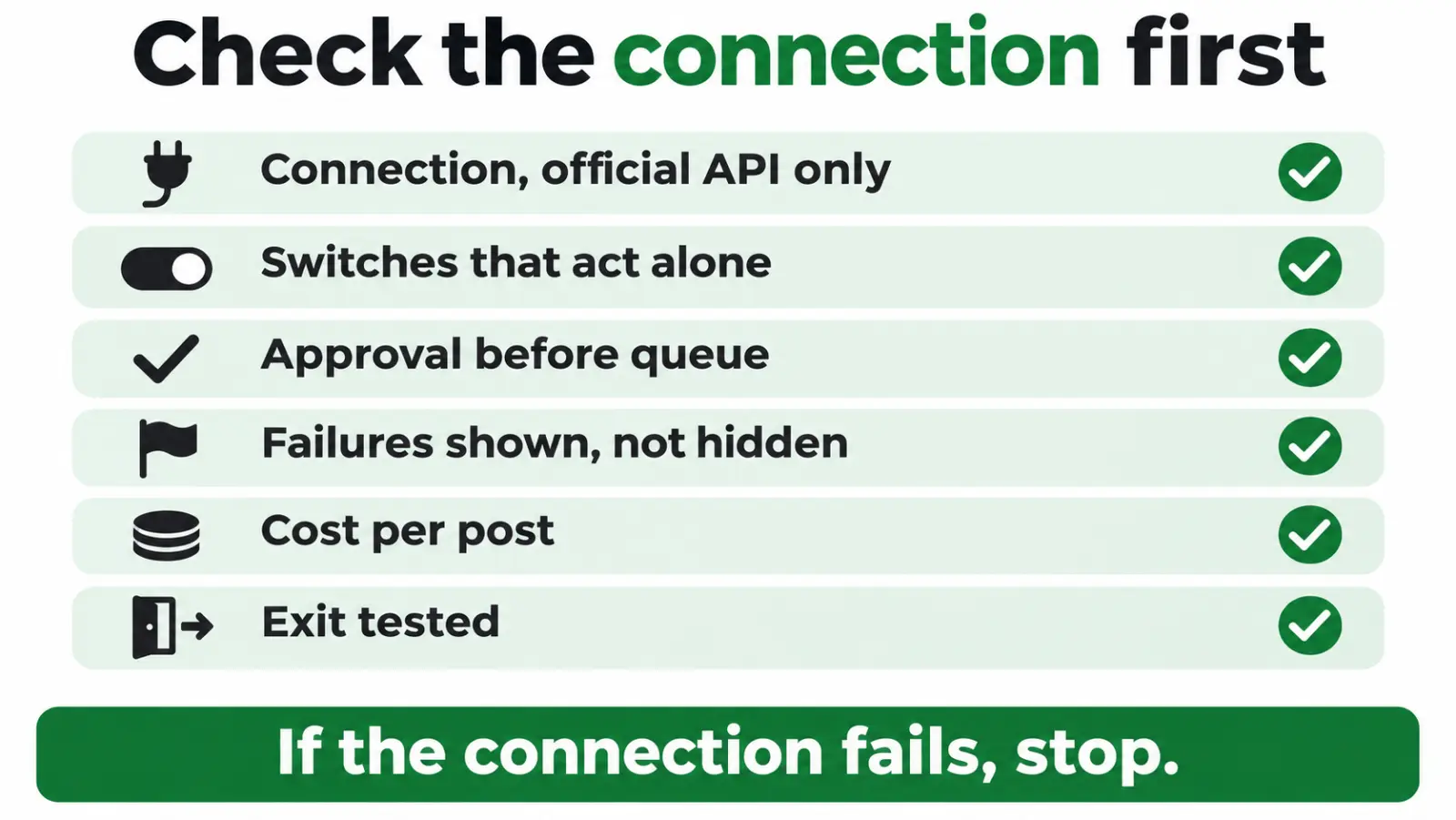
Evaluate the connection first. A tool that uses anything other than X's official API is a tool you should not connect.
Test every switch that acts without you, and turn off each one that is outside your scope.
Check the failure report and the cost per post before you trust a tool with a queue.
Make sure you can disconnect the tool and export your own drafts and queue, so leaving is cheap.
Each tool promises to save time, post on schedule and grow your reach. The differences that matter are below the feature list: how the tool connects, which switches act without you, how it reports failures, what it costs per post and how easily you can leave. This checklist puts those differences in order, so you can evaluate any tool the same way.
The checklist is generic on purpose. It names no competitor and makes no claim about any product's features or prices. It uses X's own developer documents, which apply to every tool that uses the X API, and it gives you questions you can answer by testing.
Step1:howdoesthetoolconnecttoX?
Ask the same questions of every tool, and check the answers against the rules. X's automation rules make the account owner responsible for what an app does, so the vendor's answers matter. X's terms say you cannot scrape the Services without express written permission, which is the first thing to rule out. The automated account labeling announcement is the one to read on labels for automated accounts.
The connection decides most of the risk, so check it first. The X developer guidelines list "Use only the official X API" as a core check for any app, and they name scraping and browser automation as prohibited, with permanent suspension as the consequence. A tool that logs into X as a browser, or that uses your password, is outside the official API, whatever its marketing says.
Ask the tool directly how it connects to your account, and look for the answer in its documentation. If the answer is not clear, treat that as an answer. A tool that will not explain its connection is not a tool to trust with your account.
Ask how the tool connects. The answer should name the official X API and the authorization screen you approve.
Check that it never asks for your password. A tool that asks for your X password is a warning sign, whatever the reason it gives.
Confirm the account name on the connection screen. Make sure the account you connect is the one you meant.
Note the permissions it requests. Read each permission, and ask why the tool needs it. A permission you cannot explain is a permission to refuse.
Each step below depends on a source you can check. The developer guidelines list the official-API rule and the switches that act without a user request. The pricing update gives the per-write and URL-post prices used in step five. The bookmarks reference shows what a tool that reads your saved posts has to request, which is a useful test of its scope.
Step2:whichswitchesactwithoutyou?
Every switch that acts on its own is a behavior you must approve. Automation tools often bundle features you did not ask for. The developer guidelines give a clear default for many of them. Automated likes are prohibited unless the user initiated them. Automated following is not allowed in bulk. Automated welcome direct messages to new followers are prohibited, because they are unsolicited even to followers. Automated replies are limited to one reply per interaction, and only when the user engaged first.
Write down the switches you turned off. The list is the baseline you compare against after every update, because an update can switch a feature back on.
Step3:whereistheapprovalstep?
A tool with no approval step has moved the judgment somewhere you cannot see. Look for a mark that a human must add to every queued post, and check that the default is "not approved". A tool that approves its own drafts, or that queues whatever a feature generates, fails this check. The automated posts guide describes the approval stage in more detail.
Test the approval step with one draft. Try to schedule it without approving it. If the tool lets it into the queue, the approval step is optional, and the tool fails this check.
Test 1
Schedule a draft without approving it
Test 2
Approve the draft and schedule it
Test 3
Check the live post
Step4:howdoesitreportfailures?
A failure you cannot see is a failure you cannot fix. Check what the tool does when a post fails. Does it show the failure in a list? Does it give a reason? Does it republish on its own, or wait for you? A tool that retries silently can publish a duplicate, and a tool that hides failures leaves you with a queue that looks clean but is not.
PostMine's product copy describes a failed target being reported without changing a target that already succeeded. Judge any tool by the same standard: a failure should be visible, explained and left for you to decide.
Step5:whatdoesitcostperpost?
Price the posts you actually send, not the plan you hope to use. X's developer pricing update, published on April 16, 2026 and effective April 20, 2026, lists writes through the API at $0.015 per post, and a URL post at $0.20. Ask the tool how it charges for link posts, and whether its price includes the X cost or passes it through.
A worked comparison with illustrative numbers shows the effect. Suppose your month has 40 text posts and 10 link posts. At the listed write price, the text posts cost $0.60. X's update does not say whether the $0.20 URL price replaces the $0.015 write fee or adds to it. If it replaces, the link posts cost $2.00 and the X cost for the month is $2.60. If it adds, they cost $2.15 and the total is $2.75. A tool that charges a flat monthly fee may hide that X cost, or it may charge you more for links. Ask which reading the tool uses, and write the answer down.
$0.015
per post written through the X API, from April 20, 2026
The exit is the check that is easy to skip. Before you connect a tool, find out how you would leave it. Can you disconnect the account from the tool and from X? Can you export your drafts, your queue and your post history? Does the tool delete your data when you disconnect, and how long does that take? A tool that makes leaving hard is a tool that has made staying a decision you cannot undo.
Test the exit with a harmless account, or with a draft you can afford to lose. Disconnect, check that the tool stops publishing, and check that your exported data opens in a plain file. The test takes an hour, and it tells you more than a sales call.
Scoringthetool
A checklist is only useful if you write the result down. Use a simple table: one row per step, a pass or a fail, and one line of notes. A tool that fails the connection step does not need the other steps, because the connection is the one you cannot fix by configuring it.
Evaluationsummarytemplate
Step
Passorfail
Notesyouneedtokeep
1.Connection
OfficialAPIonly,nopassword
Thepermissionsrequestedandwhy
2.Switches
Everyactingswitchlistedandturnedoff
Thedateyoulastcheckedthelist
3.Approval
Nothingqueueswithoutahumanmark
Theresultoftheone-drafttest
4.Failures
Visible,explained,notretriedsilently
Whatthefailurereportlookslike
5.Cost
Priceperpostknownforyourmix
Themonthlytotalatyourplannedvolume
6.Exit
Disconnectandexporttested
Howlongdeletiontakes
A tool that passes all six steps can still be wrong for you. The checklist answers whether a tool is safe to try. It does not answer whether the tool fits your work. For that, the calendar guide and the scheduling guide describe the routines a tool has to support.
Aworkedevaluation,withamade-uptool
The following evaluation is an illustration of the method, using a made-up tool called Tool X. It is not a review of any real product. Tool X promises to publish approved posts, to grow your reach and to keep your queue full.
Step 1 stops the evaluation early. Tool X says it connects "through a browser session", and it asks for the account password on its setup screen. Both are outside the official API, so the checklist ends at step 1. The other steps do not matter, because the connection is the one you cannot fix by configuring the tool.
Now suppose a second made-up tool, Tool Y, passes step 1. It connects through the official API, shows the permissions it requests, and names the account before saving. Step 2 finds three switches turned on by default: auto-like on keywords, auto-follow of followers and a welcome message to new followers. The guidelines prohibit all three as automated actions, because the welcome message is unsolicited even to followers. Tool Y passes step 2 only after those three switches are turned off.
Step 3 is a one-draft test. Tool Y lets an unapproved draft enter the queue, so it fails step 3 until its approval setting is changed. Step 4 finds that failures appear in a list with a reason, which is a pass. Step 5 finds a price per link post that is higher than the price per text post, which is expected, and the cost for the author's own mix is written in the summary. Step 6 finds a disconnect button and an export that opens in a plain file, which is a pass.
The summary is a short note: Tool Y passes once the switches and the approval setting are changed, and it stays on a short trial until the first month of reviews is clean. Tool X stops at step 1. The method is the same for both, and the note is what you keep.
Mistakesthatskewtheevaluation
Mistake one: judging by the feature list. A long list of features is a list of switches. Each switch is a behavior you must check.
Mistake two: trusting a claim you did not test. A promise of safe posting is not a test. Run the one-draft test and the stop test yourself.
Mistake three: ignoring the cost of links. A tool that is cheap for text posts can be expensive for link posts. Price the mix you actually send.
Mistake four: skipping the exit. The cost of leaving is paid later, when the tool changes or the price rises. Test the exit before you commit.
WherePostMinefitsthechecklist
I build PostMine, which this article mentions.
PostMine publishes only what you approve or schedule. Its connected publishing uses X's official API, never browser automation, and it does not automate direct messages, comments, follows or engagement. Its product copy says it respects X's official API limits and reports a failed target without changing a target that already succeeded.
The set-up guide turns these checks into a first-week plan, and the rules guide walks through each action in the developer guidelines.
Questionstoputtoavendorinwriting
A written answer is more useful than a call. Send the same short list of questions to every tool you consider, and keep the answers in the evaluation note. The questions should be about behavior, not about features. Which API does the tool use to publish? Which switches act without a user action? What happens to a post that fails, and is it retried automatically? What is the price for a post that includes a link, and does the price include any fee the platform charges? How do I disconnect, and how long does deletion of my data take?
Compare the answers, not the wording. A vague answer to the connection question is a fail, whatever the rest of the reply says. A clear answer that describes a browser-based connection is also a fail, because the developer guidelines prohibit non-API automation. Keep each written answer with its date, so that the evaluation can be checked again after the tool changes.
Use a feature list only after the connection, switches, approval, failure reporting and exit checks. A long feature list is not evidence that the tool is safe for your account.
How does it connect to X. If the answer is anything other than the official API, stop there.
Compare the price the tool charges with the per-post prices in X's developer pricing update, and ask how the tool charges for posts that include a link.
Turn off the switches you did not ask for, and test the rest on harmless posts. A tool that does more than you want is a tool with more to watch.
We use cookies for product analytics to improve PostMine. With your consent we also record session replays, including the content you type and view, such as draft posts (passwords excluded), so we can see how the product is used and fix what breaks. Privacy Policy




 Yerkebulan RakhimovNov 9, 202611 min read