An automated post still needs a human draft and a human approval, and the safeguards are what keep the approval real.
X's developer guidelines allow scheduled informational content, but forbid identical cross-posting and unsolicited actions.
Since April 2026, X's API charges per write, and URL posts cost more than text posts, so a publishing tool's cost depends on what it sends.
Build a stop switch, a failed list and a weekly review before you let a tool publish anything without you.
An automated post is one that goes out without you pressing publish at that moment. That is the whole definition. A scheduled post from your own queue is automated in this sense. What matters is not the timer. What matters is who wrote the text, who approved it, and whether the account is allowed to post it at all.
This guide walks through the full path an automated post takes, from the first draft to the moment it appears on X. It shows where human judgment must stay, which safeguards keep that judgment real, and what X's own documents say about automated accounts and API costs. Where a rule is a reading rather than a quoted line, the article says so.
Thepathfromdrafttopublish
Each stage in this path has a rule behind it. X's automation rules make the account owner responsible for every action taken through the account or an app connected to it, and they bar automated posts that are spam or duplicative. X's authenticity rules prohibit account manipulation and impersonation. The approval stage is the one the rules cannot supply for you. X's scheduled posts page covers scheduling in the Composer on ads.x.com and says nothing about third-party tools. Scraping, or working outside X's published interfaces, is barred by X's terms, which say you cannot scrape the Services without express written permission. The developer guidelines require the official API for automated posting.
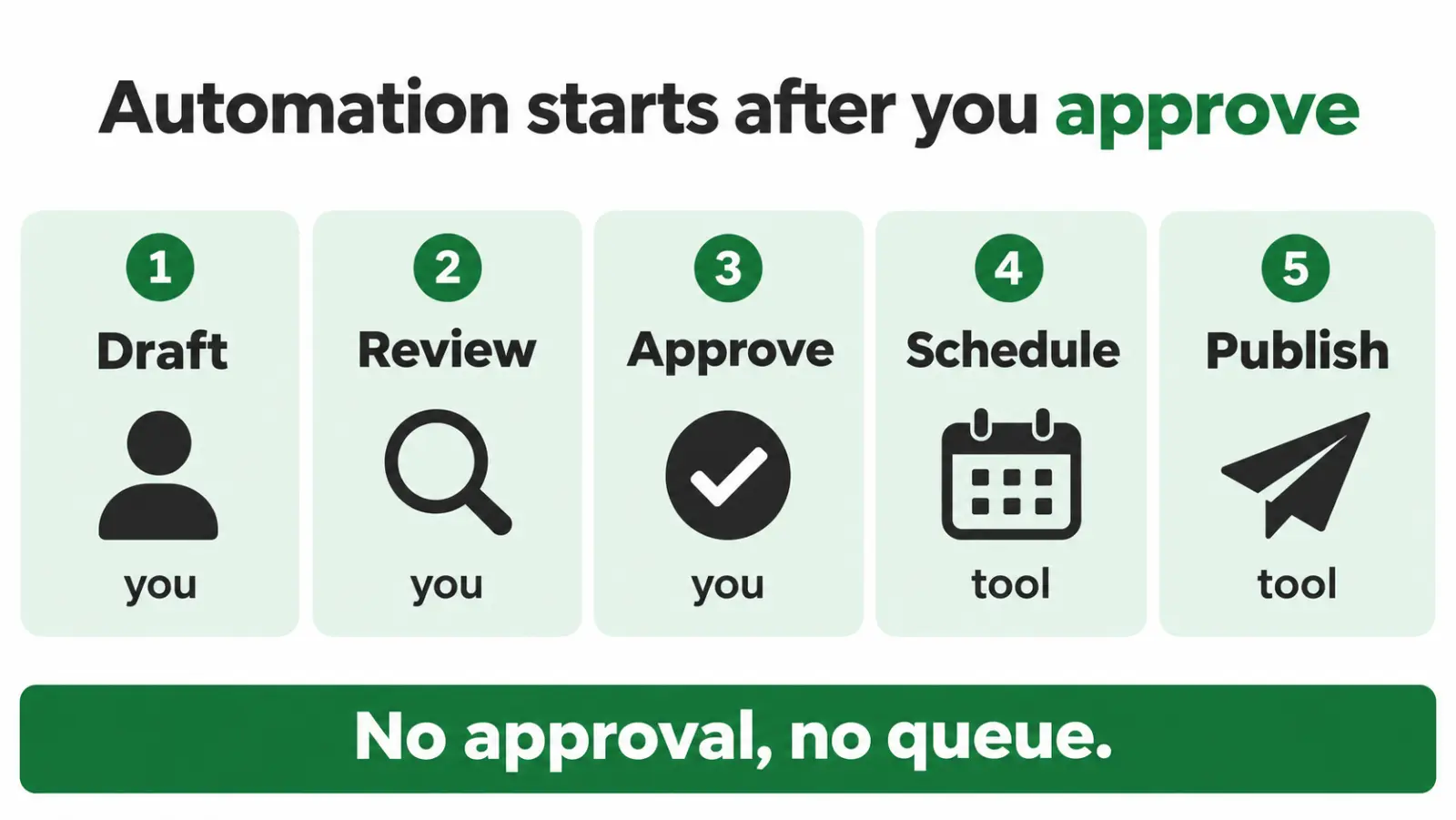
An automated post has five stages, and a person should own the first two and the last. The middle stages can be handled by software, but only if the approval stage is real. Here is the path in order, with the owner of each stage.
Draft (human). You write the post from your own notes, a real conversation or a fact you checked. A tool can help with a first draft, but the source of the claim should be you.
Review (human). You read the draft aloud, check each fact and open each link. The reply guide has a checklist you can reuse here.
Approve (human). You mark the draft as approved. Nothing that is not approved enters the queue.
Schedule (tool). The tool holds the approved post until the time you chose. It should show you the time and the timezone on screen.
Publish (tool). At the scheduled time, the tool sends the post through X's API. A failure should be reported to you, not hidden.
The approval stage is the one that is easy to skip. A tool that lets anything into the queue without a human mark has moved the judgment somewhere you cannot see. If you cannot say who approved a queued post, the post is not really automated. It is unreviewed.
Three sources define the stages in this article. The developer guidelines list the allowed and prohibited actions for automated accounts, including scheduled informational posts and the ban on identical cross-posting. X's Automated Account Labeling announcement, dated February 16, 2022, introduced the label that automated accounts carry. The pricing update effective April 20, 2026 sets the per-write and per-URL costs that a publishing tool pays.
WhatX'sdeveloperguidelinesallow
The guidelines describe automated accounts in specific, checkable terms. The developer guidelines list allowed and prohibited behavior for anything that uses the X API. For posting, the content table is the part that matters most. It lists "Automated account posts scheduled content (news, weather, quotes)" as allowed, with the reason "Informational, no unsolicited mentions". It lists "App posts identical content across multiple accounts" as prohibited.
Two things follow for a solo founder. Scheduled, reviewed content from one account is the kind of posting the guidelines describe as allowed. Identical or near-identical text across accounts is prohibited, and X's authenticity policy also bars repeating identical posts on one account. Content designed to chase trends is prohibited too. Read the current guidelines yourself, because examples change, and a summary can lag behind the document.
Thelabelsanddisclosuresthatcomewithautomation
Automated accounts carry a visible label, and the label has a history. X's developer team announced the Automated Account label on February 16, 2022, and described it as a way for bots to "self-identify as bots". The announcement gives the setting path: account settings, then Your account, then Your account information, then Automation, then Managing account. Whatever the current menu looks like, the purpose is the same. Readers should know that a post is automated and who runs the account.
The guidelines repeat the requirement. They say all automated accounts using the X API must enable the "Automated" profile label, state in the bio that the account is a bot and who operates it, and link to a human-managed account. If your account is personal and you only schedule your own reviewed posts, these requirements may not describe your setup. If a tool publishes under your name through the API, check whether the label and the disclosures apply.
WhatXchargesforAPIwrites
Since April 2026, the cost of a tool depends on what it sends. X's developer team announced a pricing update on April 16, 2026, effective April 20, 2026. Among the changes, writes through the API increase to $0.015 per post, from $0.01, on the main posting endpoint. Posting a URL through the API is priced at $0.20 per post, except summoned replies, which stay at $0.01. The same update removes following, liking and quote-posting through API writes for all self-serve tiers.
$0.015
per post written through the X API, from April 20, 2026
A worked example, with illustrative numbers, shows why the difference matters. Suppose a tool publishes 60 text posts and 30 posts with a link in one month. The text posts cost $0.90 at the listed write price of $0.015. X's April 2026 update prices a URL post at $0.20 but does not say whether that replaces the write fee or adds to it. If it replaces, the 30 link posts cost $6.00 and the month comes to $6.90. If it adds, they cost $6.45 and the month comes to $7.35. Either way, a tool that sends every post with a link pays far more than one that sends text, so a cheap-looking tool may hide its cost in the link posts. If you pay for a tool, ask how it charges for links before you connect it.
Safeguardsthatkeeptheapprovalreal
A safeguard is only useful if it is easy to use under pressure. The following list covers the safeguards I would want before any tool publishes under my name. Each one answers a specific failure, and each one can be checked in a few minutes.
Before connecting
Read the rules and the cost
First week
Run one harmless post through the tool
Ongoing
Approve every queued post
Weekly
Read the failed list and the queue
Any time
Use the stop switch
Safeguardsforautomatedposting
Safeguard
Whatitstops
Howtocheckit
Approvalbeforeeverypost
Apostnobodyread
Everyqueueditemhasahumanmark
Stopswitchyoucanreachfast
Awrongpostrunningonatimer
Testitonce,onaharmlesspost
Failedlistreadweekly
Silentfailuresandduplicates
Faileditemsaredecided,notretriedblindly
Linkcheckbeforeapproval
Staleorhijackedlinks
Openeachlinkasareaderwould
Costcheckbeforeconnecting
Surprisechargesforlinks
Comparetheper-postpricewithyourplan
Howtotestatoolbeforeyouconnectit
A tool should prove its behavior on a harmless post before it touches your real queue. A tool may have a settings page with a long list of switches. Each switch is a behavior, and each behavior is a possible surprise. A test takes about an hour and answers the questions that matter most.
Read the features list and mark every switch that acts without you. Likes, follows, direct messages, replies and quote posts are the switches to watch. Turn off every one you did not ask for.
Confirm the connection uses X's official API. The developer guidelines name browser automation and scraping as prohibited, and results in permanent suspension. A tool that works through a browser is a tool you should not connect.
Publish one harmless text post on purpose. Use a post with no link and no photo. Read the live post on your profile, and check the account name and the timestamp.
Publish one link post on purpose. Check that the link opens as a reader would see it, and check the cost line on the tool's billing page against the price X lists for that kind of post.
Force one failure and watch the report. Disconnect the test account for a moment, or schedule a post with a deliberately broken link. A good tool reports the failure where you can see it, and does not republish on its own.
Use the stop switch. Pause the tool, then confirm nothing else publishes. If you cannot find a stop switch in two minutes, do not connect the tool to your main account.
Keep the test results in one short note. Write the date, the switches you turned off, the cost per post for each kind of post, and the result of the failure test. A note like this is what you reread when the tool updates, because updates are the moment a switch you turned off can quietly turn back on.
The test also helps with the weekly review. If the tool reports a failure in the same format every time, the review takes two minutes. If the report is vague, the tool is hard to trust, and you should know that before a bad week, not during one.
Mistakesthatturnautomationintoaproblem
Mistake one: letting the tool write and approve its own posts. A tool that drafts and approves without you has removed the one check that catches a wrong fact.
Mistake two: retrying a failed post without checking the profile. A post that failed may have gone out. Check the profile before you publish it again.
Mistake three: forgetting the rules for interactions. Scheduling your own posts is one thing. Auto-liking, auto-following and auto-replying are different, and the guidelines treat them differently. The automation guide covers which actions are on which side of the line.
Mistake four: trusting the cost you saw on the sales page. API prices change. The April 2026 update changed several of them, so check the current price for the posts you send.
Edgecasesthatchangetheanswer
Links. A post with a URL can cost more through the API than a text post, and a link is easy to let go stale. Open the link on the day of approval, and again on the day of the post for anything important.
Quotes and reposts. The pricing update removes quote-posting through API writes for self-serve tiers. A tool that promises to quote posts automatically may not be able to do it on your plan. Check before you rely on it.
Time zones. A scheduled time is a time in one timezone. Check the time on screen after any trip, because the tool and your audience may be in different places.
Shared accounts. If a team member can publish through the tool, the approval has to hold for them too. A post approved by one person and published by another is still a post nobody reviewed.
WherePostMinedrawstheline
I build PostMine, which this article mentions.
PostMine publishes only what you approve or schedule. Connected publishing uses X's official API, never browser automation, and nothing publishes unless you slide to publish or set a schedule you chose. PostMine does not automate direct messages, comments, follows or engagement. Its product copy says it respects X's official API limits and reports a failed target without changing a target that already succeeded.
For the choice between X's own scheduling and a tool, the scheduling guide walks through a test you can run in an hour. The bulk scheduling guide explains how to review a batch before it enters the queue.
Yes, in the sense that the publish moment is automatic. The question that matters is who approved the text and whether the account is allowed to post it. X's developer guidelines allow scheduled informational content from automated accounts.
Automated accounts using the X API must enable the Automated profile label, disclose in the bio and link to a human-managed account, according to X's developer guidelines.
For developer apps using the X API, yes. X's April 2026 pricing update lists writes at $0.015 per post and posting a URL through the API at $0.20 per post, with summoned replies kept at $0.01.
An approval step before every post, plus a stop switch you can reach in under a minute. The approval catches the wrong fact, and the stop switch catches the wrong behavior.
We use cookies for product analytics to improve PostMine. With your consent we also record session replays, including the content you type and view, such as draft posts (passwords excluded), so we can see how the product is used and fix what breaks. Privacy Policy




 Yerkebulan RakhimovNov 8, 202613 min read