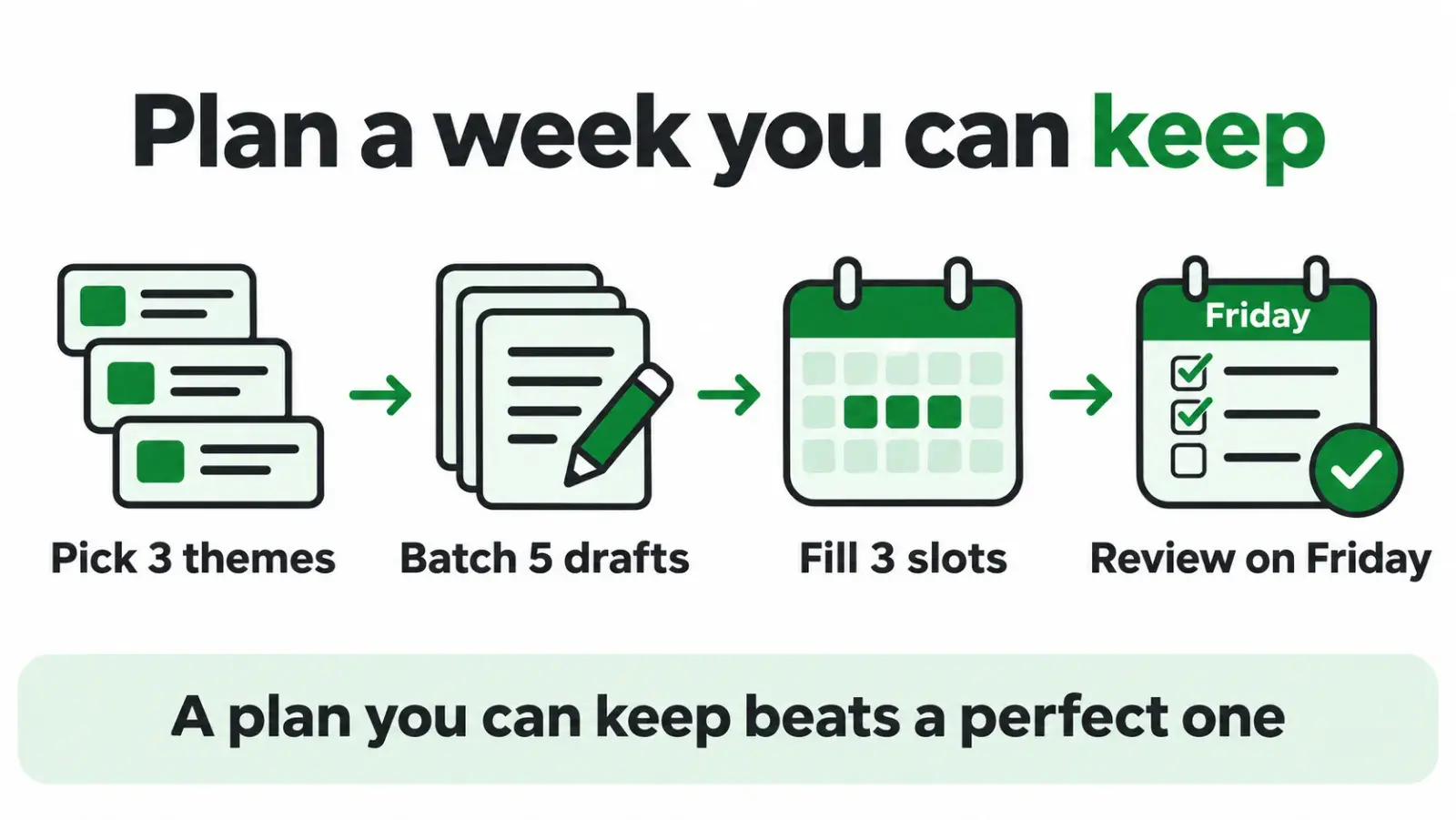
A calendar with three fixed slots beats a plan with twenty you never keep.
Pick three themes so every draft has a job.
Batch the drafts in one sitting, then review them in a separate pass.
Review once a week against your own engagement rate, not your mood.
A content calendar tends to fail in the same way. The first week is full, the second week has gaps, and by the third week the plan is a file nobody opens. The problem is rarely discipline. The plan asked for more than a week can hold.
A calendar is a commitment to a rhythm, not a list of ideas. Each slot needs a draft, a read-through, a link check and some time left over to answer the replies the post brings in. Multiply that by every slot in the week, and the real load can be two or three times what the plan assumed. This guide gives you a calendar small enough to keep and specific enough to review, and a way to check the load before you commit to it.
Workoutwhataslotreallycosts
The cost of a slot should include the check, not just the writing. X's Post Activity Dashboard shows impressions and engagements for each post you send, over the last 28 days by default, so a weekly review can use it without extra work. X's automation rules make you responsible for what a scheduling app does with your account.
Count the time per post before you count the posts. Plans fail when they count the writing and forget the rest. Write down the four jobs every post needs: drafting, reading it aloud, checking links and facts, and answering the replies that come in afterwards.
Here is an illustration with made-up numbers, not a real account. Suppose a founder spends 25 minutes drafting a post, 10 minutes on the read-through and link check, and 15 minutes answering replies in the first hour. That is 50 minutes per post. Three posts a week is 150 minutes, or two and a half hours, before any planning. A plan of seven posts a week would take almost six hours, and that is the plan that dies in week two.
Start from the number of slots you can fill without rushing. Begin with three. Add a slot only after the last few weeks held up without stress, and only when the time per post has dropped, not when the calendar looks empty. A calendar that grows slowly is easier to keep than one that starts full.
Set the slots in the queue on the same day you draw the calendar. A plan that exists only in your head disappears in a busy week, while a plan in the queue shows you the gaps before they happen.
Three external sources shape the rules in this calendar. X's developer guidelines prohibit identical cross-posting across accounts. X's platform manipulation policy bars repeatedly posting identical or nearly identical posts, and X's automation rules bar duplicative posts on one account or over several. Repeated themes with new wording are a different case. X's scheduled posts help page covers the ads.x.com Composer, so if you schedule in X's Composer, confirm the option appears in your own account first. If a tool posts through the API, X's April 2026 pricing update lists writes at $0.015 per post and URL posts at $0.20, so the cost of a calendar depends on how many of its posts carry links.
Pickthreethemes
Themes give every draft a job. Without themes, each post starts from a blank page, and a blank page is where the calendar stalls. Keep each theme to one slot a week, so none of them dominates the account and a single bad week cannot wipe out the whole mix.
Athree-themeplan(example,notabenchmark)
Theme
Whatitcovers
Wheretheideacomesfrom
Customerproblem
Aquestionorfrictionyouheardthisweek
Supportmessages,callsandrepliestoyourposts
Buildlog
Achangeyoushippedandwhatittaughtyou
Yourchangelogorcommitnotes
Opinion
Oneviewonyourfieldyoucandefend
Adecisionyoumadeandthereasonbehindit
Rotate the themes so the same kind of post does not appear three times in a row. If one theme keeps producing the strongest posts in your own numbers, keep it, but do not drop the other two. The mix is what keeps the account worth following, and a single theme turns into a single voice that readers stop noticing.
Find your three themes in what people already ask you. Open your mentions, your support messages and your last ten posts, and list what came up twice. A theme built from real questions is easier to keep writing about than one you invent to fill a slot.
Two checks keep the themes honest. First, can you name three specific posts you could write under each theme this month? If not, the theme is too broad. Second, would a reader who saw only one theme understand what the account is for? If the answer is no, the themes are too scattered.
Batchfivedraftsinonesitting
Write in one block and review in another. Writing and reviewing need different moods, and mixing them is how weak drafts get scheduled. Batch the work, then give it a separate pass. Five drafts is deliberate: three go into the slots, and two are spares for a post that fails the read-through or a timely reply that needs a slot of its own.
Write five drafts in one block. Use one draft for each slot and one spare. Mark each draft with its theme, and note the one fact or detail the post depends on.
Leave the drafts unscheduled overnight. A draft that looked fine this morning often reads differently tomorrow. The delay is the cheapest editor you have.
Review each draft against the reply checklist. Cut praise and filler, check the length for your account, and read the draft aloud. The reply guide has the checklist in full.
Check the facts and the links. Open every link. Confirm every number against its source. A calendar that repeats a stale fact every week is worse than an empty slot.
Schedule only the drafts that pass. Put each one into its slot. The spare stays in the drafts list for the next week.
Fillthreefixedslots
Same days, same hours, every week. A fixed grid removes the weekly decision of when to post. You stop asking whether today is a good day and start following the grid you already set. Pick the windows from your own data, not from a guess. For a method that does not depend on a single study, read how to find the best time to post on X.
Leave one slot empty on purpose. Empty slots are room for a timely post or a conversation that needs a reply. A calendar that fills every hour leaves no time to be present when the post goes live, and a post that goes live while you are busy can sit unanswered for hours.
Friday
Read last week's numbers, pick one theme to replace
Tuesday
Slot 1: customer problem
Wednesday
Slot 2: build log
Thursday
Slot 3: opinion
Friday
Batch the next week's drafts
Asampleweek,withthegapsmarked
The table below is an illustration, not a real account. It shows the grid a solo founder might keep after the first month, with one slot left open on purpose and one spare draft.
Sampleweek(illustration)
Day
Slot
Theme
Status
Tuesday
Morningwindowfromyourtest
Customerproblem
ScheduledonSunday
Wednesday
Morningwindowfromyourtest
Buildlog
Scheduled,linkcheckedthatmorning
Thursday
Morningwindowfromyourtest
Opinion
Scheduled,readaloudtwice
Friday
Openonpurpose
None
Roomforatimelypostorreplies
Spares(two)
Noslot
Rotate
Keptfornextweekorcut
Keep the open Friday slot. A calendar that is always full has no room for a conversation.
Whatacalendarcannotplan
A calendar plans the posts you know about. It cannot plan the news, a reply that deserves a real answer, or a launch that moves a week. Give those three things explicit room in the plan.
News and timely posts. If something in your field breaks on a Tuesday, the timely post should replace the planned post for that day, not sit on top of it. Move the planned post to the spare slot, or cut it. Two posts on the same theme in one day is how an account starts to look automated.
Replies. Replies are often worth more than a scheduled post, because they reach people who already care about the topic. The calendar should leave time after each post for the replies it brings in. If you cannot answer the first hour of replies, the post was scheduled too early or too often.
Launches. A launch moves the whole week. Plan it as a block that replaces the grid for a few days, and keep the grid for the weeks after the launch. Trying to fit a launch into an unchanged grid is how launch posts get buried under old themes.
Reviewonceaweekagainstyournumbers
Review on one day, using numbers. Pick a day and keep it. Open your analytics, compare the engagement rate of each post in the last week, and read the result against the theme and the slot. Engagement rate is engagements divided by impressions, so it compares posts of different reach fairly.
Wait for the data to settle before you judge the week. A post published on Thursday will still gain impressions on Friday, so a Friday review of a Thursday post is a guess. Review the week before, not the week in progress, and only use the numbers you can trust.
Keep the two themes that held up, and replace the weakest one for a week. Do not rewrite the whole calendar after one bad week. A single week tells you very little. A rebuild every Friday makes it hard to learn which slot or theme was responsible for anything.
Works
Review on the same day every week
Read engagement rate, not only impressions
Change one theme at a time
Write one line of notes per post
Avoid
Rebuild the whole calendar after one weak week
Judge a theme from a single post
Skip the review because the week felt busy
Compare posts from different days without the same settling time
Mistakesthatkillacalendar
Planning for a version of you with more time. Plan for the week you actually have. If the calendar needs six hours and you have two, it is a wish, not a plan.
Batching without reviewing. Writing five drafts and scheduling all five without a second pass turns the batch into a backlog of weak posts. The review pass is the part that makes the batch worth doing.
Copying the same post across the week. Reusing one text in three slots is the repeated-identical-post pattern that X's platform manipulation policy bars. Rewrite each post for its slot.
Letting the calendar stand in for a relationship. A calendar gives you a rhythm, but it does not answer people. If every slot is filled and no reply is answered, the account looks like a broadcast. Keep the open slot and the reply time.
Changing the grid after every number. A grid that moves every week cannot be compared with itself. Change one thing, keep it for three or four weeks, and then decide.
Edgecasesyouwillhit
Holidays and travel. Plan a reduced grid in advance, with two slots instead of three. A reduced grid you keep is worth more than a full grid you abandon on the first day away.
A slot that fails. If a scheduled post fails to publish, do not publish it twice to make up for it. Check the queue's failed view, fix the cause and decide whether the post is still worth sending. A post that failed on Tuesday may be stale by Thursday.
A thread in a slot. A thread takes one slot but more reading. Read the whole thread in order before you schedule it, and check the first post and the last post as a reader would see them.
A theme with nothing to say this week. Use the spare draft, move the theme to next week, or post a build log entry. Do not invent a customer problem to fill the slot.
KeepthecalendarinPostMine
I build PostMine, which this article mentions.
PostMine's queue shows Drafts, Scheduled, Posted and Failed in a calendar or a list, so the whole week sits in one view. Drafts stay in Drafts until you publish or schedule them, which gives you the spare draft a home. The weekly schedule holds time slots for each day. With "Make my schedule more natural" on, each slot can shift by up to 5 minutes, so turn that option off when the grid must match your plan exactly.
The calendar is a tool for rhythm. The writing, the reading and the replies are still yours. The scheduling guide explains how to test the scheduler before you rely on it, and the automation guide explains which parts of the calendar are safe to automate and which stay with you.
I do not have a universal number. Start with the three slots you can fill without rushing, and add more only when the weekly review shows those slots hold up for several weeks.
Let it go. A missed slot is not a reason to post twice in one day. Move on to the next draft in the queue, and keep the grid as it is.
No. A table in a note works. A tool helps when you want drafts, scheduled posts and results in one view, so the weekly review takes less time.
Yes. Plan a thread as one slot, and read the whole thread in order before you schedule it. If you have not confirmed that your account can schedule threads, post the thread by hand at its slot.
We use cookies for product analytics to improve PostMine. With your consent we also record session replays, including the content you type and view, such as draft posts (passwords excluded), so we can see how the product is used and fix what breaks. Privacy Policy




 Yerkebulan RakhimovNov 8, 202613 min read