A bookmark is a to-do only if you sort it within a week, so set a fixed time to tag and review.
Keep four fields for each saved post. They are why it matters, its topic, its status and the next action.
Turn one saved idea into one draft at a time, and never publish a saved post as it was.
PostMine no longer reads your X bookmarks, so the workflow below does not depend on a PostMine import.
Bookmarks are where good ideas go to wait. A founder sees a post that sparks an angle, presses save, and returns to it weeks later to find a list of several hundred items with no context. The bookmark did its job, which was to capture. The second job, turning the capture into a draft, never happened.
This article describes a workflow that makes the second job happen. It moves each saved post through four states, uses a short weekly review, and turns one idea into one draft at a time. It also states what X's bookmark tools do and do not offer, and what PostMine does with bookmarks, so you do not build a routine on a feature that is not there.
Capturefirst,andkeepthecapturesimple
Bookmarks are private, so an organized list is yours to keep. X's bookmarks help page says only you can see them, and it describes removing bookmarks from the Bookmarks timeline. A tool that moves or copies the list is a different case: X's terms say you cannot scrape the Services without express written permission, and X's automation rules make you responsible for any app connected to your account. When you check a saved post later, advanced search can filter by words and dates to find the original.
Capture is cheap, so keep it cheap. Use X's bookmark button whenever a post sparks an idea, and do not stop to tag it. The only decision at capture is whether the post is worth saving at all. If it is, save it. If you are unsure, do not save it, because an uncertain bookmark becomes a backlog item you will never reread.
The X developer guidelines list bookmarks as "Fine for personal/automated use" in their rules table, so saving and reading your own bookmarks sits on the allowed side of the rules. The capture step is only the start, though. The value of a bookmark comes from what you do with it within a week.
Save only what you would act on. If you cannot name a possible use in one sentence, do not save it.
Set one weekly time to sort. Fifteen minutes on the same day each week is enough.
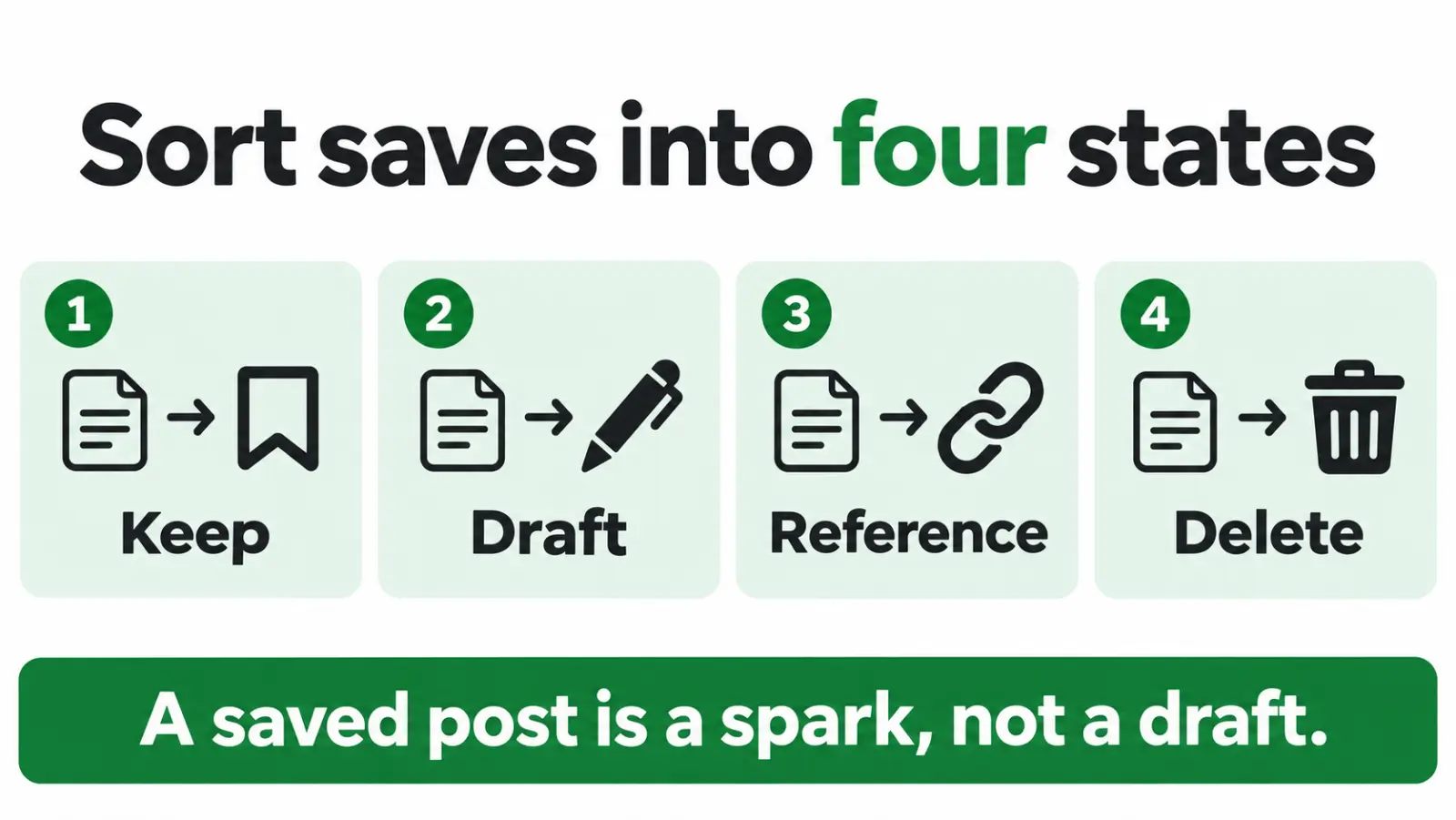
Move each bookmark into one of four states. Keep it, turn it into a draft, reference it, or delete it.
Write the four fields for every kept item. The reason it matters, the topic, the status and the next action.
Make one draft per idea you choose to use. Do not publish a saved post as it was, and do not copy its text.
Thefourfieldsthatmakeabookmarkuseful
A saved post without a reason is a bookmark you will never use. Keep four fields for every item you decide to keep. Each one answers a question you will need later.
Why it matters. One sentence on the angle the post gave you. This field is easy to skip, and it is the one that makes the bookmark useful a month later.
Topic. A short label from a fixed list, such as scheduling, analytics, reach or automation. A fixed list keeps the topics comparable.
Status. Kept, drafted, referenced or deleted. Only "kept" needs your attention in the weekly review.
Next action. A concrete step, such as "draft a reply angle" or "check the claim in the source". A next action is what turns a bookmark into a task.
Aresearchlogwithfourfields(illustrativeentries)
Savedpost
Whyitmatters
Topic
Statusandnextaction
Afoundersharesaschedulingmistake
Givesaconcreteexampleforamistakessection
Scheduling
Kept,draftonesection
Ananalystquotesastudyonlinkposts
Needsacheckagainsttheoriginalstudy
Reach
Kept,checkthesourcefirst
Athreadaboutprofilesetup
Alreadycoveredinanarticle
Profile
Referenced,nonewdraft
Apostwithastalelaunchdate
Showswhatabadbatchlookslike
Scheduling
Deletedafterthereview
The table above is an illustration of the format, with made-up entries. Its job is to show that each row answers the four questions, and that a row can end with "deleted" as a valid state.
The bookmark rules in this workflow follow two primary sources. X's developer guidelines list bookmarks as fine for personal use, and they prohibit using X data to train machine learning models. X's 2022 bookmarks announcement describes the bookmark lookup and names Notion and Trello as examples of tools a developer can connect. The four states and fields are the author's method.
Sortthebookmarksonafixedday
The weekly sort is the step that makes the system work. On the same day each week, open your saved posts, and move each one into one of the four states. Work from the oldest bookmark forward, because the oldest items are the most likely to have gone stale. Set a timer for fifteen minutes, and stop when the timer rings, even if the list is not finished. The next week continues where you stopped.
Every day
Save a post that sparks an idea
Weekly, fixed day
Sort the saved posts into four states
Weekly
Write four fields for each kept item
Monthly
Delete the referenced and stale items
A common mistake is to treat the bookmark list as an archive. An archive grows, and nobody reads it. The workflow works only if the list shrinks. Each week, a good sort should leave fewer items than it found, because each kept item either became a draft or was deleted.
Turnoneideaintoonedraft
A bookmark becomes useful when it becomes a draft. Pick one kept item, read the post and the next action, and write a draft in your own words. Do not copy the saved post's text, and do not quote it at length. The draft should make a point of your own, with the saved post as the spark.
The rule is simple, and it protects you from two mistakes. The first is publishing a saved post as it was, which can repeat someone else's claim without a check. The second is copying a post into a draft and calling it yours. The draft should stand on its own, and a reader should learn something from you, not from the post you saved.
PostMine's composer is a good place for that draft. You can write a post or a thread, keep it in Drafts, and schedule it when it passes your review. The batch guide explains how to group several drafts into one review pass.
WhatX'sbookmarktoolsdoanddonotoffer
The limits matter, so read them before you build around them. X's developer announcement of the bookmarks endpoints, published on March 24, 2022, said the lookup endpoint returns up to 800 of your most recent bookmarked Tweets, with a rate limit of 180 requests per 15 minutes for the lookup. The current API reference for Get Bookmarks lists a page size between 1 and 100, pagination tokens, and the bookmark read scope. The reference I could open does not repeat the 800 figure, so treat the 2022 announcement as the source for that number and check it before you rely on it.
The pricing update of April 16, 2026, effective April 20, 2026, lists reads of your own bookmarks at $0.001 per resource. For a few hundred bookmarks, that is a small cost, but it is a cost you should know before you run a script on a schedule. I could not confirm from the X pages I could open whether the bookmark list can be sorted or tagged inside X itself, so keep your tags in your own tool.
WhatPostMinedoeswithbookmarks
I build PostMine, which this article mentions.
PostMine no longer reads your X bookmarks. Its privacy text says so directly. Bookmarks imported before that change stay stored until account or personal-data deletion, are not displayed on any screen, and Home recommendations do not use them, although retained composer attachment context can still reference them. That means the workflow above does not depend on a PostMine import. It depends on your own tool for the sorting and on PostMine for the drafting and the queue.
Keep that boundary in mind when you plan. If a tool promises to import your bookmarks, check whether it uses the official API, what it costs, and whether it stores the copies. The evaluation checklist lists the questions to ask before you connect any tool.
Aworkedsort,withillustrativenumbers
The following sort is an illustration, not a real account. A founder arrives at her weekly sort with 40 unsorted bookmarks, most of them saved over the previous fortnight. She works from the oldest, and she has fifteen minutes.
In the fifteen minutes she gets through 22 items. Nine go to delete, because she can no longer name a use for them. Six are kept, each with its four fields written, and three of those six are on her list for the next batch. Four go to reference, because the idea is already covered by an article she wrote. Three are marked as drafts, and she turns one of them into a draft that afternoon. The remaining 18 stay in the unsorted list for next week.
The result is not a clean list. It is a list that got smaller by more than half in one sitting, with every kept item carrying a reason. That is the target. A sort that leaves the list the same size or larger is not finishing its job, and the fix is usually to save less, not to sort longer.
Notice what she did not do. She did not publish any saved post as it was, and she did not spend the fifteen minutes on tagging that she could do later. The timer protected the sort from becoming an evening of reading.
Mistakesthatturnaworkflowintoapile
Mistake one: saving everything. A bookmark that you do not act on becomes clutter. Save only what you could use within a week.
Mistake two: skipping the reason field. A bookmark without a reason cannot be judged a month later. Write the reason on the day you sort.
Mistake three: never deleting. The list should shrink. If it keeps growing, the weekly sort is not finishing.
Mistake four: publishing the saved post. A saved post is a spark, not a draft. Write your own version.
Mistake five: storing copies you do not need. If you keep copies of posts outside X, keep only the fields you use, and delete the copies you no longer need.
Edgecasesintheworkflow
Posts that get edited or deleted. A saved post can change or disappear. Check the source when you turn it into a draft, and mark the bookmark as referenced if the post is gone.
Claims that need a check. A saved post may quote a number or a study. Open the original source before you repeat the claim, and note the source in the reason field.
Long threads. A thread takes several bookmarks, or one. Save the thread once, and write the reason field for the whole thread, not for each part.
Shared research. If a team uses the same list, the sort needs an owner. One person does the weekly sort, and everyone else adds items with a reason.
Wheretheworkflowfitstherestoftheroutine
The sorting step feeds the calendar. A kept item with a topic becomes a draft for a theme in the content calendar, and a draft that passes review goes into a slot. The scheduling guide explains how to put that draft in the queue and test the scheduler before you rely on it.
Whoshouldowntheweeklysort
A sort needs an owner. If one person does it, the four states stay consistent, and the fields mean the same thing on every row. If a team shares the list, one person should still own the sort, and everyone else adds items with a reason. Without an owner, the list fills with items that have no reason and no status, and nobody can tell which items are waiting for a decision.
The owner does not need to be the person who saves the most posts. The owner needs to read the list every week, keep the fields filled, and archive what is no longer used. Keep a short note of who owns the sort, and review that note when the team changes. A list with a clear owner is the difference between a research tool and a pile.
No. PostMine's [privacy text](https://postmine.tech/en/privacy) says it no longer reads your X bookmarks, and bookmarks imported before that change are not displayed or used for recommendations. Keep your research workflow in your own tool, and bring the idea into PostMine as a draft.
Keep only the ones you will act on within a week. A long pile of bookmarks is a backlog, and the ones you never reread are the ones you should delete.
I could not confirm the bookmark sorting options from the X pages I could open. Use your own tags in a separate tool, and treat X's bookmark list as the capture step only.
Storing your own saved posts for personal reference is covered only by the bookmark action, which X's [developer guidelines](https://docs.x.com/developer-guidelines) list as "Fine for personal/automated use." The guidelines say nothing about storing copies, and copies pulled through the API carry deletion duties. Do not redistribute stored posts at scale or use them to train models, because the guidelines prohibit both.
We use cookies for product analytics to improve PostMine. With your consent we also record session replays, including the content you type and view, such as draft posts (passwords excluded), so we can see how the product is used and fix what breaks. Privacy Policy




 Yerkebulan RakhimovNov 9, 202610 min read