

Yerkebulan Rakhimov @buildwithyerke · Nov 5, 2026
Building an X growth tool:
The idea: help creators grow.
The reality: keep finding rough edges.
A reply works when it proves you read the post. Here is how to write one that sounds like you, what X's length limits mean for it, and what to check before you post.

Key takeaways
AI-written replies can give themselves away in the first line. They open with praise, say something true that could sit under any post, and end with a question that asks for nothing in particular. Readers skim replies quickly, so the reply has to earn its second sentence.
A reply is the smallest unit of writing on X, and it is the one people judge fastest. A reader sees the post, then the reply under it, then decides in a second whether the author was there. That judgment is harder to earn in a reply than in a post, because the reply sits next to someone else's words and has to justify its own place. This article covers how to write a reply that sounds like you, what the length rules mean for it, the edge cases that change the advice, and the checks to run before you post.
Read the post twice. Then write down the one sentence you would say if you were talking to the author face to face. That sentence is your anchor. If you cannot write it, you have nothing to add yet, and the right move is to skip the reply.
If you cannot name one detail, skip the reply.
Next, find one detail the author wrote that a reader could skim past: a number, a tool name, a choice they made. A reply that names that detail and says what you think about it reads as human, because it shows you were actually there. The detail is the proof that you read the post. Generic praise is not proof of anything, and every reader knows that.
Example: you named the first sentence. Most replies skip it, so I would start there too.
The first read is for the author's meaning. The second read is for the detail. On the first read you are trying to understand the post. On the second you are looking for the single sentence you could only write if you had read it closely. If the second read finds nothing, the post is either too short or too general, and a reply will not add much. That is a valid reason to scroll on.
Two short example posts: one point each, said plainly. They show the shape I aim for in a reply. Each makes one claim, gives one detail, and stops.
Yerkebulan Rakhimov @buildwithyerke · Nov 5, 2026
Building an X growth tool:
The idea: help creators grow.
The reality: keep finding rough edges.
Yerkebulan Rakhimov @buildwithyerke · Nov 7, 2026
I connected my ChatGPT Dot to a Yandex Station, and now I can call it with a wake word, no laptop or phone needed!
It's open source!
A reply can follow the same shape. It names the detail in the first line, states the opinion in the second, and ends. The two posts above do not add a closing summary, and a reply should not either.
The checklist is four steps. Each one has a test you can run in a few seconds, and skipping any one of them can make a reply sound generic.
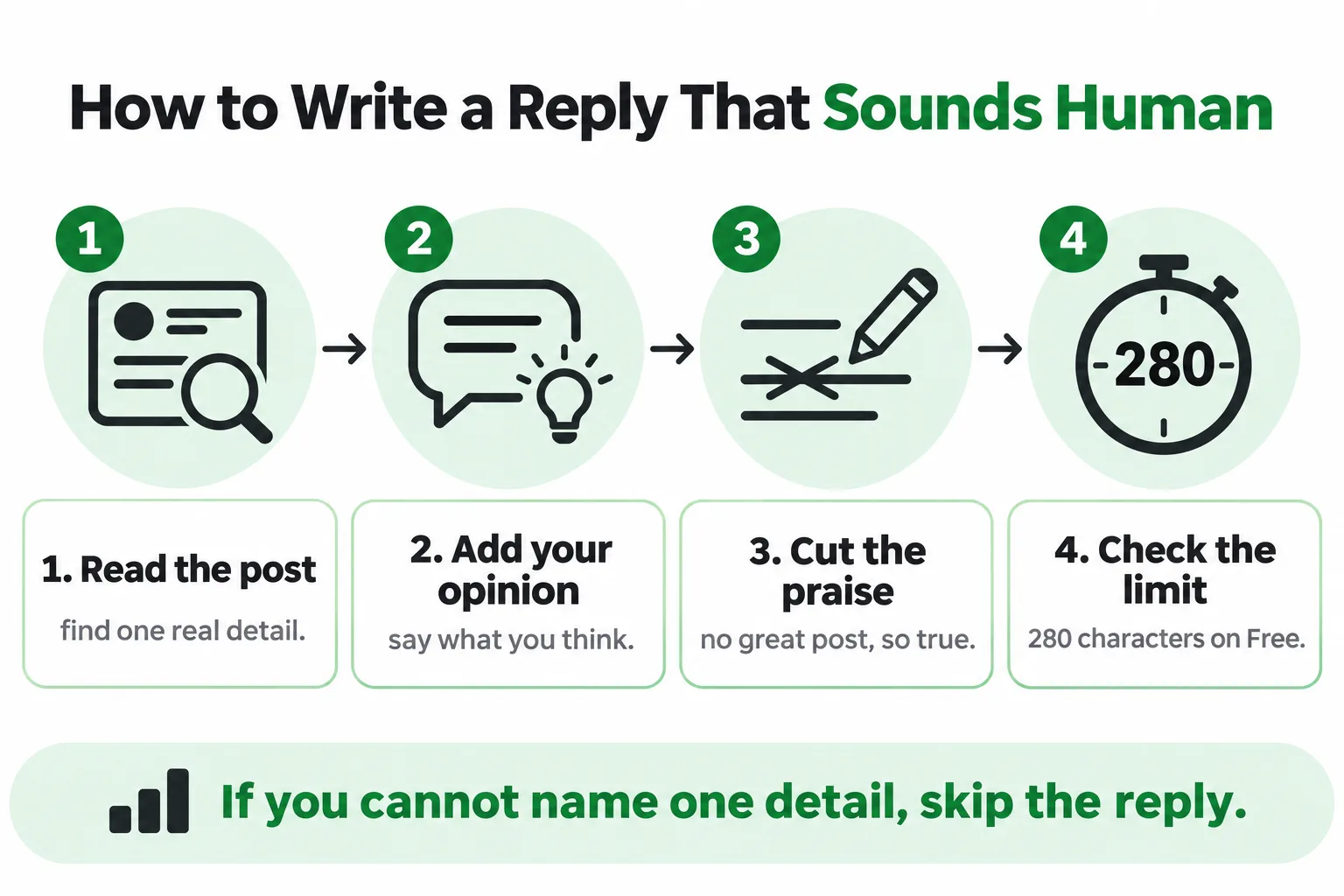
The reply loop
Name the detail
Pick one specific thing from the post.
Add your opinion
Say what you think, even if it is small.
Cut the praise
Delete the words that carry no information.
Read it aloud
If it sounds like a press release, rewrite the first line.
Then check the length for your account and post.
The checks behind each step are the point of the loop. For the first step, the test is whether a stranger could tell which post your reply belongs to from the first sentence alone. For the second, the test is whether you would defend the sentence if the author replied to you. For the third, delete "great", "so true" and "this is important" first, because readers discount them first. For the fourth, ask whether you would say the sentence to the author in a conversation.
Then check the length for your account and post. The next section covers the numbers.
Free accounts and Premium accounts have different post lengths. Check the limit for your own account before you post, and treat a reply that fits in 280 characters as the default for everyone. A reply written for the short limit is usually better even on an account that can post longer, because it forces the one point that a reader will remember.
| Account type | Characters per post |
|---|---|
| Free | 280 |
| X Premium | 25,000 |
The Premium limit is set by X's Help Center page about X Premium, which says subscribers can post up to 25,000 characters; 280 is the standard limit it implies. The page is the source to check if the numbers change. The limit is the ceiling, not the target. A reply that uses 2,000 characters is rarely a good reply.
The count itself is not always what it looks like. The X developer documentation on counting characters says that any link counts as 23 characters, however long the address is, that emojis count as 2 each, and that CJK characters count as 2 each. Attached media from official clients counts as 0. Auto-populated @mentions at the start of a reply do not count, but mentions you add yourself count normally.
The chart is a weighting, not a measure of your reply. It explains why a short reply with an emoji and a link can use more of the limit than its text suggests, and why a reply in Japanese or Korean fills the limit faster than the same idea in English.
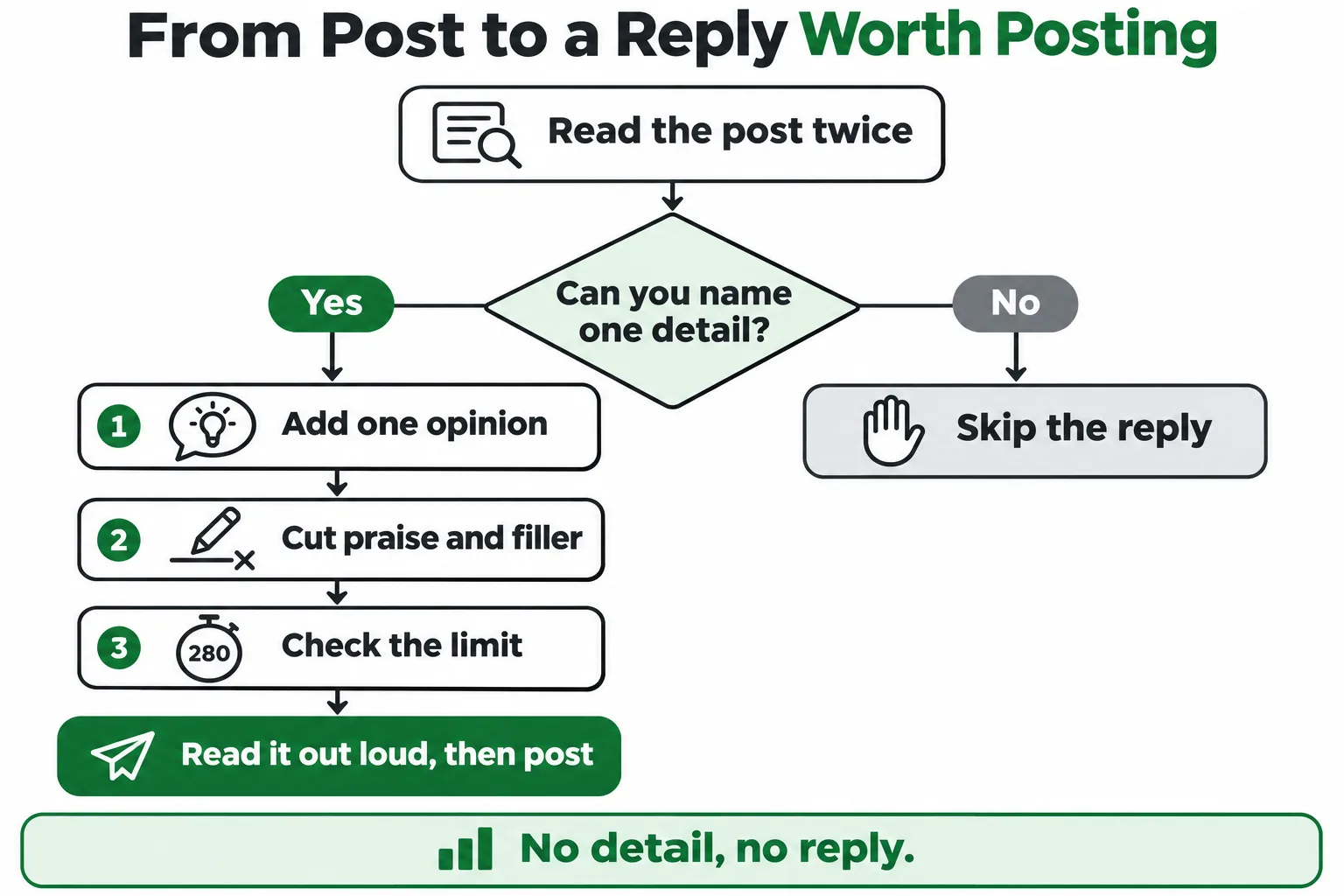
The flow is short. Read the post twice. Ask whether you can name one detail. If you can, add one opinion, cut praise and filler, check the limit, read the reply aloud, and post. If you cannot name a detail, skip the reply. The skip is part of the flow, not a failure of it.
In my view, the first words of a reply decide whether the rest is read. The openers below show the pattern to avoid, and the ones that work better.
Works
Avoid
A generic reply
Great post, so true.
This is the advice everyone needs.
A reply with one detail
Great post, so true.
You name the first sentence, which is the part most replies skip.
The cons column is not a list of rude replies. Each of those lines is polite, and each one could be posted under any post on any topic. That is why readers skip them. A polite reply that says nothing specific still tells the author that you did not read closely.
This is an illustration, made up for this article. It is not a real reply and it reports no result.
Suppose the post says: "We moved our billing page to after the first export. Trials went up, and support tickets about billing fell." A generic reply would be: "Great insight! Simple changes like this can make a huge difference." It names nothing, opines nothing and could sit under any post about product changes.
A specific reply names the detail, the order of the change, and gives one opinion: "Moving billing after the first export makes sense to me, because the user has a reason to pay before they see the price. I would test whether the support drop holds once the trial length changes." The reply has one detail, one opinion and one question that the author can answer. It is longer than the generic one, but it is still short, and it fits easily in 280 characters.
Notice what the specific reply does not do. It does not praise the author. It does not summarize the post. It does not end with a generic question such as "What do you think?" It states a view and invites a specific response, which is the most useful thing a reply can do.
The draft starts from the post you are replying to. PostMine's reply box has an optional thoughts field, so you can add your own point before the draft is written. Read the draft against the checklist above before you post it.


The feed shows the posts worth replying to, and each card has the reply box under it. The box is where you write the point, and the draft comes after. If the draft does not match the point you typed, do not post the draft. Rewrite the point and try again, or skip the post.
Some replies need a different approach. These are the cases I check for before I apply the checklist.
These are common mistakes in replies that read as automated. Each one is visible in the first two sentences.
Before you reply to a conversation, read how X connects replies and mentions to the post they answer. The Help Center explains how replies and mentions work, and its guide to conversations on X shows how a reply sits inside a thread of posts. Check both pages before you assume a reply will reach the person you addressed.
Several Reddit threads describe replying to other people as a growth method. The reports below are one user's experience each, not evidence about what works for any account. They are useful because they show which claims repeat and where the rules draw the line.
One thread describes a bot that replies to relevant posts. The author writes "I built a bot that auto-replies to relevant tweets to turn me into a professional reply guy" (r/aiagents, 2026-03-05, by DecentVast7649). The thread is a useful warning rather than a method. X's automation rules say that automated replies are not permitted when they are sent "to posts based on keyword searches alone", and that spammy or duplicative use of replies can lead to enforcement, such as removal from search (X Help Center: automation rules). A reply generated from a keyword match is the case the rule names.
Another thread asks whether replying to larger accounts is a real growth strategy. The original post says: "adding something meaningful instead of dropping a generic comment just to get visibility" (r/TwitterMarketing, 2026-09-29, by Adorable-Fortune2926). That matches the checklist above: a reply that adds a fact or a question gives the reader a reason to keep reading.
A third thread asks how reliable the reply-guy method is. The original poster writes that after a week and a half of replies in a niche they had "only just been stuck at 1 follower" (r/Twitter, 2026-10-24). A commenter in the same thread reports a very different result, saying they gained most of their followers by engaging with high-profile accounts. Both are single experiences, and neither tells you what your niche will do. The honest reading is that replies can bring visibility, and that the result depends on whether the replies add something.
The conversation mechanics matter here too. X's Help Center says that usernames "will not automatically be added to the beginning of the reply, giving you all available characters to use in your response" (X Help Center: About conversations on X). That is why a reply costs only the characters you type, and why the 280-character count in the checklist is the number that matters.
Replying at scale is where the rules matter most. Automated replies are governed by X's rules, and the Help Center page on automation is the place to check the current wording before you script any reply. You may send one automated reply or mention per user interaction, and the callout below quotes the opt-in condition as the page states it.
A reply you write, read and post yourself is not automation. A script that posts replies without your review is. If you are not sure which side a tool falls on, read the rules before you use it.
For the character rules on their own, see the character limit guide. For the wider question of engagement that does not depend on bait, see how to improve X engagement without engagement bait.
Check the length before you post. The counting rules count a link as 23 characters, an emoji as 2 and media as 0, so a reply with a long link can be shorter than it looks. Longer posts are a subscriber feature under the X Premium page, so a reply that needs more room on a standard account has to be shortened, not extended.
Skipping is a valid outcome. Skip a post when you cannot name a detail to respond to, when you disagree in a way you cannot express in the space, or when you would be adding a reply only to be seen. A reply that is not worth writing will be read as a reply that is not worth reading. Your time is better spent on the next post that gives you a detail.
Sources, checked 2026-11-09
No. Skip a post when you cannot name a detail to respond to.
Check the limit for your account type in the table above before you post. A reply that fits in 280 characters is the safe default for everyone.
Yes, as a starting point. Read the draft against the checklist and add the one detail only you would say. Automated posting is governed by X's rules, so check them before you script anything.
X publishes no safe number of replies. Pace yourself, watch how your replies land, and check the current rules in the X Help Center before you change your volume.
Draft in PostMine, add the one thing only you would say, then post.

Free accounts get 280 characters per post and X Premium accounts get up to 25,000. Here is how X weighs emoji, links and CJK text, what does not count, and how to check a post before you publish.
Yerkebulan RakhimovNov 5, 202613 min read

Engagement bait gets clicks but few real replies. Ask about one detail, write for one reader, and measure replies, not likes, every single week.
Yerkebulan RakhimovNov 9, 202611 min read

An automated post is a post a tool publishes without you pressing the button. Here is the full path from draft to publish, the safeguards that keep it honest, and the rules and costs that X's own documents attach to it.
Yerkebulan RakhimovNov 9, 202611 min read
