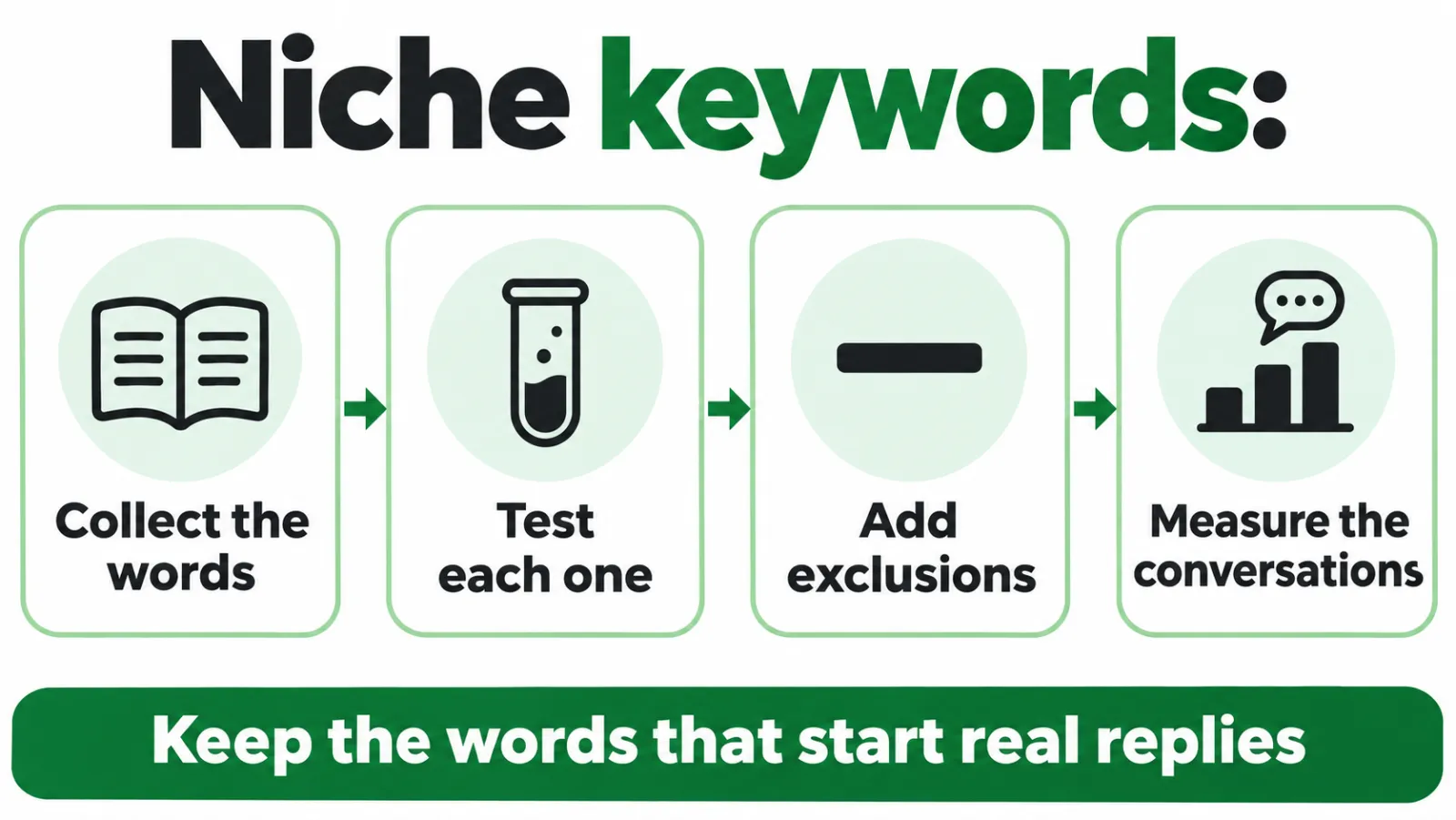
Start from the words your readers use, not the words you use to describe your product.
Test each keyword on its own, then as a group. A keyword that brings noise is a keyword to narrow, not a keyword to keep.
Exclusions matter as much as keywords. Add the words that show up in spam and off-topic posts.
Measure keywords by the conversations they bring, not by how many posts they match.
Keyword research on X is different from keyword research on a search engine. A search engine ranks pages for a query, while X shows you posts from the last few hours, days and years, mixed with spam, news and people who share the same word for a different reason. The goal is not to find the most popular word. It is to find the words that bring the conversations you want to join.
This guide covers how to build a keyword list for a niche, how to test each term on X, how to add exclusions that remove the noise, and how to measure which keywords are worth keeping. It uses the operators described in the operators cheat sheet, and the range and language habits in the advanced search guide.
Startfromthewordsyourreadersuse
Your product has a name, a category and a set of features. Your readers have a problem, and they describe it in plain words, often with more emotion and less precision. A keyword list built from your product's own language misses those readers, because they are not searching for your category. They are searching for the frustration that led them to it.
Collect the words from the places where your readers already write. Support messages, reviews, the questions customers ask on calls, and the replies on your own posts are good sources. Write each phrase as the person wrote it, including the spelling and the tone. Those are the variants to test, and they are more useful than any list you invent in a meeting.
Keep the list in a note with three columns: the phrase, where you found it, and what the person was trying to do. The third column helps later, when a keyword brings posts that match the words but not the problem.
Run each query in X's search, or in the developer search if you have API access. Do not scrape X to collect results. X's Terms of Service say that, except as required by applicable law, you cannot scrape the Services without X's express written permission.
Testeachkeywordonitsown
Test each variant as a single query first. Search for the phrase in quotation marks, with a language filter if your audience uses one language. Open the first twenty results and sort them, in your head or on paper, into three groups: real conversations on the problem, posts that use the words for something else, and spam or promotion. The ratio tells you how much the keyword is worth.
A phrase in quotation marks is safer than a single word. The developer documentation for X's search operators says that broad single keywords match a very large volume of posts, which buries the useful ones. A phrase narrows the match to posts that contain those words in that order, which is usually closer to what a reader wrote.
Sortingthefirsttwentyresultsforonekeyword
Group
Whatitlookslike
Whattodo
Realconversation
Apersondescribestheproblemandothersreply
Keepthekeyword;notethephrasing
Wrongmeaning
Thewordsappear,butthepostisaboutsomethingelse
Addanexclusionfortheunrelatedword
Spamorpromotion
Accountssellingaproductorpostingthesameline
Addanexclusion,ornarrowthephrase
Oldanddead
Postsfromyearsagowithnoreplies
Addadaterange,thentestagain
The table is a way to read a result list quickly. If most of a list falls in the first group, the keyword is working. If most falls in the other three, change the keyword before you spend more time on it.
Combinekeywordsintogroups
Once each keyword has been tested, combine the good ones into a group. A group uses OR inside brackets, so a post matches if it contains any of the variants. A query such as ("too expensive" OR "price went up" OR "cost is rising") lang:en -is:retweet is more useful than three separate searches, because you read one list and see the pattern across the phrasings.
Keep groups small. A group of twenty phrases is hard to read and harder to debug. Build a group of three to six good phrases, test it, and add another group for a second angle on the same problem. Two or three focused groups usually beat one huge query.
Addexclusionsthatremovethenoise
Exclusions are as important as keywords. Every niche has words that appear in spam, in unrelated news and in posts about something else entirely. Each time you find one of those words in a result list, add it as an exclusion with a minus sign. Over a few weeks, the exclusions turn a noisy list into a readable one.
The developer documentation says that a negated operator cannot be used alone, so an exclusion needs a positive term in the same query. It also says to list each excluded term on its own rather than negate a group in brackets. A query that excludes three words is written as -word1 -word2 -word3, and it works the same way as the grouped form would, with the benefit that you can see and edit each term.
Collect phrases from real readers. Use support messages, reviews and questions, and keep the wording as written.
Test each phrase in quotation marks. Open the first twenty results and sort them into the three groups.
Keep the phrases that bring real conversations. Note the phrasing of the posts that started replies.
Group the good phrases with OR. Build two or three focused groups, not one large query.
Add exclusions for the noise. Add one word at a time, and retest after each change.
Rerun each group weekly and note the change. A group that starts returning spam is a group to fix.
Measurethekeywordsbyconversations
A keyword is valuable when it brings conversations, not when it matches many posts. Measure each group by the number of real conversations it brings over a fixed window, and by the replies those conversations get. A group that returns a hundred posts and two conversations is weaker than one that returns twelve posts and five conversations.
Keep the measurement simple. Once a week, count the real conversations in each group, note the top two or three, and record the phrasing of the posts that started them. After a month, you have a short table of which groups work, which phrases carry the most signal, and which exclusions removed the most noise. That is more useful than a long list of keywords.
Usethelanguageanddatefilters
Two filters can change the result list a lot. The language filter removes posts in languages you do not read, and it can also remove posts that are classified under a different language than you expect. Check the result with and without the filter, and keep the filter if it removes noise rather than the conversations you want.
The date filter matters because a keyword can peak. A phrase that was common during a product launch may be quiet now, and a comparison across a range of years can hide that. Use a range that matches the question. For a current niche list, a range of a few months keeps the result focused on the period you care about.
Commonmistakeswithnichekeywords
Starting from your own vocabulary. Readers search for the problem, not the category you sell in.
Testing a keyword as a single word. A single word brings a flood of unrelated posts. Test phrases.
Building one huge query. Large queries are hard to read and debug. Use small groups.
Skipping the exclusions. Without exclusions, the list fills with spam and off-topic posts within weeks.
Measuring by volume. A keyword with many matches and no conversations is not working.
Keeping a keyword forever. Topics move. Review the groups every few weeks and retire the ones that have gone quiet.
Edgecasesinnichesearch
Some niches share words with other niches. A word that means one thing in your field can mean something else in another, and the result list will mix them. Add exclusions for the other meaning, or require a second term from your niche in the same query.
A keyword that is a brand name can attract posts about the brand from people who are not your customers. Treat brand keywords as a separate group, and read them for complaints and questions, which often point to a real need in the niche.
Some topics are discussed mostly in another language. If your niche is strong in a language you do not read, run the same test in that language, check a sample with a native reader, and build the group in that language rather than translating the English one word for word.
WhatanichethreadonRedditfound
A Reddit thread from May 2026 asks how to grow a niche X account from zero. The original poster writes that no one "seems to take the account seriously" (r/socialmedia, 2026-05-16, by Jealous-Educator777). A commenter, u/TomTeachesTech, advises finding the larger accounts in the niche, turning on their notifications, replying when they post, and not buying followers. For keyword research that advice points at the same thing as this article: find the accounts and words that already carry the conversation, and join them instead of guessing.
A keyword is worth keeping only if it returns posts from people you would want to talk to. Run it as a query over a week of posts, read the top ten results, and count how many come from accounts that discuss the topic in their own words. If most results are reposts of one post, the keyword is noisy rather than popular. The X search policies say that an account can get filtered from search when it repeats or near-duplicates content, so a keyword that returns many copies of one post tells you little about the conversation.
Hashtags need a separate check. The Help Center's guide to hashtags says a hashtag is used to index keywords or topics, which lets people follow a topic. A hashtag is only one of several ways a topic is named, though. Compare the hashtag with the plain words people use in the same posts, and keep whichever one returns the accounts you want. The operator reference lets you combine the two in one query when the difference matters.
Search results also depend on visibility. The search help page says the platform may not show every post in search, and that protected posts are visible only to approved followers. The public and protected posts guide says protected posts do not appear in third-party search engines. A keyword group that looks small may contain protected accounts, so check that before you drop a group.
WherePostMinefits
PostMine's Feeds page shows real posts from X that you can reply to, and the conversations you find through keyword search are a good input for that page's replies. The search finds the conversations for the phrases you chose. The reply is still yours to write, in your own words, after you read the post and its context.
The product does not choose your keywords, and it does not decide which conversations matter for your business. Those choices come from the words your readers use, and they stay with you.
Enough to cover how people talk about the problem, and few enough to read the results. Start with five to ten variants, test them, and cut the ones that bring noise.
Only with care. A single word matches a very large number of posts, so pair it with a phrase, an account or a date range before you trust the list.
Count the posts that are real conversations on your topic, and the replies they get, over a fixed window. A keyword that returns many posts and no real conversation is not working.
Only with a tool that uses the developer search, which needs API access. For a manual list, rerun the saved queries once a week and note the change.
We use cookies for product analytics to improve PostMine. With your consent we also record session replays, including the content you type and view, such as draft posts (passwords excluded), so we can see how the product is used and fix what breaks. Privacy Policy




 Yerkebulan RakhimovNov 9, 20269 min read