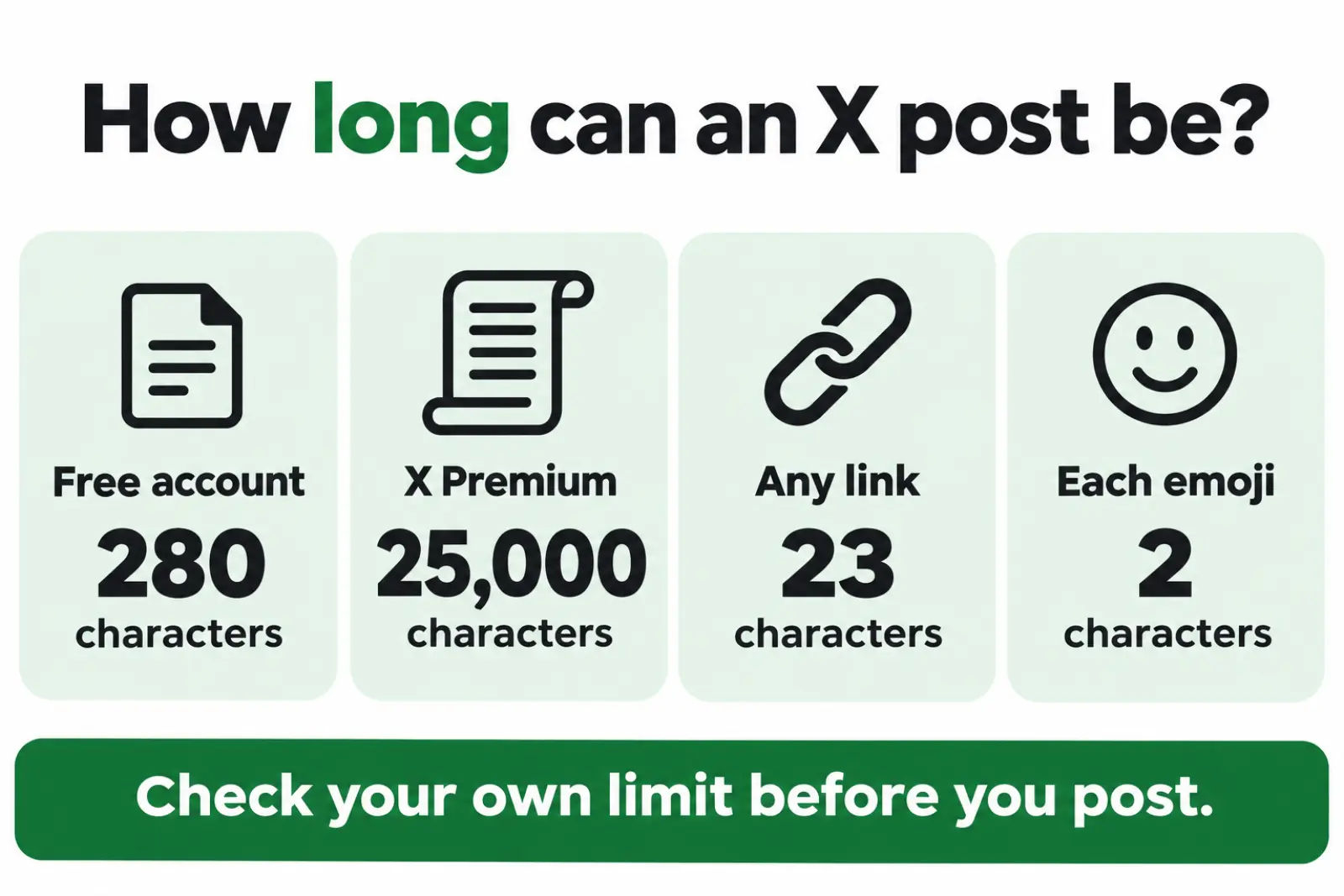
Free accounts get 280 characters per post. X Premium accounts get up to 25,000.
X does not count every character as 1. Emoji and CJK characters weigh 2, and any link weighs 23.
Check the weighted count before you publish, because a post can look short and still be over the limit.
On Free, pick one point per post even when there is room for more. The first line decides whether a reader stays.
A Free account can write 280 characters in one post. An X Premium account can write up to 25,000. Those two numbers are the part people remember, and they are the part that matters least when you are about to post. X does not count characters the way a word processor does. Emoji, CJK text and links carry different weights, so a post can look short and still be over the limit. I check the weighted count before I publish, every time, because the rule is simple once you see it and easy to break when you do not.
Thetwolimits
The limit depends on the account that posts. X says Premium subscribers can write longer posts of up to 25,000 characters, and Free accounts stay at 280 (X Premium help). The limit follows the account you post from. A Premium reader does not give a Free writer a longer post, and a Free reader does not shorten a Premium post.
The 280 figure is a weighted count, not a count of letters. X's counting page says posts can contain up to 280 characters, and that not all characters count equally (X developer docs: counting characters). The chart below shows what that means for a Free post when the text is made of one kind of character.
MaximumcharactersonaFreeaccount,bykindoftext
Latin letters and punctuation280
Emoji140
CJK characters140
HowXweighseachcharacter
The counting docs set the weights. Latin letters, punctuation and common symbols count 1 each. Emoji count 2 each. CJK characters count 2 each. Other Unicode characters take a default weight of 2 (counting characters). The emoji rule has no exceptions in the docs: skin tones, ZWJ sequences and family emoji all count as 2, no matter how many code points they contain.
That makes emoji the most common surprise. A short line full of emoji can fill a Free post faster than a long sentence of plain words. The arithmetic is worth doing once by hand, so the numbers stop feeling random.
Threemade-upposts,weightedthewayXcountsthem
Illustrativepost
Parts
Weightedtotal
Free(280)
Premium(25,000)
A
180letters,3emoji,1link
180+6+23=209
Fits,71left
Fits
B
240letters,2emoji,1link
240+4+23=267
Fits,13left
Fits
C
300letters,nolink
300
Overby20
Fits
D
150emojiand10letters
300+10=310
Overby30,thoughitlooksshort
Fits
These posts are illustrations I made up to show the arithmetic. They are not data from X or from any account. Post D is the trap: 150 emoji look like a short post, and the counter sees 310.
Linksalwayscount23
Any valid URL in a post is wrapped with X's short link and counts 23 characters, whatever its original length. The docs give two examples of very different URLs that both count 23 (counting characters). The rule holds for a short domain and for a tracking URL with a long path.
Here is a Free post in practice. Suppose you write 250 weighted characters of text and add one link. The total is 250 + 23 = 273. That leaves 7 characters, which is enough for a full stop and a short closing word, but not for a second link. A second link, even a short one, costs another 23.
For a link you need the reader to open, the cost is only part of the question. I put a link in a reply when the post has to stand on its own, and I keep the main post free of links when the point is the argument. That is my habit, not an X rule. For what the data says about links and reach, read do links affect X reach.
Mentionsandmedia
Two more rules change the count, and both are in the docs (counting characters):
Auto-filled @mentions at the start of a reply do not count. Auto-populated mentions at the start of a reply do not count toward the limit (X developer docs: counting characters). X's conversations page says usernames are not added automatically, so check what your composer inserts (X Help Center: About conversations).
@mentions you type yourself count normally. A handle you add in the middle of a sentence adds its full length, including the @.
Media attached through an official client counts 0. A photo or GIF attached in X's own apps does not take characters from the text. The docs say this applies to official clients, so test a post from a third-party app before you rely on it.
Worked example, labelled as an illustration: a Free reply that opens with a handle you typed, followed by 200 characters of text and one photo, weighs 200 plus the handle's length. Every weighted character counts, because X does not add the handle for you. The reply is harder to read with a repeated handle, so I remove a handle I do not need.
Hashtags are simpler. The docs say they count normally, with the # and the tag text both counted. A hashtag is a cost, and on Free it competes with your words for the same 280.
Links are also a case where the field and the count differ. X's help page on public and protected posts says a link in a protected post is shortened to an http://t.co address (X Help Center: Public and protected posts), so count a link with the 23-character rule, not the length you see in the field.
Edgecasesthatchangethecount
Most posts are plain text with one link, and the simple rules are enough. These are the cases where the simple rule gives the wrong answer.
CJK text fills the limit fast. An illustrative Chinese sentence of 100 characters weighs 200, because each CJK character counts 2. On Free that leaves 80 weighted characters, not 180.
Mixed text adds up per character. An English sentence with one Japanese word is counted letter by letter. The English part costs 1 each, the Japanese part costs 2 each, and the total is the sum.
Emoji sequences cost the same as one emoji. A family emoji is built from four people and three joiners, but the docs count the whole sequence as 2. That is the one place the rule is generous, so do not lean on it for a long string of them.
A link inside a sentence still costs 23. Writing the URL as text in brackets or with words around it does not lower the cost. Only the visible length is ignored, and the 23 is fixed.
Textencodingandpastedtext
X normalizes text to Unicode Normalization Form C, usually called NFC, before it counts (counting characters). The docs use the word café as an example. Written with a composed é it is 4 characters. Written with a separate combining accent it looks the same on screen, but it is stored as 5 code points, and X normalizes both forms to 4 characters before it counts.
This matters when you paste text from a document or from an AI tool. Most of the time the difference is invisible. The practical rule is simple: count the text after you paste it into the composer, not before. In my practice, the composer count is the one I trust before I publish.
Wherethesourcesleaveagap
X's docs say that other Unicode characters default to a weight of 2, and they point to a configuration file in the open-source twitter-text library for the exact ranges (counting characters, twitter-text config). The docs do not list which scripts fall into the default in plain words. I could not confirm from X's pages the weight of Cyrillic or other scripts, so I do not state one here.
That gap matters for a bilingual founder. If you write in Russian or another non-Latin script, do not trust my arithmetic or any rule of thumb. Paste a sample into the twitter-text parser, or read the X character count that the composer shows, and use that number. I treat the library and the composer as the source of truth, and my notes as a guess until they agree.
Copyingfromothertools
A separate app may show its own character count. A tool that counts every character as 1 will show a post as shorter than X counts it, which is the same trap as post D in the table above. If you draft in a separate app, check its count against the composer once. Paste a post with two emoji, one link and a line of CJK text, and compare the numbers. If they differ, trust the composer and the X rule, not the tool.
Copying text between a tool and X can also change what you paste. Smart quotes, non-breaking spaces and characters from an AI draft look like ordinary characters on screen, and each can change how the final text is stored. I check the composer count after the last paste, not the count in the draft file.
My habit is to write short posts directly in the composer and use a separate draft only for the first pass. That is my habit, not an X rule, and it removes the copy step where most count mismatches start.
Commonmistakes
Works
Count the weighted total, with emoji at 2 and links at 23
Paste the final text into the composer and read its count
Check whether the post is a reply, because auto-filled mentions do not count
Test a non-Latin sample with the library before you rely on a count
Avoid
Count words and assume the limit follows
Count a link by its visible length
Use a Premium limit on a Free account
Write to the edge of 280 and then add an emoji
A risky habit is the last edit. Writers finish a post at 278, add a single emoji to finish the thought, and find that the post is now over the limit because the emoji counts as 2. The fix is a margin. My habit is to leave 10 to 20 weighted characters on Free, so the last edit cannot break the post. That is my practice, not a rule X publishes.
Another mistake is copying a limit from a forum post. The number that matters is the one for your account type, checked on the day you post.
Whenalongerpostearnsitslength
On Premium, a 25,000-character post is available, and the temptation is to use all of it. I do not. A longer post earns its length only when one point needs more room than a Free post gives it. A worked example, the kind of case I would write as a long post: a founder explains a pricing change, with the numbers, the reason and the one trade-off that surprised them.
A thread is often the better format for the same content, because each part is short enough to read in one glance. The How to plan and write an X thread article covers thread structure. My rule of thumb is simple: if you cannot name the one point in two sentences, the post needs a cut, not more room.
Length on Free is also a discipline. Most replies need exactly one point. How to reply on X without sounding like AI walks through the reply check, and it starts with the same idea: one detail, one opinion, and a limit you can check before you post.
Howtocheckapostbeforeyoupublish
Start from the account type. Check whether you post from Free or Premium. The limit belongs to that account.
Count the text with weights. Letters and punctuation count 1, emoji and CJK characters count 2.
Replace every link with 23. The visible length of the link does not matter.
Remove auto-filled reply mentions from the count, and add any mention you typed yourself.
Paste the final text into the composer and read the X character count before you publish.
WhereX'slimitsarestated,andwheretheyarenot
The two limits in this article come from two X pages. X's help page on X Premium says Premium posts can run up to 25,000 characters, and that free accounts stay at 280 (X Help Center: About X Premium). X's developer counting page sets the weights and the 23-character rule for links, and it says that emoji count as 2 and CJK characters count as 2 (X developer docs: counting characters).
What those pages do not state is how a limit interacts with a reply's automatic mentions in every client, or whether a third-party app applies the same count before it sends a post. The counting page says attached media from official clients counts 0, which is specific to official clients, and I do not extend that to other apps (X developer docs: counting characters). If a number matters for a post, check it in the composer you publish from.
The help page for X Premium is also the place to check the limit's current wording. Pages change, so I write the date of my check beside each limit, as the sources block does, and I re-check the two numbers before I quote them in a new post.
Apracticalwaytotestthecount
The limit pages describe the rule, and the composer shows the count you need. X's counting page is the source for the weights, including the 23-character rule for links and the weight of 2 for emoji and CJK characters (X developer docs: counting characters). The twitter-text library is the open-source way to reproduce that count in your own tools, and its configuration file lists the weight ranges (twitter-text configuration).
A practical test uses three posts. Write three posts you would publish: one plain, one with an emoji and a link, and one in a script you use. Paste each into the composer and note the count. Then run the same text through the library and compare the two numbers. If they match, you can trust the library for drafts. If they differ, the composer wins, and you should note the difference in your own style guide.
The Premium limit is the last check. X's help page says Premium posts can run up to 25,000 characters (X Help Center: About X Premium). PostMine's quickstart says it detects X Premium for that limit (PostMine quickstart).
HowthisfitsinPostMine
PostMine detects X Premium and uses the 25,000-character limit for an account that has it (PostMine quickstart). Each thread part shows its own X character count, so you can check the length of every part, not only the first one. The Limits section of the same quickstart lists the same two numbers and the 23-character rule for URLs.
Before anything publishes, PostMine opens a review of every part. You confirm the publish with Slide to publish, and nothing goes out without that step.
Long posts have a second route. X's help page on threads explains how to create a thread when one post is not enough (X Help Center: How to create a thread), which is the option when a point needs more room than one post. Replies have their own composer rule: X's conversations page says usernames will not automatically be added to the beginning of a reply, so the handle at the start is part of what you type (X Help Center: About conversations). The Post Activity Dashboard reports post-level numbers for each post you publish, long ones included, so you can check how a post performed once it stabilizes (X Business Help: Post and Video Activity Dashboards).
A Free account can write 280 weighted characters in one post. X Premium accounts can write up to 25,000 characters. The count uses weights, so emoji and CJK characters count as 2 each.
Yes. Any valid URL counts 23 characters, whatever its original length, according to X's counting docs.
No. X's docs say every emoji counts as 2, including skin tones and family emoji.
Not as a rule. On Free, most posts need one point, and a shorter post with one clear point is easier to read in a feed. That is my view, not an X rule.
We use cookies for product analytics to improve PostMine. With your consent we also record session replays, including the content you type and view, such as draft posts (passwords excluded), so we can see how the product is used and fix what breaks. Privacy Policy




 Yerkebulan RakhimovNov 9, 202611 min read