X does not publish a per-day reply number you can rely on.
The one hard limit in the rules covers automated replies only. It allows one reply per interaction, and only when the user engaged first.
Spread replies out, vary the text, and never post the same line twice.
Replies that add one specific detail are the ones worth sending.
The honest answer starts with what X publishes. X does not publish a daily reply number that I could find, in the rules or in the developer documentation I checked. What it does publish is a set of rules about automated replies, and those rules are the place to start. They describe what counts as automated activity, and they apply to every account that uses a tool.
So the practical answer has two parts. The first is the rules that are written down, which give you a few hard lines. The second is a pacing habit that keeps your replies looking like yours, which you have to apply by hand because no official number will do it for you. This guide covers both, with a worked example of a pacing plan and a checklist you can run before each reply.
Whattherulesactuallylimit
The rules are about what software does, but the reply habit has a time cost too. X's help page on replies and mentions describes joining conversations by replying to others and by mentioning them in your own posts. Its conversations page covers conversation ranking.
The rules limit what software does, not what a person types. X's developer guidelines apply to apps that use the X API, and they apply to bots, mobile apps, browser extensions and any other integration. They do not set a daily count for a person writing replies by hand. They do set the conditions under which a reply is allowed when a tool sends it.
ReplyscenariosinX'sdeveloperguidelines
Scenario
Allowed?
Why,astheguidelinesstateit
Apprespondsto@mentionsaskingforhelp
Yes
User-initiatedrequest
Appauto-repliestoanyonementioningakeyword
No
Unsolicitedinteraction
Appauto-repliestouserswhoreplytoyourpost
Limited
Userengagedfirst,limit1reply,conditionsapply
AI-poweredappgeneratesandpostsreplies
Onlywithpriorapproval
RequirespriorapprovalfromX
Appreplieswith"followmeformore!"torandomusers
No
Spam,unsolicited
Utilityappthatunrollsthreadswhenmentioned
Yes
User-initiatedutility
The table is the most useful thing to read in the whole rule set, because it shows the pattern behind each decision. A reply is allowed when a user started the interaction. A reply is not allowed when software starts it, or when the reply is there to promote something to people who did not ask.
1
automated reply per interaction, and only if the user engaged first
Three sources set the reply rules used here. The developer guidelines define what automated replies may do, including the one-reply-per-interaction rule and the prior approval required for AI reply apps. The automation rules page is written mainly for developers, and its "For X users" paragraph covers account responsibility. The free-plan limit of 280 characters sets the length of a post on a free account, and URLs count as 23 characters in that count.
Theonehardnumber:onereplyperinteraction
The only reply count in the automation rules is one reply per interaction. The guidelines say an automated account may reply only if the user engaged first, and may send at most one reply per interaction. That is the clearest limit in the document. It is about what a tool may send, not about how many replies a person may write in a day.
It is worth reading the rule closely. "One reply per interaction" means one reply to each thing a user did. It does not mean one reply per day. A tool that answers every mention, every reply and every quote with a sequence of messages breaks the rule even if each single message looks harmless.
For a person writing replies by hand, the rule still gives a useful test. Reply once to each conversation, and do not follow up with a stream of messages that a tool would be allowed to send only once. A thread of three careful replies in one conversation is a conversation. Ten replies to the same post in ten minutes is a pattern.
Whythereisnosafedailynumber
No official daily number exists, so pacing is a judgment. I could not find a published number of manual replies per day in the sources I opened. The guidelines mention rate limits for apps, and they ask developers not to encourage overuse. Those are real constraints on tools, but they do not translate into a number a person can check.
That means the honest answer is a pattern, not a figure. Spread your replies across the day. Keep each reply specific to its post. Stop when the replies start to repeat themselves. A rule of thumb that holds up is that a reply should only go out if you could explain why you wrote it to the author in one sentence. If you cannot, the count is already too high.
Paceyourselfbyhand:aworkedplan
The example below is an illustration, not a real account. A founder who wants to reply to around eight posts a day spreads the replies across three blocks, and keeps each one tied to a real post.
The plan does three things. It spreads the replies out, so there is no burst. It mixes accounts you know with new ones, so the replies are not all aimed at one circle. And it caps the count per block, so the afternoon cannot quietly turn into a second morning. Adjust the numbers to your own week, but keep the shape: small blocks, several times a day, and room to skip.
Burstsandcopiedtext
Bursts and copied text are the two patterns that read as automation. A reply that is copied from the last reply, or a run of replies sent within a few minutes, looks like a script to the author and to anyone scrolling past. The guidelines name spam and identical content across accounts, and X's authenticity policy also bars repeated identical posts.
Copied text is the easier trap to fall into. A template such as "great post, love this" is one line, but it is the same line under every post, and the author notices it. A simple test: if a reply could be pasted under a different post without changing a word, it is not a reply yet. Rewrite it around a detail from the post under which it sits.
Bursts are harder to see from the inside. Ten replies in one hour feel like a productive hour. From outside, they look like a tool running. Spread them out, and let the morning and the afternoon be different.
Thequickcheckbeforeeachreply
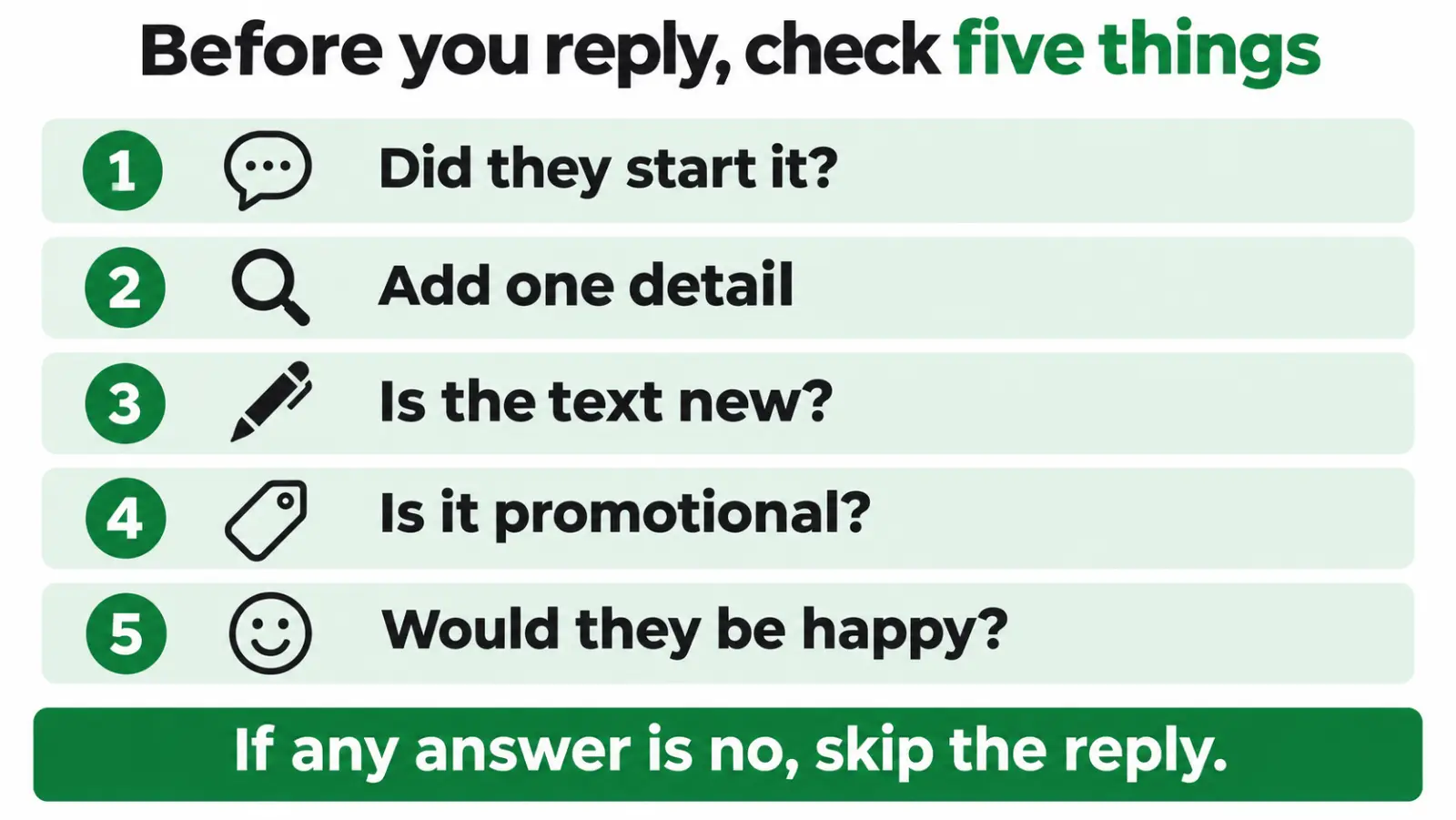
Run the same few questions before every reply. The developer guidelines include a quick check for apps with six questions: user initiated, transparent, easy opt-out, real value, official API only, and within limits. The five questions below are my adaptation for a person writing replies.
Did the person start this interaction, or did I? Mentions, replies to my posts and direct questions are reasons to answer. Random posts in a feed are a choice I should justify.
Does the reply add something the post did not already say? A detail, a number or an honest opinion qualifies. Praise alone does not.
Is the text new? If the same sentence has appeared in another reply this week, rewrite it.
Is it promotional? A reply that carries a link or a pitch to someone who did not ask is the pattern the guidelines prohibit.
Would the author be happy to get this reply? If the answer is not clearly yes, skip it.
If any answer is no, skip the reply. Skipping costs nothing. A reply you should not have sent costs reach, reputation and, in the worst case, the account.
Mistakesthatmakereplieslooklikespam
Replying to everyone who mentions a keyword. A keyword is not a conversation. A reply to a post that merely contains a word you follow is an unsolicited reply, even if you write it yourself.
Using the same praise under every post. "Great post, so true" is the first thing people skim past, and it is the kind of repeated text that reads as spam.
Dropping links into replies you did not earn. The guidelines treat apps that auto-reply to random posts with affiliate links as spam. Applying that to a hand-written reply is my judgment. Earn the link with a real answer first, and only add it when the link answers the question.
Replying to the same account over and over. A long run of replies to one account reads as pursuit, even when each reply is good. Two or three careful replies in a conversation are plenty.
Replying faster than you can read. If you reply before you have read the whole post, the reply will miss a detail that matters, and the author will notice. Slow down.
Letting a tool reply for you. A tool that posts replies without your review is automation of the reply itself. The guidelines require prior approval from X for an AI reply app, so this is not a gray area you can settle by yourself.
Edgecasesthatchangetheanswer
A user asks you a question directly. This is the cleanest case. The user started the conversation, so a reply is the expected response, and speed matters more than volume.
A support question from a mention or a DM. The guidelines allow customer support automation when the user initiates the conversation, there is a clear opt-out, the response is helpful rather than promotional, and the DM includes a privacy policy link. A human answering the same question has the same obligation to be helpful, and the same reason to keep it short.
Your own thread. Replying to a reply on your own post is still a conversation. Keep those replies short, and do not let a thread turn into a stream of one-line answers that could be sent by a script.
A big account. Replying to a large account more than once in a day can be noticed by that account's audience.
A reply from a teammate. If another person replies from your account, the same rules apply to them. A tool that sends replies on their behalf is the same risk as one that sends them on yours.
Whattodoifareplygetslimited
Stop first, then read the notice. If an account gets a limit or a notice about replies, stop sending replies from that account and read what X says. Do not restart the same pace the next day to see whether the limit lifts. The notice is the signal, and the levers you control are lower volume, more spacing and fewer repeated patterns.
I do not have a verified step-by-step recovery process to publish here, so do not rely on a guide that promises one. Read X's current notice and the rules that apply to it, and change the habit that caused the notice before you post again.
HowPostMinefitsareplyhabit
I build PostMine, which this article mentions.
PostMine's Feeds show real posts from X with a reply box under each one, and the Chrome extension adds reply suggestions inside the reply box on x.com. The suggestions are drafts for you to read and edit. The guideline checks above still apply: pick the post yourself, add the detail yourself, and post only what you would stand behind.
If you want the full checklist for writing a reply that reads as yours, the reply guide covers it in detail. For the rules on what a tool may do, the automation guide walks through each action in the developer guidelines.
X publishes no safe number of replies that I could find. Check X's automation rules against your own plan, and pace yourself by hand until you have a pattern you can defend.
Bursts and copied text are the two patterns most likely to read as automation. Slower, specific replies are the ones people actually read, and the ones least likely to look like a script.
Only in the narrow cases the developer guidelines allow. A user who mentions you can start an interaction, and an automated reply is limited to one per interaction. Keyword-based auto-replies are not allowed.
In my reading, not if you read, edit and post it yourself. The guidelines do not address that case directly. They treat an app that generates and posts replies as needing prior approval from X, so a tool that posts replies without your review falls under that rule.
We use cookies for product analytics to improve PostMine. With your consent we also record session replays, including the content you type and view, such as draft posts (passwords excluded), so we can see how the product is used and fix what breaks. Privacy Policy




 Yerkebulan RakhimovNov 8, 202613 min read