X's bookmarks help page, checked 2026-11-10, describes saving and removing bookmarks but no export, so the realistic options are manual copy, the official Get Bookmarks endpoint through your own developer app, or a tool that uses the official API.
The 2022 announcement describes the lookup as up to 800 of your most recent bookmarks, and the current Get Bookmarks reference I checked does not state that cap, so test your own count.
The official endpoint returns up to 100 bookmarks per request, and X's pricing update lists bookmark reads at $0.001 per resource from April 20, 2026.
PostMine's privacy text says it no longer reads your X bookmarks, and it does not describe a bookmark export.
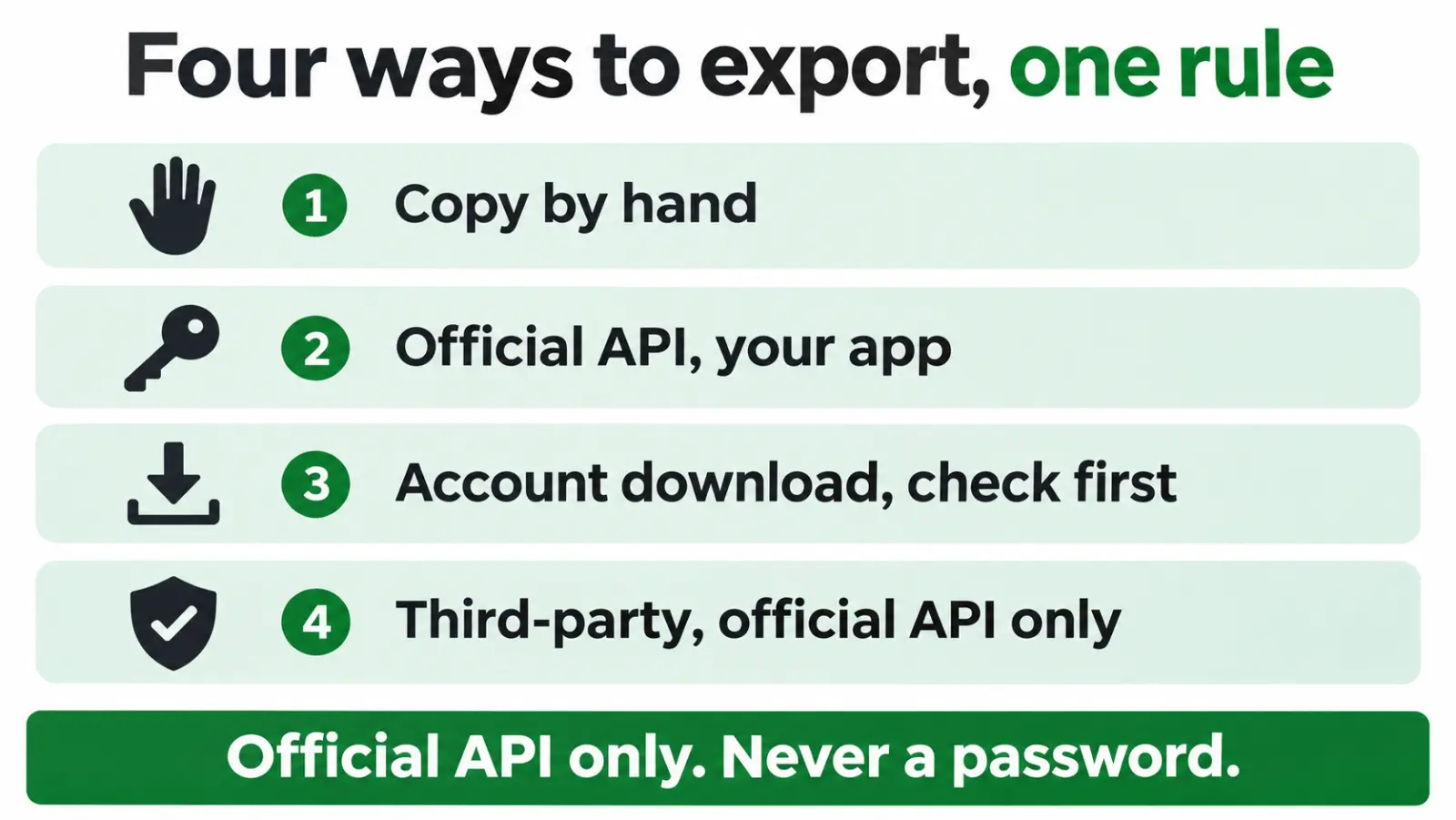
Founders ask how to get their X bookmarks out of X, and the honest answer has three parts. X's bookmarks help page, checked 2026-11-10, describes no export button or download. The official bookmarks endpoint exists, with limits and a cost. And any tool that does the export has to use the official API, because the developer guidelines prohibit scraping and browser automation.
This article lays out the options in order of effort, with what each one costs and limits, and it explains why an export is a snapshot rather than a backup. It also covers the rules that apply when you move your own saved posts into another tool, so the export does not create a new problem.
Whatthesourcesconfirmandwhattheydonot
A tool that acts on your bookmarks is an automated application, so X's automation rules apply to it, and you remain responsible for what it does with your account. X's authenticity rules name account manipulation as prohibited, which is the standard to hold any tool to before you connect it. The announcement on automated account labeling is the other place to check for rules on automated accounts.
Start with what the sources say, and mark what they do not say. X's developer documentation includes an API reference for Get Bookmarks. It describes a list of posts bookmarked by the authenticated user, with a page size between 1 and 100, pagination tokens and a bookmark read scope. The developer announcement of March 24, 2022 for the bookmarks endpoints says the lookup returns up to 800 of your most recent bookmarked Tweets, with rate limits per user.
X's bookmarks help page describes no export option. X's archive help page, checked 2026-11-10, lists archive contents such as posts, Direct Messages, followers and Lists, then "and more," and does not name bookmarks. Whether a standard account download includes bookmarks is therefore not stated by X, so check your own archive file and test the result before you rely on it.
Thefourrealisticoptions
Pick the option by volume and by how much you trust the result. The table compares the four routes. Each one has a different cost in time, money and risk.
Bookmarkexportroutes,compared
Route
Whatitcosts
Whatlimitsit
Bestfor
Manualcopy
Yourtime,aboutaminuteperpost
Yourpatience,noAPIlimits
Under30savedposts
Yourowndeveloperapp,officialAPI
Developeraccess,alittlecode,aper-readprice
Upto800recentbookmarks,pagesofupto100,ratelimits
Afewhundredposts,runonce
Youraccount'sdatadownload
Nothingextra,iftheoptionexists
Unconfirmedwhetherbookmarksareincluded
Checkfirst,thendecide
Athird-partytool
Asubscription,plustrustinitsconnection
OnlytheofficialAPIisallowed,checkitsmethod
OnlyifitusestheofficialAPI
The first route is the honest baseline. Copy the link and the first line of each post into a note, and you have a usable list for a small set. The second route is the one that scales, and it is the route I would use for more than a few dozen posts.
800
most recent bookmarks the 2022 announcement says the lookup returns
Four sources define what an export can and cannot contain. The Get Bookmarks reference lists the page size of 1 to 100, the pagination token and the bookmark read scope. X's 2022 announcement describes the lookup as up to 800 of your most recent bookmarks. The April 2026 pricing update lists bookmark reads at $0.001 per resource. The developer guidelines say that only the official API is allowed for tools that read your account.
Routetwoinpractice:theofficialendpoint
The official endpoint is a read, not a backup. To use it, you create a developer app, authorize it to read your bookmarks, and request the bookmark list page by page. The reference lists the bookmark read scope and the pagination token, so each request returns a page and a token for the next one. The 2022 announcement says the endpoint uses an OAuth 2.0 flow with PKCE, which you should expect in any tool that reads your bookmarks.
A worked cost with illustrative numbers shows the scale. Suppose you want to export 350 bookmarks. At 100 per page, that is four requests, and at $0.001 per resource the read costs $0.35. If the endpoint returns the 800 most recent, the full export costs $0.80, and it takes eight pages. The cost is small, but it is a cost, so run the export once rather than on a schedule.
Step 1
Create a developer app and authorize your own account
Step 2
Request one page of 100
Step 3
Request the next pages until the token ends
Step 4
Count the results against your own count
Limitsyoumustplanaround
Each limit changes what the export means. The first limit is the cap. The 2022 announcement describes up to 800 of your most recent bookmarks, so older saves may not appear in the result. The second is the rate limit. The same announcement lists per-user limits of 180 requests per 15 minutes for the bookmark lookup, which is generous for a single export but matters if you run several at once. The third is the price. From April 20, 2026, the pricing update lists reads of your own bookmarks at $0.001 per resource.
These numbers come from the sources I could open, and the 2022 figures are dated. Check the current reference and the current pricing page before you build a script, because limits and prices change. Keep the date of your check in your notes.
Check the download, but do not assume the contents. If your account offers a data download, look for bookmarks in the file list. If they are there, open the file and count the entries against your own count in X. If they are not there, the download is not an export route for bookmarks, and you should use one of the other routes. X's archive help page does not name bookmarks, so the file test is the only reliable answer.
Only a tool that uses the official API is allowed to export for you. The developer guidelines list "Official API Only" as a core check for any app, and they state that scraping or browser automation results in permanent suspension. A bookmark tool that logs in through a browser, or that asks for your password, is outside that rule, whatever it promises. Ask the tool how it connects, and do not connect a tool that will not answer.
The developer guidelines list bookmarking as fine for personal or automated use. The rules become strict when stored posts are redistributed at scale or used to train models. The developer guidelines prohibit using X data to train machine learning models, with an exception for Grok, and they cap redistribution of Post IDs at 1.5 million per 30 days.
Checktheexportbeforeyoutrustit
An export is only useful if you can prove what it contains. Before you sort or delete anything based on an export, run four checks. Each one takes a few minutes, and together they tell you whether the file is complete enough to use.
Count the results. Compare the number of rows with your own count in X, taken on the same day. A capped export will stop at a round number, and that is the first sign to look for.
Check the dates. Find the oldest and the newest row. If the oldest row is recent, the export did not reach back to the saves you care about.
Look for duplicates. Each post should appear once. Duplicates can mean a page was requested twice, and they inflate the count.
Open five random rows. Confirm that each one links to the post you expected, from the account you expected.
If a check fails, do not hide the failure by editing the file. Write the failure in your notes, with the date and the count, and decide whether the gap matters for the work you are doing. A capped export is still useful for the most recent posts, as long as you say so in the notes and do not describe the list as complete.
A worked check, with illustrative numbers, shows the logic. Suppose your own count says you have 620 bookmarks, and the export returns 500 rows, with the oldest row from eleven months ago. The export is incomplete, and the oldest row suggests a cap or a page that failed. Before you sort, rerun the export for the missing range, or record that the list covers only the recent saves. Either choice is honest. Treating 500 rows as all 620 is not.
Keep the check in the same place as the export file. When you come back to the list in a month, the check tells you what the file means without reopening the question.
WhatX'stermsandhelppageadd
Two X pages set the rules for an export that a tool might make on your behalf. X's Help Center page on bookmarks, checked 2026-11-10, says bookmarks are private and viewable only to you, and it describes saving and removing bookmarks on iOS, Android and desktop. It does not describe an export or a download of your bookmark list, so do not assume one exists in the app. X's Terms of Service, effective October 9, 2026 and checked 2026-11-10, say you may not access the Services in any way other than through the published interfaces, and that you cannot scrape the Services without X's express written permission. A third-party tool that reads bookmarks by scraping a page, rather than through the official API, is outside those terms whatever it promises.
Mistakesthatmakeanexportmisleading
Mistake one: treating the export as a backup. An export is a snapshot. It shows what the API returned on the day you ran it, not everything you ever saved.
Mistake two: assuming the export is complete. If the count stops at a round number, check whether the cap applied. A capped export looks finished, and it is not.
Mistake three: running the export on a schedule. Each read costs money, and a repeated export of the same bookmarks wastes that cost. Run it when you need it.
Mistake four: sharing your access token. The token authorizes reads from your account. Store it as a secret, and never paste it into a note, a chat or a shared document.
Mistake five: exporting from the wrong account. Check the account name before you authorize the app. A bookmark export from the wrong account is a list of someone else's saves.
Edgecasesyouwillhit
Posts that were deleted. A saved post can be deleted on X after you saved it. The export may still hold a record, or it may return nothing for that ID. Mark those rows in your log, and do not repost them as if they were live.
Long threads. A thread can be saved as several posts. Group the parts by their conversation, so you do not treat each part as a separate idea.
Media. A saved post with an image or a video exports as a reference, not as the media itself. Check the media separately if you need it.
Privacy. A bookmark list shows what you care about. Keep the export on your own device, and delete the copies you no longer need.
WhatPostMinecanandcannotdohere
I build PostMine, which this article mentions.
PostMine's privacy text says it no longer reads your X bookmarks. It also says bookmarks imported before that change are not displayed on any screen, and Home recommendations do not use them, although composer attachment context saved earlier can still reference them. It does not describe a bookmark export, so use one of the routes above. Bring the ideas you choose into PostMine as drafts, and keep the export and the sorting in your own tool. The organize guide explains the sort that comes after the export.
For the rules that apply to any tool that touches your account, the evaluation checklist lists the connection and exit questions to ask first. The workflow guide covers the step after the export, which is moving the list into a workspace you can use.
No. X's bookmarks help page, checked 2026-11-10, describes no export or download. X's archive help page lists archive contents without naming bookmarks, so check the archive file yourself and do not assume bookmarks are included until you see them in it.
X's 2022 developer announcement says the lookup returns up to 800 of your most recent bookmarks. The current Get Bookmarks reference, checked 2026-11-10, sets max_results from 1 to 100 per request and does not state an 800 cap, so test your own count before you trust an export.
From April 20, 2026, X lists reads of your own bookmarks at $0.001 per resource, so 800 bookmarks cost about $0.80 at that price.
Only through the official API. X's developer guidelines prohibit scraping and browser automation, and they say non-API automation can lead to permanent suspension.
We use cookies for product analytics to improve PostMine. With your consent we also record session replays, including the content you type and view, such as draft posts (passwords excluded), so we can see how the product is used and fix what breaks. Privacy Policy




 Yerkebulan RakhimovNov 9, 202610 min read