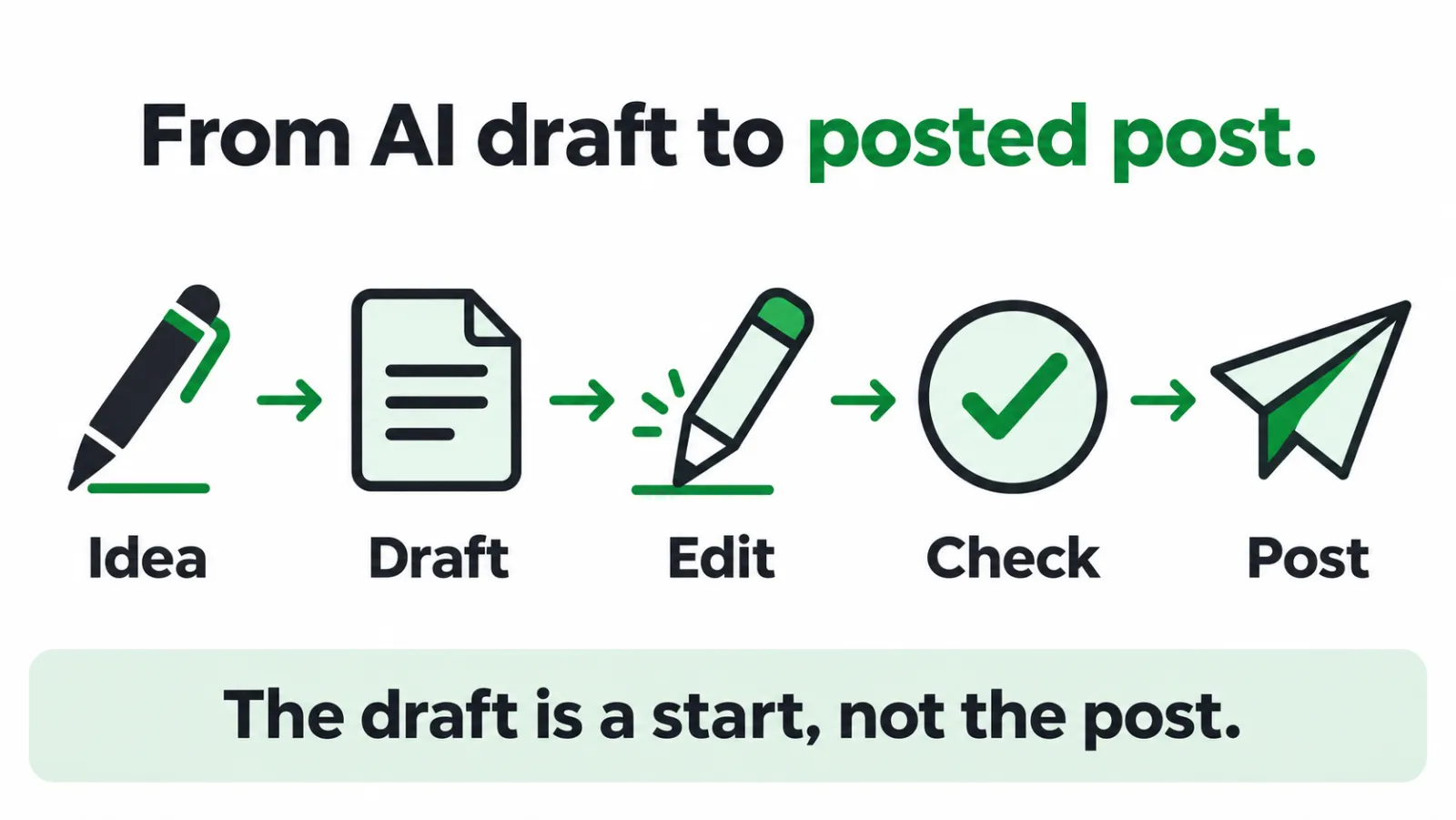
A generator gives you a draft. The post starts after you edit it.
Give the tool your point and one real detail. Vague input makes vague drafts.
Check the character limit for your own account, including links and per-part counts.
Drafting with AI is a writing aid. Automatic posting and automated replies have their own rules on X.
The first draft from an AI tweet generator is rarely the one to post. It is clean, a little formal, and says something true that could sit under almost any account. A reader who has seen a few of these drafts recognises the shape before the first line ends. That recognition is the real cost. A post does not have to be wrong to lose the reader. It only has to be generic.
A generator is good at giving you a starting point, and bad at giving you a post. That sentence is the whole method. The rest of this article explains how to set up the input so the starting point is useful, how to edit the output so it sounds like you, what the length limits are for your account, and which rules apply once a tool moves from drafting into posting.
I use generators, and I think they are worth using. The gain is not that they write for me. The gain is that a rough draft is easier to fix than a blank box is to fill. Editing a weak sentence takes less effort than writing a good one from nothing, and a generator will give you five versions of the same point in a minute. In my view, that speed helps only if you read each version critically and keep the one detail that belongs to you.
Givethetoolyourpoint,notatopic
A common mistake is to type a topic. "Write a tweet about productivity" gets you a tweet about productivity, which is a tweet about nothing in particular. The tool has no way to know what you learned, so it fills the gap with a generic sentence it can find. That sentence can be true and still be forgettable.
Give the generator your point in one plain sentence, plus one real detail. The point is the thing you want a reader to take away. The detail is the fact only you can state: a number, a tool name, a decision you made. "Fewer posts, more replies" is a point. As an illustration, not a real post: "I cut my weekly posts from seven to three and kept the replies" is a point with a detail. The detail gives the tool something to work with, and it gives the reader a reason to believe you.
The difference shows up in the draft. A topic-only prompt returns advice that could sit under any account. A point-and-detail prompt returns a draft that starts from your decision. That draft is easier to edit, because the facts are already in it and you only have to fix the voice and the length.
Whatageneratorcanandcannotdo
Generators are strong at some tasks and weak at others. Knowing the split tells you where your own time goes.
Whodoeswhichpart
Task
Generator
You
Rewriteonepointinseveralshapes
Good.Itproducesvariantsfast
Pickthevariantthatsoundslikeyou
Shortenalongdraft
Fair.Itcutstheobviousfiller
Decidewhichfactmustsurvivethecut
Knowwhatyoulearnedthisweek
Cannot.Ithasneverseenyourweek
Supplythefactandthedetail
Keepyourvoice
Partial.Itcopiesthetoneyoudescribe
Rewritetheopeningandtheclosingline
Checkthefactsandnumbers
Unreliable.Itwritesconfidentnumbersitdidnotcheck
Sourceeverynumberbeforeitstays
Decidetopost
Never
Alwaysyours
The last row is the one that matters most. A generator can draft, rephrase, and trim. It cannot decide that a post is worth sending under your name, and it cannot check a number against a source you opened. Those two decisions are where your attention should go.
Puttheconstraintsintheprompt
A useful prompt is short and specific. It tells the tool what to keep, what to avoid, and how long the result may be. I use the same five parts every time, so drafts from different sessions stay comparable and I can see which part changed the result.
Whatausefulpromptcontains
Part
Whattowrite
Whyitmatters
Yourpoint
Onesentence,inyourwords
Stopsthedraftfromdriftingtoagenerictopic
Onerealdetail
Anumber,atoolnameorachoiceyoumade
Givesthepostafactnooneelsehas
Yourvoice
Twoorthreewords,suchasplainanddirect
Shapesthetonebeforeyoueditit
Thelength
Youraccount'slimit,notthetool'sdefault
Avoidsadraftyouhavetocutinhalflater
Whattoavoid
Praise,hashtags,filleropeners
RemovescommonAItellsbeforetheyappear
The last row is easy to skip. If you do not tell the tool to skip the praise, you will get a line like "Great question" or "So true" in the first sentence. Those lines are the fastest way to sound like a bot, so forbid them in the prompt and check for them again after the draft comes back. A prompt cannot guarantee the result, but it changes the odds, and the check after the draft is what catches the rest.
The length row needs its own note. Set the length to your account's limit before you ask for the draft. The numbers for that limit are in the section on account limits below.
Do not ask for three variations and pick the one that sounds best. Variations can make the choice feel like progress while the point stays the same. Ask for one draft, edit it, and if it is weak, rewrite the input, not the output. A better input fixes the draft at its source. Picking among weak drafts only hides the problem.
Aworkedexamplefromdrafttopost
Here is an illustration, made up for this article. It is not a real post and it reports no real result.
The problems are easy to list. The opening line is a general claim that could sit under any account. The three tips have no detail behind them. The closing question asks for nothing in particular, so readers have no reason to answer it. And nothing in the draft could only have come from the writer.
The fix starts with a better input. The point was "replies did more for my account than original posts this month." The detail was "I cut original posts from seven a week to three and kept the replies." The voice was plain and direct. The things to avoid were praise, lists and closing questions. With that input, the second draft opens on the decision:
The edit was short. The opening line now states a decision. The praise and the list are gone. The closing line is a point, not a question, and it ends on something a reader can act on. Even so, I still read it aloud before I post, and I would cut "Your own posts can wait" if it sounded like advice I do not hold.
Works
Opens with the detail the draft buried
States one point you actually hold
Ends on a fact or an opinion, not a summary
Avoid
Great point, so true
Here is why this matters
Let me know what you think below
Thetellsthatgiveadraftaway
Readers notice patterns faster than they notice mistakes. A draft can be accurate and still feel automated because of its structure. Here are common tells, and the fix for each.
CommonAItellsandthefix
Tell
Whatitsoundslike
Thefix
Praiseopener
Greatpoint,sotrue
Openwiththedetailfromyourinput
Restatingcloser
Thekeytakeawayisthatconsistencywins
Deleteit.Endonthefactoryouropinion
Three-tiplist
Tipone,tiptwo,tipthree
Keeptheonetipyouhavetested
Balancedhedge
Itdependsonyourgoalsandyouraudience
Stateyourviewfirst,thentheonelimitithas
Questionwithnostake
Whatdoyouthink?
Askonlywhenyouwantaspecificanswer
Hashtagstack
#growth#startups#tips
Removeitunlessthetagaddsinformation
Uniformrhythm
Everysentencehasthesamelength
Breakonelongsentenceandshortenoneshortone
The balanced hedge is one tell to watch for. A sentence like "it depends on your goals" sounds careful, but it says nothing a reader can use. If the honest answer really depends on something, name the one thing it depends on and give your view on that. A reader will forgive a clear opinion that turns out to be wrong much faster than a fog of qualifications.
Heavy punctuation is another tell some readers pick up, especially long strings of dashes used for emphasis. Replace the dash with a full stop, and let two short sentences carry the emphasis instead.
Editinfourpasses
I edit a generated draft in the same four passes every time. The order matters, because the first pass changes what the later passes have to fix.
Open with the detail. Rewrite the first line so it states the fact or decision.
Cut the filler. Delete praise, restating closers and any sentence with no fact or opinion.
Check the voice. Change words you would never say aloud, one by one.
Read it aloud. If it sounds like a press release, go back to the first line.
The first line does much of the fix.
In the first pass, look at the opening sentence only. If the first sentence could be pasted under a stranger's post, it is not doing its job. Move the detail from the middle of the draft to the front. The detail may already be in the draft, buried in the third sentence, and the generator put the generic claim first because generic claims are easy to write.
In the second pass, cut. Generators like to add a closing line that restates the point, and they can add a sentence that explains why the point matters. Both can be removed. Keep only the sentences that add a fact, a decision or a clear opinion. If a sentence could be deleted without a reader noticing, delete it.
In the third pass, check the voice. Change each word you would never say to a person across a table. Generators prefer certain words, such as "crucial", "key" and "powerful". Those words are not wrong, but they are the words of a brochure. Replace them with the plain word you would use. Do this line by line. Your voice is mostly in the small word choices, not in the big structure.
In the fourth pass, read the whole thing aloud. Listen for the places where your voice stops and the draft begins. Those places can be the last sentence or a list that appeared without a reason. Fix them, then read it again.
Works
Opens with the detail the draft buried
States one point you actually hold
Ends on a fact or an opinion, not a summary
Avoid
Part four restates part two
A closing line that says what the post was about
Hashtags and emojis added as decoration
After the four passes, compare the draft with your own last five posts. Read them one after another. If the draft could have come from a different person, rewrite it until the difference is only the topic. This comparison catches a common failure: a draft that is clean and correct and still sounds like nobody in particular.
Checkthelimitforyouraccount
The limit depends on your account. The X Premium page describes up to 25,000 characters for subscribers; 280 is the standard limit it implies. Check your own account type before you decide how long a draft can be.
X counts characters with a weighting rule, not one character per letter. The X developer documentation on counting characters says that most Latin letters and punctuation count as 1, that each emoji counts as 2, and that each CJK character (Chinese, Japanese, Korean) counts as 2. Any valid link counts as 23 characters, however long the address is. Attached media from official clients counts as 0. Do not count by eye. A draft that looks short can be long once the emojis and the link are in.
CharacterseachitemusesunderX'scountingrules
Plain letter1
Emoji2
CJK character2
Link, any length23
The chart above is the weighting from the developer documentation, not a measure of your draft. It explains why a generator draft with two emojis and a link can be far shorter than its text suggests.
Whattodowhenadraftistoolong
Situation
Whattocut
Why
Overbyafewcharacters
Thesentencethataddstheleast
Keepsthefactthereadercamefor
Overbyhalf
Awholepoint,notaclause
Apostwithonepointsurvivesthecutbetter
Containsalink
Wordsaroundthelink,neverthelink
Alinkcountsas23whateveritslength
Containsseveralemojis
Emojisfirst,sinceeachcosts2
Removesdecorationwithouttouchingthepoint
WritteninaCJKlanguage
Fillerphrases
Eachcharactercounts2,sopaddingcoststwice
Two more edge cases are worth knowing. Auto-populated @mentions at the start of a reply do not count, but mentions you type yourself count normally. And the limit applies to each post, so a thread needs its count checked part by part. The thread-specific rules are covered in the article on X thread generators, and the character rules on their own are in the character limit guide.
Edgecaseswheretheruleschangethedraft
Some drafts need more than the standard edit. These are the cases I check for, and the change each one needs.
Drafts in a CJK language. A Japanese or Korean draft fits far fewer characters than the same text in English, because each character counts 2. Set the length in the prompt in your own language, and count the draft in the composer before you trust your eye.
Drafts with links to sources. A link to a page you opened costs 23 characters. Keep the link, and cut words around it. If the link needs a sentence to explain it, the sentence stays and the filler goes.
Drafts that reuse a template. A generator will happily use the same structure for every post. Rewrite the first line of each draft so the structure changes from post to post. Repeating the same post text on one account is also a rule problem, not only a style problem, so change the wording and the example as well.
Long drafts on Premium. The 25,000 limit lets you write longer, but a long generator draft is still a generator draft. Edit it down to the point before you consider whether the length is worth keeping.
Drafts for a thread. A generator will often return a long text that you then split into parts. Split by claim, not by paragraph, and check each part alone. The method for that is in the article on planning a thread.
Wheretheevidencestops
I have not found a source that shows posts drafted with an AI tool reach fewer people than posts written by hand. So I make no claim either way. Anyone who tells you a generator lowers your reach, or raises it, should be able to show the test.
The test is simple and yours. Pick one topic. Write one post by hand and one from a generator, edit both to the same standard, and post them on the same weekday in the same window. Keep the format identical. Compare the results after the same number of hours. One pair of posts tells you little, so repeat it over several weeks before you draw a conclusion.
Knowwhereautomationstarts
Drafting with a tool is a writing aid. You read the draft, you change it, and you publish it. That is a different thing from a script that posts or replies on your behalf. X's automation rules are specific about the second case, and the Help Center page is the place to check the current wording before you script anything.
According to that page, the deployment or operation of an AI reply bot requires prior written and explicit approval from X. The page says that automated replies may be sent only to a user who has "requested or have clearly indicated an intent on X to be contacted by you (i.e. opted in), for example by replying to a post from your account, or by sending you a Direct Message". You may send one automated reply or mention per user interaction. The same page says that advertisers, publishers and brands running auto-response campaigns must request approval from X and may face additional rules.
The line I draw for myself is simple. A human reads every word before it goes out. If a tool publishes without that reading, it is automation, and I check the rules first. I would not build a reply bot on a generator, and I would not tell a reader to build one without reading the current rules.
Commonmistakes,andhowtoavoidthem
These are common mistakes in generator-assisted posts. Each one is a failure of the edit, not of the tool.
Posting the first draft because it is fast. The first draft is the one the generator is most sure of, so edit it before you decide whether it is worth posting.
Keeping the closing line. The closing line is where the generator restates the point. Readers skip it, and it lowers the value of the post at the moment it should land.
Trusting a number the tool wrote. A generator writes numbers that sound right. Keep a number only if you can point to the source you opened, or to your own measurement.
Counting the link as its full length. The link costs 23 characters. Counting it as the full address makes you cut words you did not need to cut.
Using one template for every post. A structure that works once becomes a tell when it repeats. Change the first line and the shape of the post each time.
Forgetting the voice. A draft can be correct and still sound like a brochure. The voice is in the small word choices, so check them one by one.
Keepyourvoiceacrossmanydrafts
One draft can be edited into your voice. Drafts from a generator can drift toward its voice over time, especially if you use the same prompt each week. Two habits help. The first is to keep a short list of posts you wrote yourself and are proud of, and to read a few before you edit a new draft. The second is to note the words you always change. If you always cut "crucial", add it to the list of words to remove from future prompts.
PostMine's Style Guide sits in Context, built from recent X posts or written by you, and the composer works from that context. That helps with consistency across drafts, but it does not replace your reading. The Style Guide sets the frame. Your edit decides the words.
Wheredraftsmeettheplatform'srules
A draft tool can produce text quickly, but the platform's rules apply to what you publish, not to how it was written. X's platform manipulation rules apply to the account and its posts, whatever tool produced the words. Its automation rules also say that automated replies sent to posts matched by keyword search alone are not permitted. A generator that fills a reply box for you is a draft tool only if you read and send each post yourself.
Length is another place where drafts go wrong. The X Premium help page says that subscribers can post up to 25,000 characters in a longer post, while other accounts stay within the standard limit. Check the count in the composer, not in the generator, because the generator does not know which account will post the text.
A draft is also not a measurement. The view counts page says that a view counts when a logged-in user sees the post, wherever it appears, so a draft you test on your own account can add to your own numbers. Do not judge a generator by your own views. Judge the drafts by the replies that arrive from the people you wanted to reach. Who can reply is your choice: the conversations guide says you can change who replies to your post after you publish it.
Once a draft is published, compare it with your other posts in the post activity dashboard. Note the tool and the prompt for every draft in your own log, so that a later comparison of generator output and your own writing is based on the same period and the same kind of post.
Check the character count before you publish a draft. The developer documentation on counting characters explains how links, emoji and other characters are counted, so a draft that looks short in the generator can count differently in the composer. Generators can also add hashtags. The hashtag guide says a hashtag is used to index keywords or topics, so keep a hashtag only when the topic is indexed under it. Keep the draft in your own notes until you publish it.
WherePostMinefits
PostMine's composer works this way. You write a post or a thread, and Improve writing with AI rewrites a part or a selection as a diff. You accept or reject each change. Publish opens a review, and you confirm with Slide to publish. Nothing publishes without that explicit action or a schedule you set.
The product does not decide what you think. It gives you a draft you can change line by line, which is the part that helps most. The diff view matters because you see exactly what the tool changed, and you can refuse the change that flattened your voice without rewriting the whole post.
Drafting with a tool is a writing aid, and you publish it yourself. Automated posting and automated replies fall under X's automation rules, and AI reply bots need X's prior written approval.
Check the limit for your own account. The standard limit is 280 characters. The Premium page describes 25,000 characters for subscribers, and a link counts as 23 characters.
In my view, often yes, when it opens with praise or ends with a summary. Rewrite the first line with a real detail and cut the closing line, and most of the tell goes away.
No. Read it aloud, change the opening line, remove filler and check every number before you decide to post.
We use cookies for product analytics to improve PostMine. With your consent we also record session replays, including the content you type and view, such as draft posts (passwords excluded), so we can see how the product is used and fix what breaks. Privacy Policy




 Yerkebulan RakhimovNov 9, 202614 min read