The profile is the first post. A stranger may decide quickly whether to read more.
Post every day from one topic once the setup is done. A steady pattern is easier to judge than one good post.
Use the later weeks for replies with a point, not for follow hunting.
Judge the month with a log. One quiet day says very little.
A new X account can look quiet for its first few weeks, and that is also the time to build the things that will matter later. The first month is mostly setup, steady posting, a few real conversations, and a log that shows what is working.
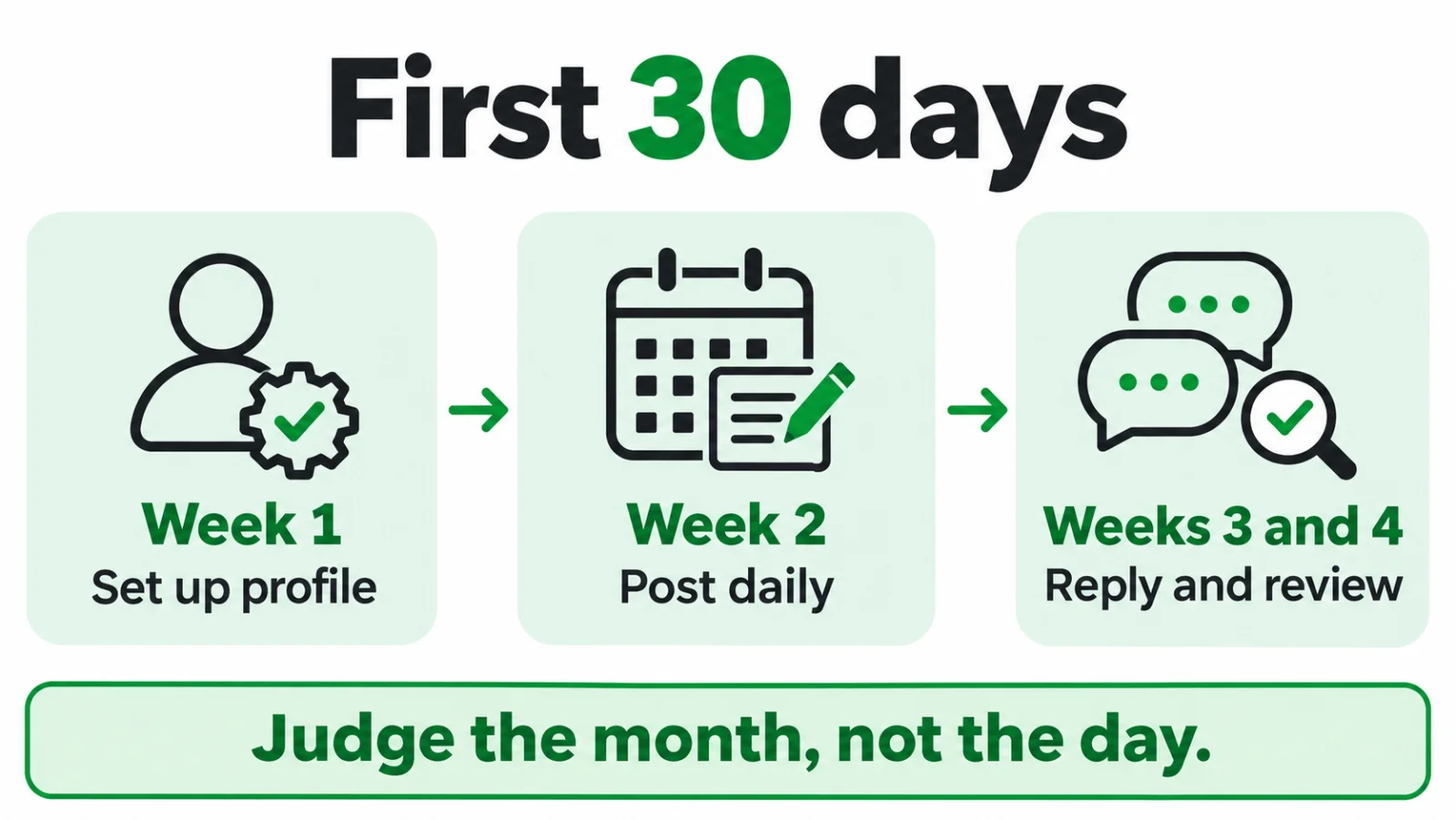
Here is the plan I would follow. It fits in one month, and each part is simple enough to keep when you are busy or tired of posting into silence. The plan has four weeks. Week one is setup. Week two is daily posting. Weeks three and four add replies and a review. At the end you change one thing and run the next month with it.
Whatthefirstmonthisfor
A new account has three jobs in its first month. It has to be understandable, so a stranger can tell what it posts. It has to be consistent, so the same stranger sees a pattern rather than one post. And it has to be measurable, so you can tell what worked by the end of the month.
None of those jobs depends on reach. A new account can do all three with a small audience. That is why the plan focuses on habits you control. You cannot choose whether a post goes viral, but you can choose the topic, the pace and the log.
Weekone:setuptheprofilebeforethefirstrealpost
The first month starts before the first post. A new account with an empty bio gives a stranger little to judge. Write one line that says who the account is for and what it posts. Keep the name and photo plain, so people can recognise the account at a glance.
The profile has three fields that matter, and each has a limit you should know before you write:
Then write one message that shows the topic. It can be a short note about what you are building, or a finding from your own work. The goal is that anyone who lands on the profile can tell quickly what they will get from it.
The profile answers one question: what do I get from this account? If the answer is unclear, every later post has to fix that problem before it can do its job.
A profile check you can run in five minutes
Open your profile in a private window, or ask a friend to read it cold. Then answer three questions:
Can you say what the account posts after reading the bio once?
Does the pinned post, or the first visible post, match the bio?
Would you follow this account if you saw it in a reply under a post you like?
If any answer is no, fix that before week two. A profile fix takes minutes and affects every later read. For a longer checklist, see X profile audit checklist.
Weektwo:posteverydayononetopic
Use the first week for setup and a few small tests. Once the profile says what the account is about, post every day. Daily posting is easy to keep and gives you enough posts to see what readers respond to. A week of silence tells you little.
If the first week feels empty, do not change the topic yet. A stranger needs a few posts on one subject before they can tell what the account is about, and you need the same evidence to judge it.
The posts do not need to be perfect. They need to be specific, on your topic and in your voice. Write each post for one reader who has one problem. If you cannot name the reader, the post is too general.
A daily post you publish beats a perfect post you never finish.
What to post in week two
Rotate between three kinds of post, so the account has variety without drifting off topic:
A finding. Something you measured or noticed in your own work this week.
A mistake. Something you got wrong and what you changed.
A question about one detail. A specific question you would like an answer to, with a point of your own first.
Keep each post short. One point, one example and then stop. A post that needs three paragraphs of setup is usually two posts stuck together.
A worked example, made up
Imagine a founder who builds a tool for tracking freelance invoices. On day three, a finding post might say: "Freelancers I talked to paid faster when the invoice showed the due date in bold. Small test, eight invoices, but worth a look." On day five, a mistake post might say: "I sent a reminder email on day ten. Replies came after day three. I moved the reminder and the early replies doubled." The numbers in those examples are made up. The shape is the point: a specific detail, a result and a reason to reply.
If you want to write in batches and publish at a steady time, use the Queue in PostMine. Schedule the posts you already wrote, so the rhythm holds on busy days.
Scheduling so the pace holds
X's help page on scheduled posts covers Promoted-only posts in X Ads at ads.x.com, and it lists the current steps, according to X's help page on scheduled posts. The x.com web composer was observed to have a Schedule post button on November 9, 2026. Whichever tool you use, write two or three posts in one sitting, then publish them on the days you chose. That keeps the daily rhythm from depending on whether you are free at the right moment.
Weeksthreeandfour:replywithapoint
By the third week, your posts may have a few readers. Use the later weeks for replies. Find posts in your niche, read them, and reply only when you have one detail and one point to add.
A reply with a specific detail gets read. A reply that says nice post does not. Keep replies short. Two sentences is often enough, and log every one. The log is how you learn which conversations were worth the time.
Read the post twice. Then pick one detail the author wrote that most readers would skip.
Write your point. One sentence that says what you think about that detail. If you cannot write it, skip the post.
Cut the praise. Delete any sentence that carries no information.
Check the length. Free accounts have a 280-character limit per post, and Premium accounts allow up to 25,000 characters, according to X's Premium help page. A reply that fits in 280 characters is the safe default for everyone.
Hashtags can help you find the conversations to reply in. X's help page on hashtags says a hashtag is used "to index keywords or topics on X," and clicking a hashtagged word in a post shows the other posts that include it (X Help Center: How to use hashtags). Advanced search filters posts by words, people, places and dates when you are logged in (X Help Center: Advanced search). Use both to find the posts your reader already reads, then reply with one point.
To keep the accounts you read in one place, X's help page on Lists says you can create Lists of other accounts "by group, topic or interest" (X Help Center: Lists). A List organizes your reading, and it does not follow anyone for you. X's help page also says Lists let you customize, organize and prioritize the posts you see in your timeline. Read the List in one sitting, and reply to one post from it each day.
Whattocheckeachweek
The table below is the review you run at the end of each week. It takes about fifteen minutes if the log is up to date.
Some weeks will show one post with a reply and six with nothing. That is still information. Look at which post got the reply and what it had in common with the others. The point of the review is to find one pattern, not to score the week.
Whatotherfirstmonthslooklike
Other people's first months are worth reading, with the caveat that each one is a single person's experience. A founder who builds an AI company wrote in an r/DigitalMarketing thread that after about six months of daily posting, engagement and reposts, across a personal and a company account, they had "hardly gained over 300 followers." The complaint was that accounts posting news and illustrated faces were growing faster. That is a useful warning for month one: a steady routine can look like no progress for a long time, so compare yourself with your own log, not with the accounts in your feed.
A different r/GrowthHacking thread reports the opposite story. Its poster, who promotes xengage.studio in the thread, wrote that "I stopped treating Twitter like a broadcasting platform and started treating it like a conversation." The impression and profile-visit numbers in the thread are not checked here, so they are not repeated. What is worth taking from it is the change in behaviour: replies that start conversations, instead of posts that only announce.
Judgethemonthwithalog,notaday
A new account's numbers jump around. One post with few views says very little, and one good day says even less. Views on X count logged-in views on any surface, according to X's help page on view counts, so a single post can get views from your followers, from search or from a feed you do not control. Judge the trend across the whole month, not the single post.
Keep one simple log. Write the date, what you posted, which posts got replies, and what you learned. At the end of the month, read the log and change one thing for the next month. The log turns a month of noise into a short list of decisions.
The timeline below shows how the month is paced. Each step is a decision you make, not a number to hit.
Week 1
Set up the profile
Week 2
Post every day on one topic
Week 3
Start replying with a point
Week 4
Review the log and change one thing
Week one is about setup, not replies, so an empty log in that week tells you nothing. What matters is whether the replies you start in week three begin to produce answers by week four.
Works
Judge the trend across the month
Keep one log for posts and replies
Change one thing at a time
Avoid
Judge the account after a single post
Change topic every few days
Count followers as the only signal
Aworkedmonth,madeup
Here is a made-up month to show how the plan runs in practice. The founder, a solo developer who builds an invoice reminder tool for freelancers, sets a rule before starting: one topic, one post a day, and replies only with a point.
In week one, the bio says "I post what I learn building an invoice reminder for freelancers." The banner repeats it in one line. The first pinned post is a short note on why late invoices hurt small studios more than large ones. Setup takes an evening. Nothing else changes that week.
In week two, the founder posts daily. Day three is a finding: eight freelancers who received a reminder on the due date paid faster than those who received one a week later. The sample is small, and the post says so. Day five is a mistake: the first reminder email had a link to a login page instead of the invoice, and the fix is in the post. Two posts get a reply. One is from a freelancer who asks which reminder timing worked best, and the founder answers with the number and the caveat.
In weeks three and four, the founder replies to posts from freelancers and small agencies, using the four steps above. About a third of the replies are skipped because no point came to mind. The log records the account, the point, and whether anyone answered. By the end of week four, the log shows the replies that started conversations were the ones about a specific billing step, not about invoicing in general.
The month ends with one change for the next month: keep the topic, and write one post a week about the billing step that started conversations. The numbers in this example are invented. The point is the shape: a fixed topic, a log that names the habit, and one change at the end.
Commonmistakesinthefirstmonth
The mistakes below are the ones this plan is built to avoid.
Changing the topic in week two. The second week is when the account first starts to make sense. Changing topic then resets the evidence.
Posting every day without a point. Daily posting only helps if each post says something specific. Ten empty posts teach you nothing.
Deleting posts that got no reaction. A quiet post still shows what you tested. Delete it only if it contains something you would not want public.
Counting followers as the only signal. Followers are the slowest signal and the easiest to misread. Replies and the conversations they start tell you more early on.
Changing five things at once. If the topic, the posting time and the reply style all change in one week, you cannot tell which change mattered.
Changeonethingafterthemonth
At the end of the month, pick one thing to change. Maybe the topic is too wide. Maybe the posts are too long. Maybe replies get better answers in one part of your niche than in another. Change one thing, then run the next month with that change in place.
Changing five things at once makes the next month impossible to read. Keep the test small, so the result tells you which change mattered. A small change you can measure beats a big change you cannot explain.
For the longer view on which numbers to read and how to read them, see how to read X analytics. For the first two months of a topic-first account, how to grow on X from zero covers the habits that come after this plan.
HowtoapplythisinPostMine
PostMine supports the parts of this plan that are about habits and records. Nothing publishes without your action or a schedule you set.
Queue schedules the posts you already wrote, and publishes each one at the time you schedule it. Publish opens a review, and you confirm with Slide to publish.
Feeds builds a feed from up to five keywords or from people lists. In the app you can also build one from your followers, the accounts you follow, repliers or an X list. You read each post and reply inline with the Reply button.
My Replies lists the replies you sent and how each one performs.
Analytics shows your account's trends, with the account overview CSV import for past days and a daily export.
Use the first week to set up the profile and test a few posts. From the second week, post every day on one topic. Daily posting gives you enough data to judge what works.
Send replies only when you have a point to add. A few good replies a day beat many generic ones. I cannot point to a fixed number from X, so judge your replies by whether they start conversations.
PostMine schedules posts you wrote and publishes only on your explicit action or schedule. X's automation rules also apply to any automated posting you set up elsewhere, so read them before you connect any tool.
That is a result too. Check the log for the habit you kept least, change one thing, and run the next month. A month with a clear log is more useful than a lucky week with no record.
We use cookies for product analytics to improve PostMine. With your consent we also record session replays, including the content you type and view, such as draft posts (passwords excluded), so we can see how the product is used and fix what breaks. Privacy Policy




 Yerkebulan RakhimovNov 9, 202613 min read