Choose the horizon from how often you can review the queue, not from how far ahead the tool allows.
Keep timely and link-heavy posts within one or two days, and let evergreen posts sit longer.
Plan a horizon you can reread in one sitting, and review it on the same day each week.
Test the horizon for four weeks before you change it, so a single change does not decide the whole schedule.
People ask how far ahead they can schedule an X post, and the honest first answer is that I could not find a published maximum. The X pages I could open describe scheduling through the Composer on ads.x.com, and they do not state a window in weeks or months. Third-party guides give other numbers, but they are not X rules. Buffer's guide says up to 18 months for most tweet types, except polls, and Sprout's bulk import help recommends no more than six months in the future. So the useful question is not what the tool allows. It is how far ahead you can keep the queue true.
That question has a practical answer. The right horizon is the one you can review in one sitting, on the same day each week, without skipping the links. The author's rule of thumb is one to two weeks. This guide explains why, how to test a horizon, and the posts that should never sit in a queue for long.
Startwiththereview,notthetool
A horizon longer than your review is the risk. X's automation rules make you responsible for what an app does with your account, whatever horizon you choose.
The horizon is a review problem. Every scheduled post is a promise that you will still stand behind it on the day it goes out. A promise is only safe if you check it, so the horizon should be the amount you can check properly in your weekly review. If the review takes ten minutes, a horizon of one week is realistic. If you can give it an hour, two weeks is realistic. A horizon longer than your review is a queue you cannot keep honest.
The X Help Center describes the scheduling option as part of the Composer on ads.x.com. It does not set a review standard for you, and it cannot know which of your posts depend on this week's news. That check belongs to you.
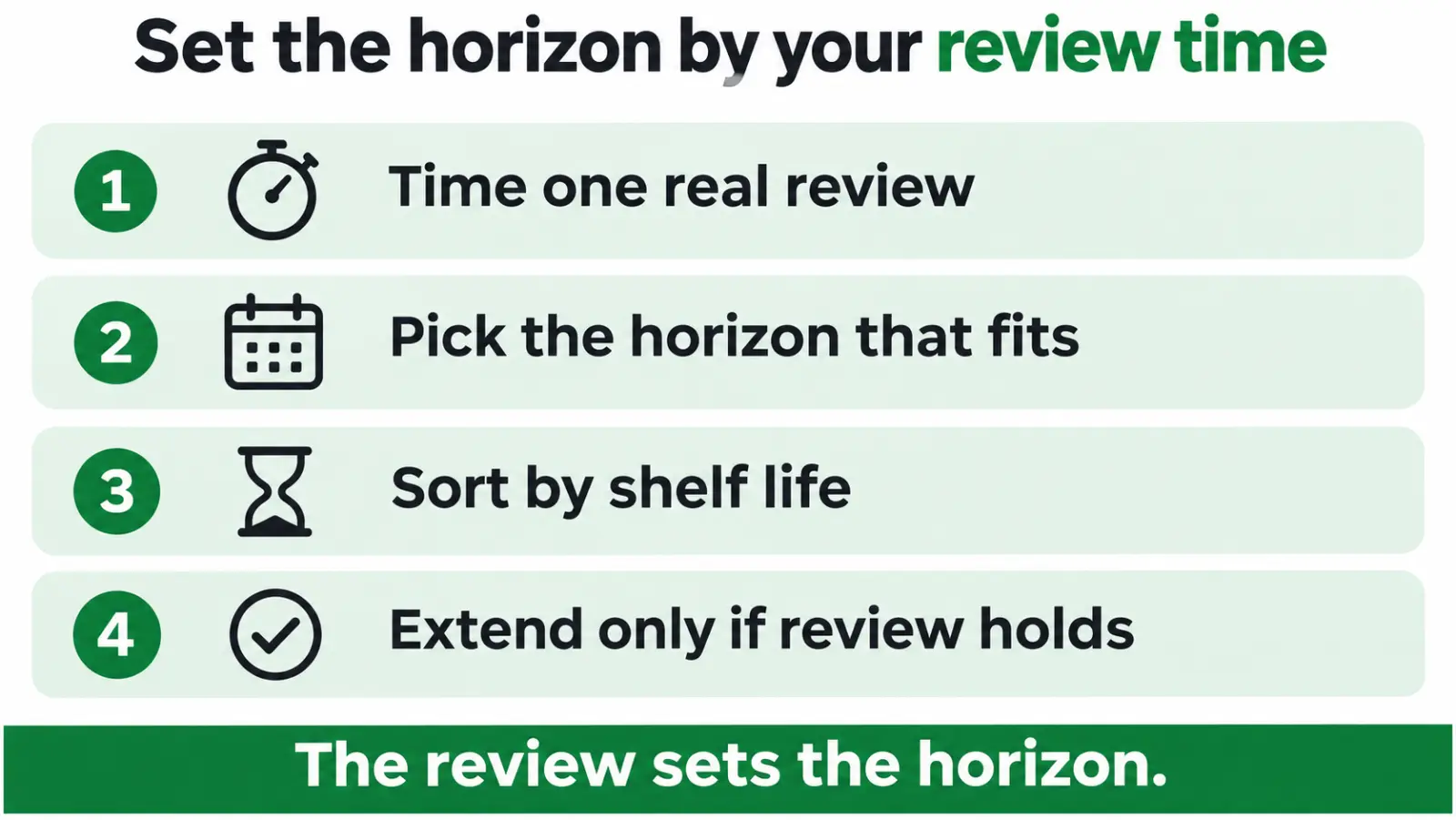
Measure your review time. Time one real weekly review, including the links and the failed list. Write the number down.
Pick a horizon that fits the time. Ten minutes supports about one week of posts. An hour supports two weeks.
Sort posts by how fast they go stale. Evergreen posts can sit longer. Timely posts cannot.
Schedule the first horizon only. Leave the rest in drafts until the first horizon has been reviewed once.
Repeat the review on the same day each week. Extend the horizon only after the review finds few problems for three weeks in a row.
Three sources frame the horizon. The scheduled posts help page describes scheduling through the Composer on ads.x.com and does not state a maximum window, which is why this article reasons from review time instead. The developer guidelines describe scheduled informational content as an allowed example for automated accounts, and they prohibit identical content across multiple accounts. They set no time limit on how far ahead a post can sit. The pricing update matters for link posts, because URL posts through the API cost $0.20 each.
Sortpostsbyhowfasttheygostale
Not every post has the same shelf life, so the horizon should not be one number. A useful rule is to group posts into three shelf lives before you decide how far ahead to schedule them.
Link-heavy posts deserve special care. Pages change, redirects appear and sometimes a page disappears. The Buffer analysis of link posts is about reach, not about how long a link stays valid, but the same habit applies: a link you did not open this week is a link you have not checked. Keep link posts on a short horizon, and open each link again on the morning it goes out.
Aworkedhorizon,withillustrativenumbers
The example below is an illustration, not a real account. A founder posts four times a week. Her weekly review takes about twenty minutes, which she has timed over three weeks, and it includes opening every link.
She starts with a horizon of one week, which gives her four posts in the queue at any time. For four weeks, the review finds one stale post each week, and she fixes it in two minutes. In week five she extends the horizon to two weeks, which gives her eight posts. The review now takes thirty-five minutes, and it finds two stale posts in the first week of the new horizon. She keeps the two-week horizon for one more week, because the problems are small and she has time. In week seven she sees three stale posts, and she shortens the horizon back to ten days.
The point of the example is not the exact numbers. It is the rule she followed: she extended the horizon only when the review still held, and she shortened it when it stopped holding.
Weeks 1 to 4
One week ahead
Week 5
Extend to two weeks
Week 6
Hold at two weeks
Week 7
Shorten to ten days
Wherethetimingevidencefits
A horizon is not a posting time, but the two interact. If you schedule a month of posts for a time that does not suit your audience, the length of the horizon does not help. The public studies disagree about the best hour, and both say that their averages are a starting point. Buffer's study says posting time still matters on X, and that content quality and consistency matter more. Sprout's study reports windows in local time across many profiles. The timing guide explains how to test your own windows before you fix a horizon around them.
A horizon also depends on how often you post. A founder who posts once a week can keep a horizon of a month without much effort, because each post is a decision. A founder who posts daily needs a shorter horizon, because the queue grows faster than the review.
Achecklistforeachweeklyreview
A review that takes the same steps every week is the only review you will keep up. The horizon depends on the review, so the review needs a fixed shape. The checklist below takes about twenty minutes for a queue of four posts a week, and it scales with the horizon. Run it in the same order each time.
Open the Scheduled list and read every post in full. Do not skim. A post that was right when you scheduled it may not be right now.
Open every link in those posts. A redirect or a missing page is a common reason a scheduled post is wrong on the day.
Check each date, price and number against its source. Any claim that depends on a moment needs a fresh check, or a rewrite.
Open the Failed list. Decide what happens to every failed post before the next horizon starts.
Count the posts you unscheduled during the week. More than one or two a week means the horizon is too long for your time.
Write one line of notes. The horizon you ran, the time the review took, and the number of stale posts you found.
The notes matter more than they look. After four weeks, the notes show a trend. If the review time climbs while the number of stale posts stays flat, the horizon is still fitting. If the stale posts climb, the horizon is too long, and the fix is to shorten it before the next batch, not after a bad week. The bulk scheduling guide explains how to build the next batch from that trend.
Two small habits keep the checklist honest. First, do the review at the same time of day, because your attention changes through the day and so does the quality of the read. Second, do not skip the review in a busy week. A skipped review is the week a stale post goes out, and the horizon that caused it was probably too long for the week you had.
Mistakesthatcomefromschedulingtoofar
Mistake one: scheduling for a version of your account you no longer run. A post written in January for a product you have since changed is a post about a product that no longer exists.
Mistake two: treating the horizon as a goal. A long queue feels productive. If the review does not keep up, the queue is a backlog, and a backlog is a list of promises you have stopped checking.
Mistake three: scheduling after a bad week. After a week of missed posts, the temptation is to fill the queue in one evening. That is the moment to shorten the horizon and rebuild the routine.
Mistake four: forgetting the failed list. A long horizon can hide a failed post for weeks. Check the failed list in every review, and decide what happens to each failure.
Mistake five: using the horizon to avoid the review. A schedule does not replace reading the posts. If you skip the review because the queue looks full, the horizon has stopped doing its job.
Edgecasesthatchangethehorizon
Launches. A launch moves your calendar. Keep the launch week on a short horizon, and reread every post on the morning it goes out.
Threads. A thread counts as several posts, and each part needs reading in order. Plan a thread as one item in the horizon, and read it fully before it enters the queue.
API-based tools. If a tool publishes through the X API, check the current write price for your posts before you extend a horizon. X's April 2026 pricing update lists writes at $0.015 per post and URL posts at $0.20, so a link post costs more than a text post whatever date it is scheduled for.
Automated accounts. The developer guidelines describe scheduled informational content as an allowed example for automated accounts, and they prohibit identical cross-posting across accounts. X's automation rules also bar duplicative posts on one account or over several. A long horizon of identical posts is the pattern to avoid, on one account or across several.
HowtoapplythisinPostMine
I build PostMine, which this article mentions.
PostMine's queue lets you schedule to your next free slot or to a time you pick. It shows Drafts, Scheduled, Posted and Failed in a list or a calendar, so the horizon is visible in one place. The weekly schedule holds time slots for each day. Unscheduling moves a post back to Drafts, which helps when a horizon needs to shorten after a bad week. Nothing publishes unless you slide to publish or set a schedule you chose.
The bulk scheduling guide explains how to batch a horizon without losing quality, and the calendar guide explains how the horizon fits a weekly grid.
Checkingthehorizonagainstyourcalendar
A horizon only helps if it matches the grid you already keep. If your calendar holds three slots a week, a two-week horizon holds six posts, and the review should read six posts, not twenty. Count the posts in the horizon before each review, and compare the count with the slots on the calendar. A mismatch means one of two things: a post was scheduled outside the grid, or a slot was left open and forgotten. Both are easy to fix in a review and hard to notice in a long queue.
The calendar guide describes the open slot a calendar should keep on purpose. Count it in the horizon too. An empty slot that you left open is a decision, and it should appear in the review notes as one. An empty slot that nobody decided to leave open is a gap in the plan.
I could not find a published maximum in the X pages I could open. Buffer's guide says up to 18 months for most tweet types, and Sprout recommends no more than six months for bulk imports. Neither is an X rule. Check the limit your own scheduling option shows, and treat your review rhythm as the real limit.
Not for evergreen posts you have read twice. It is too far for news, prices, launch dates and links that you have not checked in the last few days.
Rarely. A month written in one session is written for the week you imagined. Schedule one or two weeks, review them, and add more when the queue is stable.
When your weekly review finds few stale or wrong posts, and you rarely unschedule to fix a mistake, the horizon fits your rhythm. If you unschedule every week, shorten it.
We use cookies for product analytics to improve PostMine. With your consent we also record session replays, including the content you type and view, such as draft posts (passwords excluded), so we can see how the product is used and fix what breaks. Privacy Policy




 Yerkebulan RakhimovNov 9, 202614 min read