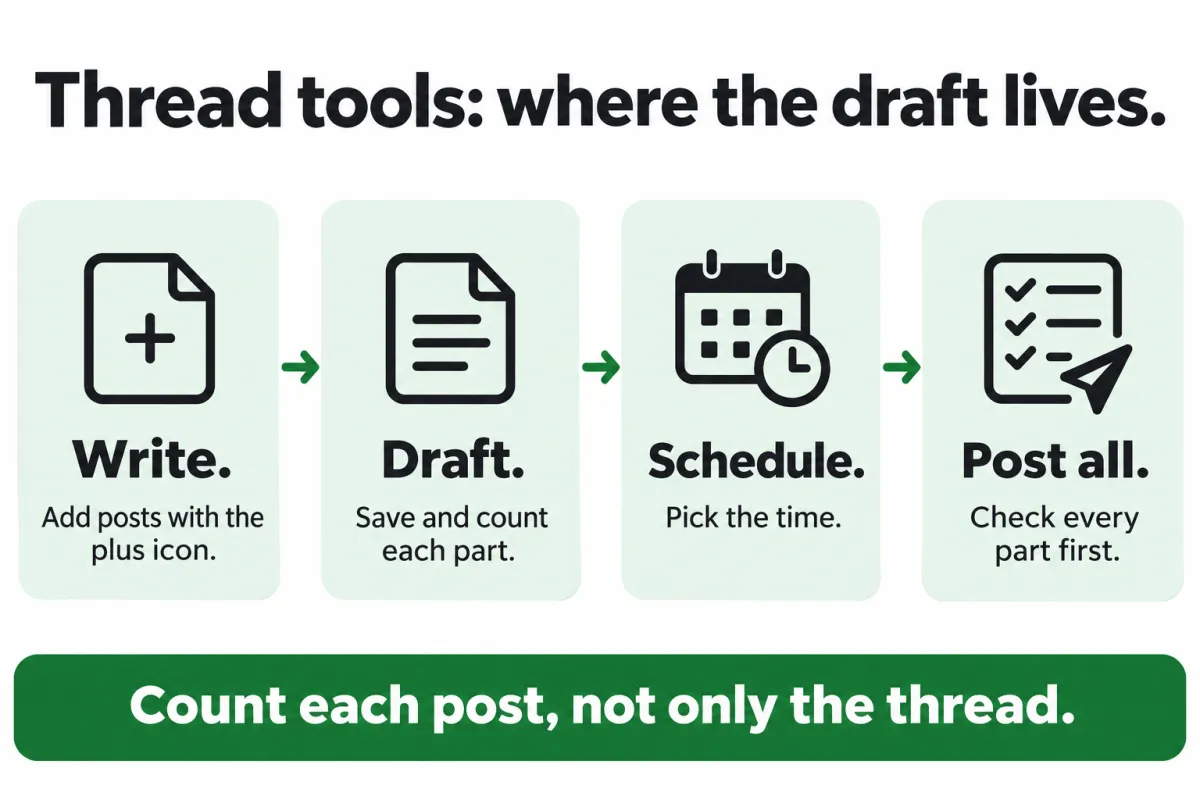
X has a built-in thread composer, and its help page describes it: add posts with the plus icon, then tap Post all. Long posts are a separate question: X says Premium subscribers can post up to 25,000 characters.
Typefully's X page sells scheduling and writing help, and says you can start with a free account and a 14-day trial. Its pricing page, checked 2026-11-10, shows plan names but no dollar figures in the rendered text.
Tweet Hunter lists tweet and thread scheduling on its $29 Discover plan and thread ideas and hooks on its $49 Grow plan. SuperX lists an AI Post and Thread Writer from its Advanced plan.
Buffer's Free plan lists one threaded post. Its Essentials and Team plans list unlimited threaded posts.
PostMine's docs say you can write a post or a thread, and that each thread part shows its own X character count. Its pricing page does not list a thread feature, so test threads on the Free plan before you rely on them.
I build PostMine, so read this page with that in mind. I wrote it to be checkable. Every feature and price below comes from X's Help Center, a vendor's pricing or product page, or the PostMine docs, all checked on 2026-11-10. Where a page does not say a thing, I write "not stated" rather than fill the gap. Where a competitor is stronger, I say so.
A thread is a series of posts that X connects into one story, and the tools that help you write one are mostly small. The real choices are about where the draft lives, whether you can schedule it, whether the tool counts characters for you, and whether it helps you write the parts. This roundup compares six options on those points, starting with the one every X account already has.
StartwithX'sownthreadcomposer
X's help page "How to create a thread on X" describes the built-in way. Its iOS tab says you "Tap the compose icon to draft a new post," then "tap the highlighted plus icon" to add posts, and when the thread is complete you "tap Post all to post." Its Desktop tab says "Click the Post button to draft a new post" and "click the highlighted plus icon" (X Help Center: create a thread, checked 2026-11-10). The page also says "A thread can be saved as a draft," and that drafts indicate "the number of posts in your thread." After you post, the thread's author can add more posts from the thread's detail page.
The composer has one limit that matters. X says that "Longer posts allow subscribers to post up to 25,000 characters," while other posts are shorter (X Help Center: X Premium, checked 2026-11-10). If you do not pay for Premium, each post in your thread keeps the standard 280-character limit. X's thread page says that when a post goes over the limit, "the text that is over the limit will be highlighted for easier editing before you post" (create a thread, checked 2026-11-10).
For many people, X's composer is enough. It is free, it is X's own, and it does not add a tool between you and the platform. What it does not do is save a queue of threads for later, count characters across several threads you are planning, or help you draft the parts. Those are the jobs the tools below sell.
Thesixoptionsataglance
The table compares what each vendor's own page lists for threads. "Not stated" means the page I read did not say it, not that the feature is missing.
The rows are different products doing different things. A thread composer is a writing surface. A thread maker adds a schedule, a draft library and sometimes AI. Read each cell as a feature statement from the vendor, and test the one you need before you pay.
X'sowncomposer,inmoredetail
X's thread help page includes a detail that many people miss. A thread you have already posted is not closed. The page says "Once you have posted a thread, you can always add additional posts from the thread detail page," and that the option "is only visible to the thread author" (X Help Center: create a thread, read 2026-11-09). That makes X's composer a workable place to extend a thread you already posted.
The page also says drafts of threads are "distinguishable from a single post draft by indicating the number of posts in your thread." That is useful if you save several drafts, but it is not a schedule. A saved draft waits until you open it and post it yourself.
If your thread is one long argument you write once a week, the native composer is the right tool. The gap appears when you want the thread to publish at a fixed time, when you write four threads in one sitting and want them spaced across the week, or when you want the tool to count characters for each part before you post.
Typefully
Typefully's X page is built around scheduling and writing. Its page heading reads "Schedule X (Twitter) posts easily" and includes the subhead "Get fresh ideas and writing help with AI," and it lists "Schedule the same post on multiple platforms" as a feature (Typefully for X, checked 2026-11-09). The page also says "You can create a free account and use our 14-day free trial to try out all features in Typefully for yourself" (same page).
Typefully's pricing page lists a Free plan with 10 posts a month and one social set. Its Creator card reads "All features in Free +," "AI writing features," and "Annual billing only." The rendered page, captured on 2026-11-10, shows no dollar figures, so I do not compare prices (Typefully pricing, checked 2026-11-10).
Typefully's support article on X posting limits, dated July 21, 2026, says a Free X account can publish up to 50 posts in a thread with up to 280 characters per post, and an X Premium account up to 50 long-form posts in a thread with 25,000 characters per post (Typefully: Twitter / X posting limitations, checked 2026-11-10). For a side-by-side look at PostMine and Typefully, see PostMine vs Typefully.
Typefully also publishes a minimal-theme browser extension for X, which is a different product from its thread editor (Minimal Theme for X, checked 2026-11-09). It does not change how a thread is written.
TweetHunter
Tweet Hunter's Discover plan lists "Tweet and thread scheduling" and "Evergreen tweets" alongside 3,000 auto-DMs and "Complete X Analytics" for $29 per month (Tweet Hunter pricing, checked 2026-11-09). Its Grow plan, at $49 per month, adds "Daily AI-written tweets," "Re-write tweets," "Finish writing a tweet" and "Thread ideas & hooks" under its AI writer heading (same page).
So Tweet Hunter is the one tool on this list whose pricing page names thread ideas and hooks as a plan feature. Those are help with the start of a thread, the part most people find hardest. The company's own description of Grow is "Grow & monetize at max speed with the AI writer and CRM" (same page).
Tweet Hunter is a larger product than a thread maker. If you need its auto-DMs or its X CRM, the thread features come bundled with them. If you need only a thread tool, the cost of the bundle is the question.
SuperX
SuperX's Advanced plan lists "AI Post & Thread Writer" alongside 1,500 AI credits a month and "SuperX Engage · 750 replies/month" (SuperX pricing, checked 2026-11-09). Its Pro plan, at $49 per month, lists "Publish X Articles" and "500 posts/month, scheduled at optimal times," and its FAQ says "Every paid plan can write and publish X Articles. Published articles count as 2 posts toward your monthly post quota" (same page).
SuperX's tools menu links to an "AI Thread Generator" page at superx.so/ai-thread-generator (SuperX pricing, checked 2026-11-10). That page, checked 2026-11-10, describes itself as "A free Twitter thread maker" with no signup. You describe the topic and choose a length: Short is 5 tweets, Medium 6 and Long 8. The page says "Every tweet stays under the 280-character limit" (SuperX AI Thread Generator, checked 2026-11-10).
For a thread maker, SuperX's main point is that writing, scheduling and X Articles sit in one product. That is a strength for someone who writes long posts often. It is a cost for someone who wants a thread tool and nothing else.
Buffer
Buffer's pricing page lists "Threaded posts" as a row in its publishing table. On its Free plan the value is 1. On Essentials and Team it is "Unlimited" (Buffer pricing, checked 2026-11-09). Buffer's AI Assistant is listed on every plan, with "Unlimited use of our AI to create, refine, and repurpose content (optional)" on the free and paid plans (same page).
Buffer's Essentials plan costs $6 per channel per month and lists unlimited threaded posts, and its Free plan allows one threaded post. Those are the figures I can compare, and I did not compare thread prices across the tools. The Free plan is still useful for testing a thread format on one channel before you pay for more.
PostMine
PostMine's docs describe the composer this way: "Write a post or a thread; every edit saves to Drafts automatically, and each thread part shows its own X character count. Each part takes up to four photos, or one GIF from KLIPY search" (PostMine docs, checked 2026-11-09). The docs also say "Improve writing with AI rewrites" is available from the composer (same page).
Those statements are the thread features I can verify. PostMine's pricing page lists its plans' contents, including "Queue, scheduled," "AI that writes in your voice" and "Post Studio: daily posts ready to review," and it does not list a thread feature by name (PostMine pricing, checked 2026-11-09). If threads are your main format, test the composer on the Free plan first.
The per-part character count is the detail I would check first. A thread is only as good as its weakest post, and a counter on each part catches the overflow before you publish.
Works
X's composer is free and built in, with saved thread drafts
Tweet Hunter lists thread ideas and hooks on Grow
Buffer's Free plan lists threaded posts, and its paid plans list them without a cap
PostMine's docs describe a per-part character count and automatic draft saves
Avoid
Free threads are limited on Buffer, one threaded post on Free
Typefully's plan prices and AI tier were not readable on its pricing page
PostMine's pricing page does not list a thread feature by name
SuperX's thread writer sits on a $99 list-price plan, with a $49 launch price
ThreadsandX'srules
A thread is a sequence of posts, and each post follows the same rules as any other. The one rule that bites threads is the duplicate rule. X's automation page says "You may not post duplicative or substantially similar posts on one account or over multiple accounts you operate" (X Help Center: automation rules, read 2026-11-09). A thread that repeats the same sentence in each part, or a thread reposted on a timer with no change, is the case that rule describes.
That is also why a thread maker that schedules repeats needs your review. A tool that queues the same thread every week can produce near-duplicates without you noticing. Write each thread fresh, or change the opening and the examples before you schedule a repeat. Do not treat a thread that you posted once as a template to publish again unchanged.
X's help page for threads describes the composer in terms of posts, not automation. Nothing in the page says a thread can be published on a timer from the composer, so a scheduled thread depends on the tool you schedule it with.
Draftingthepartsofathread
The parts of a thread need a job each. The first post carries the claim or the question, because it is the only one many readers see. The middle posts carry evidence, examples or steps. The last post gives the reader one thing to do or remember. Write each part so it still makes sense if someone reads it alone, since some readers will see a single post from the thread in their feed.
A thread maker helps most at two points. At the start, an AI writer can propose hooks, and Tweet Hunter's Grow plan lists "Thread ideas & hooks" on its pricing page (Tweet Hunter pricing, checked 2026-11-09). At the end, a per-part counter makes sure no post is cut off. SuperX's pricing page lists its writer for Advanced (SuperX pricing, checked 2026-11-10). Its free AI Thread Generator, checked 2026-11-10, writes a thread from a topic in 5, 6 or 8 tweets, and says every tweet stays under the 280-character limit.
Typefully's pricing page lists "AI writing features" on its Creator plan, which is billed annually only (Typefully pricing, checked 2026-11-10). The rendered page shows no prices.
Whatever tool you use, the draft is yours to edit. A thread that reads like a generic AI list will lose readers after the first post, whichever tool wrote it. Read each part aloud once before you post. The part that sounds stiff is usually the one that needs a rewrite, and it is faster to fix before you publish than after.
Whatuserssay
Reddit has little to say about thread makers in the threads I saved. One r/DigitalMarketing post from May 31, 2026, titled "Review on typefully?", asked for reviews of the tool and had no replies at the time I read it (u/Extreme-Zebra2362, r/DigitalMarketing, May 31, 2026). It is a request, not a review.
A 2024 thread asked "Typefully automation" questions, and an r/SaaS thread from 2022 asked who used only the auto-retweet feature of Hypefury or Typefully. Those threads are older than most of the features on this page, so I do not quote them as evidence of how the tools work today.
I did not find G2 or Capterra reviews of these tools that I could read on 2026-11-09, so I have not quoted any. Treat this section as an open gap, not as a verdict.
HypefuryisnotanXoption
Hypefury is a popular thread writer on other networks. Its pricing page lists a feature named "Write once, every platform fills in (long posts become threads)" (Hypefury pricing, checked 2026-11-09). That page also lists six platforms: Instagram, Facebook, Threads, LinkedIn, TikTok and Bluesky. X is not on the list, so I do not count Hypefury's thread feature as an X option.
Howtochoosebyhowyouwrite
Choose by the work, not by the brand.
You write one thread a week and post it by hand: X's composer is free and enough. Use it and move on.
You draft several threads at once and want them spaced out: a scheduler with drafts. Check Typefully's plan prices, Tweet Hunter's Discover plan or PostMine's Starter plan. Test Tweet Hunter Discover on its 7-day trial, and PostMine on its Free plan.
You want help writing the first post of a thread: Tweet Hunter's Grow plan lists thread ideas and hooks. SuperX's Advanced plan lists its thread writer.
You post threads on a channel you run with a team: Buffer's Team plan lists approval workflows, with threads unlimited on paid plans.
You want a review step on every post in a thread: PostMine's composer holds drafts until you publish or schedule them. Its docs say so in plain words.
Apracticalcheckbeforeyoupay
Write one real thread of five posts in each tool you are testing. Count the time it took, the number of times you had to fix a post that was too long, and whether the schedule did what you expected. A free trial or a free plan is enough for that. A demo is not, because it shows you the best case.
Verdict
X's composer is the free default, and it handles a thread well if you post it yourself. For scheduling and drafts across several threads, Typefully and Tweet Hunter are the two to test first, and their pricing pages name the features you need. For AI help with the first post, Tweet Hunter's Grow plan and SuperX's Advanced plan list it. Buffer's Free plan is too thin for regular threads, and its paid plans list threads without a cap. PostMine's composer counts characters per part and holds drafts until you publish them, but its pricing page does not name threads, so check the docs and test the Free plan.
Yes. X's own composer lets you add posts to a thread and post them together, and X's help page describes the steps. Free tools such as Buffer's Free plan allow one threaded post. Typefully's page lists a free account.
X's composer posts the thread as you write it. A thread maker adds drafting, saved drafts, scheduling and sometimes AI help. The question is whether you need those extras, and whether they are included on the plan you can afford.
X's Help Center says longer posts are for subscribers, who can post up to 25,000 characters. Each post in a thread still has its own limit, so a thread maker that counts characters per post helps you stay inside the rules for each one.
Tweet Hunter's Grow plan lists thread ideas and hooks and an AI writer. SuperX's Advanced plan lists an AI Post and Thread Writer. PostMine's docs describe AI rewrites in its composer. Typefully's pricing page lists 'AI writing features' under its Creator plan, which is billed annually only, and shows no prices in its rendered text on 2026-11-10.
We use cookies for product analytics to improve PostMine. With your consent we also record session replays, including the content you type and view, such as draft posts (passwords excluded), so we can see how the product is used and fix what breaks. Privacy Policy




 Yerkebulan RakhimovNov 9, 202614 min read