Start the audit with one written goal, or every step will measure something different.
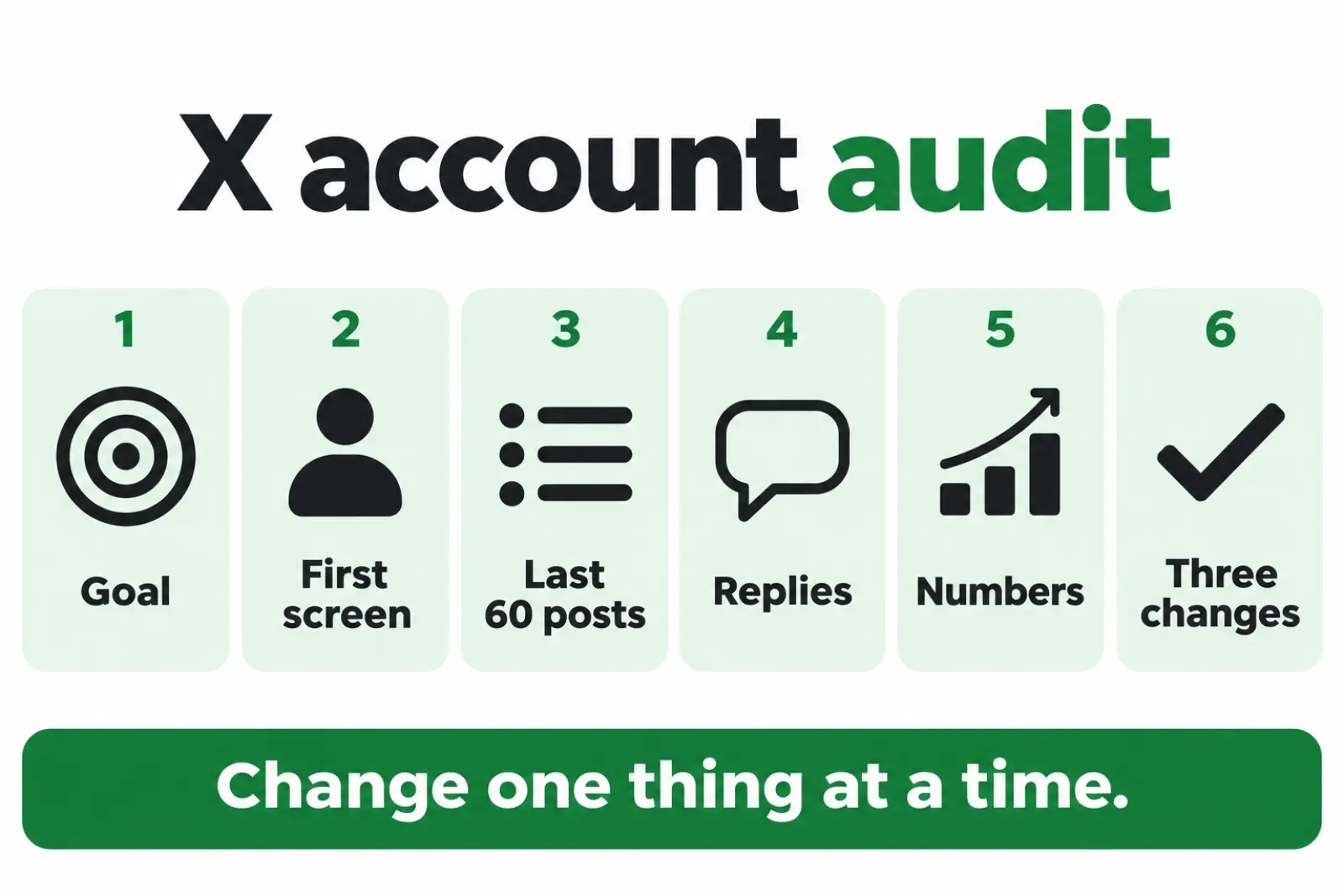
Audit the first screen, then the last sixty posts, then the replies, then the numbers. That order keeps the evidence in the right place.
Use the 36-hour rule before you read any post's numbers, and compare posts with posts of the same format.
End the audit with three changes, each tested alone, and a date to check them.
An account audit is the one hour in a month when you stop writing and read what you have already written. It is easy to skip, because the posts feel finished once they are published. The audit is where you find the gap between the account you meant to build and the account a stranger sees.
This article walks through the audit in the order I run it: one written goal, the first screen, the last sixty posts, the replies and mentions, the numbers, and the follow-up. Each step has an output you can write down. The steps use X's own definitions and limits, and where a judgment is mine, the text says so.
Before you open X, write one sentence that says what the account is for in the next three months. "Get more followers" is too vague to test. "Get five founders a week to reply to a post and visit my profile" is specific enough that each post can be judged against it.
The goal decides the metrics. A reach goal makes impressions the main number. A conversation goal makes replies and profile clicks the main numbers. A follow goal makes follows from a post the main number. If you do not write the goal, the audit will read every number as equally important, and it will end with no decision.
Write the goal at the top of the audit sheet and do not change it during the audit. If the goal changes, start a new audit.
Step2:readthefirstscreen
Open your profile in a private window or on a phone, and read the first screen before you scroll. Check the photo at thumbnail size, the banner for clutter, the bio for the reader and the work, and the pinned post for a clear example. X's help page gives the bio limit of 160 characters and the recommended photo and banner sizes (X Help Center: How to customize your profile).
The full checks are in the profile audit checklist. In the audit, you only record the result: pass or fail for each field, with one line of reason. Do not fix anything yet. A fix made in the middle of an audit makes the rest of the numbers harder to read.
Step3:reviewthelastsixtyposts
Open the last sixty posts on your timeline, and write one row per post. The columns are the date, the format (single post, thread, video, reply), the topic, the first line and the post's result for the goal you wrote. Sixty posts usually cover several weeks and most of your formats. If you post less often, use the posts from the last six weeks instead.
Read the rows in order. Look for three patterns: the formats you use most, the topics that repeat, and the first lines that open the posts. Look for one format that does most of the work, and one that takes time without returning much. The audit shows which is which.
Step4:checktherepliesandthementions
Replies are where many accounts win or lose their audience. Open your recent replies and mentions, and ask two questions. Did you reply to people whose posts you had read closely? Did the replies say something specific, or did they sound like the same line in every thread?
Replies also show the balance between talking and listening. If every reply is a link or a sales line, the profile is doing the work of a flyer. The reply habit I use is in the reply article, and the audit simply records whether it is happening.
Automated replies are a separate question. X's automation rules set limits on what automation can do, and I read them before I script anything (X Help Center: Automation rules).
Step5:readthenumbers,afterthewindow
Now open the analytics. Export the posts older than 36 hours, because X says its metrics can take that long to stabilize (X Business Help: Post and Video Activity Dashboards). The export is set to UTC/GMT, so read its dates in UTC. Use one date range that covers the sixty posts, and split the export if it runs past 30 days or 3,000 posts.
For each post, write the impressions, the engagements, the rate, the profile clicks and the follows from the post. Read them inside each format, not across formats, and note the videos separately, because X's Video Activity Dashboard defines the view rate as the rate at which a video is "watched in 50% view for 2 seconds or more, or when someone clicks to expand/unmute your video" (X Business Help: Post and Video Activity Dashboards). Media Studio is a Premium-tier feature (X Help Center: Premium), so a Basic account may not have video analytics at all.
Before the audit
Write the goal in one sentence
Minute 0 to 15
First screen and profile fields
Minute 15 to 35
Sixty posts, formats and first lines
Minute 35 to 50
Replies, mentions and the numbers after 36 hours
Minute 50 to 60
Three changes, each with a check date
Step6:findthethreechanges
The output of an audit is not a list of problems. It is three changes, each one testable on its own. A list of ten problems cannot be tested, and the audit becomes a to-do list that nobody finishes.
To pick the three, I look for the cheapest change with the clearest result. A first-screen fix is cheap and visible. A format change is slower and needs two weeks. A reply habit is slow and harder to measure, so I pick it only when the replies were clearly weak. Write each change with the date, the metric you expect to move, and the date you will check it.
Test each change alone. If you change the bio, the pinned post and the format in the same week, the next audit cannot tell you which change did the work. That is my rule for any audit, and it is the reason the timeline above has three separate changes.
Commonauditmistakes
Starting without the goal. Every number then looks equally important.
Reading posts younger than 36 hours. The numbers are still moving, so the read is not final.
Comparing a thread with a single post. The formats do not load the same way.
Fixing things during the audit. The later numbers then mix two versions of the account.
Trying to fix ten things. Three tested changes beat ten untested ones.
Works
One written goal before any reading
The first screen read before the numbers
Sixty posts reviewed in one sitting
Three tested changes with dates
Avoid
Reading the numbers in the first hour
Mixing formats in one average
Fixing the bio and the posts in one week
A to-do list with no check date
Howoftentorunit
Run the full audit once a month. Run a short version after any change in format, bio or topic, so you can see what the change did before the next full audit. For most founders, the monthly audit is enough to keep the account honest without turning it into a second job.
The first audit takes longest, because the sheet is empty. Later audits are faster, because the sheet already holds the rules you wrote, and the time goes into the decision rather than the reading.
WhatX'spagessayabouteachpartoftheaudit
Each step of the audit touches one X page, and the audit is more reliable when you know which page owns which claim. The profile fields, the bio limit and the photo and banner sizes come from X's help page on customizing the profile, which sets the bio at 160 characters and the recommended sizes at 400 by 400 pixels and 1500 by 500 pixels (X Help Center: How to customize your profile).
The pinned post is a profile choice you control. X's pages I could open describe pinning, but they give no refresh schedule, so the audit checks the pinned post on a schedule you set, not only when you remember it.
The numbers in step five come from the Post Activity Dashboard, which X describes as the place to see metrics for every single post you make (X Marketing: Measure results). The dashboard's own definitions are in X's Business Help pages (X Business Help: Post and Video Activity Dashboards). Use the Business Help page when a column is unclear, and the marketing page only for the overview.
Replies in step four are governed by X's automation rules once you move from reading them to scripting them. Read the rules before the audit proposes any automated reply (X Help Center: Automation rules). X's help page on replies and mentions says you can join conversations by replying to others and by mentioning them in your own posts (X Help Center: Replies and mentions).
Timethenumberssteptothe36-hourwindow
The numbers step is the one people rush, so give it a fixed date. X says its systems can take up to 36 hours to stabilize, and it says post metrics are usually updated within a few seconds (X Business Help: Post and Video Activity Dashboards). An audit that runs on the day you post will read the first hour as the post's result.
My fix is to schedule the numbers step for the day after the last post in the sample is older than 36 hours. The first screen and the sixty posts can be read on any day, but the numbers have to wait. If the sample includes posts from the last two days, I drop them from the numbers and keep them in the format review, so the two parts of the audit do not mix windows.
The dashboard also carries the posts' own numbers, and X's marketing page describes it as the place where you see how many times X users have seen, reposted, liked and replied to each post (X Marketing: Measure results). Read those numbers only after the window closes, and copy them into your audit sheet with the export date written beside them.
X's view counts page defines a view as a logged-in view on any surface, so a view count is not the same as an impression count (X Help Center: View counts).
PostMine's Analytics page shows your account's trends, so a daily trend can confirm that the sample period is settled before you read it (PostMine quickstart).
Keeptheauditsheethonestbetweenaudits
An audit sheet decays if nobody updates it between audits. Keep a single line in the sheet for each change to the bio, the pinned post or the posting format, with the date. That line is the reason the next audit can tell which change came first. A quarterly check is a schedule you set for the sheet, not an X recommendation.
The sheet also records what the audit did not check. If a page could not be opened, write the page's name and the reason, so a later reader does not assume the claim was verified. That habit is what keeps an audit useful for a year rather than a single month.
WherePostMinehelps
PostMine's Analytics page shows your account's trends, and it can import an account overview CSV and export the daily CSV (PostMine quickstart). That gives the audit a daily trend to check against the sixty-post sample. The audit is yours, and PostMine is a place to read the numbers it runs on.
A suggested budget is about an hour for the first pass, then thirty minutes a month. These are my estimates, not measured times. The first pass is slow because you read the posts. Later passes are faster because you compare them with your notes.
Sixty posts is the sample size I use. It covers several weeks and most formats, and it is small enough to read in one sitting.
No. The audit uses your profile, your posts and X's native post numbers. A paid tool can speed up the export, but it cannot change the definitions.
Once a month is enough for most founders. Audit sooner after a format change, a new bio or a launch, so you can see what the change did.
We use cookies for product analytics to improve PostMine. With your consent we also record session replays, including the content you type and view, such as draft posts (passwords excluded), so we can see how the product is used and fix what breaks. Privacy Policy




 Yerkebulan RakhimovNov 9, 202613 min read