An X Chrome extension runs inside your browser on x.com. Before you install one, read what it asks for: the manifest lists the sites it can touch and the browser features it can use, and the privacy statements say what data leaves your browser.
SuperX's listing shows 4.1 from 56 ratings and about 7,000 users, version 0.8.15 updated November 6, 2026. Tweet Hunter X's listing shows 2.7 from 94 ratings and about 30,000 users. Minimal Theme for X's listing shows 4.6 from 265 ratings and about 30,000 users.
SuperX's manifest, as embedded in its listing page, asks for cookies, webRequest, declarativeNetRequest, tabs and alarms on x.com and its own domains. Tweet Hunter X's asks for storage and access to x.com and api.x.com.
PostMine ships an optional Chrome extension that runs on x.com. Its privacy page says it places controls in reply boxes and a side panel. I did not read its manifest, so I do not list its permissions.
X's automation rules say using non-API forms of automation, such as scripting the X website, may result in permanent suspension of the account. Check what an extension does on the page before you rely on it.
I build PostMine, so read this page with that in mind. I wrote it to be checkable. Store facts come from Chrome Web Store listing pages and their embedded manifests, read on 2026-11-09. PostMine's extension is described only from PostMine's docs and privacy page. I did not install any extension in a browser profile, and I did not decompile their code. Where I could not read a fact, I say so.
An extension for X is a small program that runs inside Chrome on the pages you open. It can read what the page shows, add buttons or a sidebar, and in some cases send data to its vendor's servers. The manifest file that ships with it lists the sites it can touch and the browser features it can use. The store listing shows privacy categories. Most users never open either, and this roundup does.
WhatanextensioncanseeonX
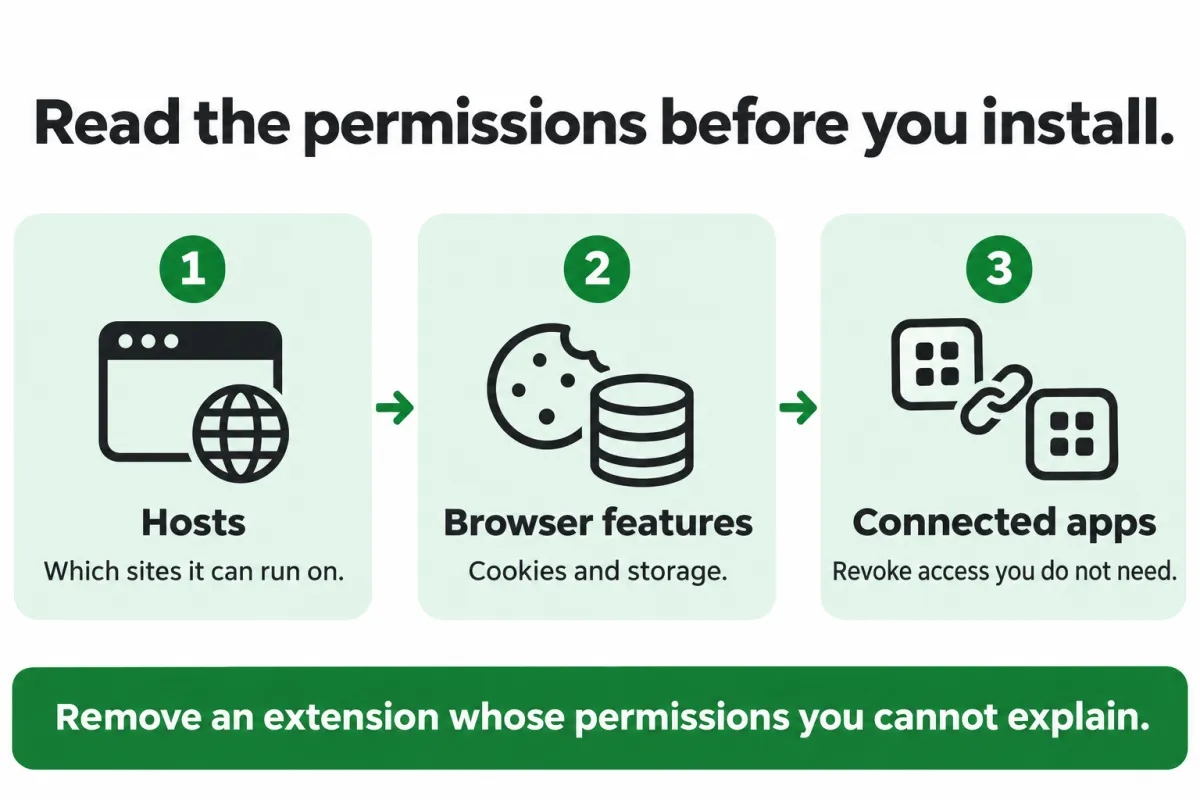
Chrome asks an extension for permissions in its manifest. Three kinds matter for X.
Host access decides which sites the extension can run on. A host of x.com means the extension can read and change pages on X. A host of api.x.com means its code can make requests to X's API domain. A host like xbase.so means it can talk to that company's own servers.
Browser features decide what else it can do. storage keeps settings in the browser. cookies lets the extension read cookies for the sites it has host access to, which on X can include your login session. webRequest and declarativeNetRequest let an extension observe or change network requests on matching sites. tabs lets it see which tabs are open and their addresses. alarms lets it run work on a timer in the background.
Optional access can be requested later, when a feature needs it. A manifest can list optional permissions as well as required ones. I checked the required lists in the manifests I read, and I did not check for optional entries.
Chrome's permission names describe what the code is allowed to do, not what it does. A cookies permission does not mean the extension reads your cookies. I did not check the code of any extension here, so I report what each one requests and not how it uses it.
Fourextensions,onebyone
SuperX (Twitter Analytics)
SuperX's listing is titled "SuperX (Twitter Analytics)", and it is published by the owner of superx.so. It shows 4.1 out of 5 from 56 ratings and about 7,000 users, version 0.8.15, updated November 6, 2026 (SuperX on the Chrome Web Store, checked 2026-11-09). Its overview says "SuperX is the most complete Chrome extension for Twitter / X power-users," and lists "Auto Retweet & Plug," "Auto Delete posts," "Tweet Scheduler," "SuperX Engage" and quick-action shortcuts for reply, like and retweet without opening a new tab (same page). So the extension does more than read analytics: it can repeat posts and act on posts from the timeline.
The listing's description also says "SuperX only reads data you already see on twitter.com. We never post without permission or sell your information. OAuth login uses official Twitter / X flow" (same page). Its privacy tab declares "Personally identifiable information," "Authentication information" and "Website content" as data categories (SuperX privacy tab, checked 2026-11-09). "Only reads" describes what the extension shows you. The privacy categories describe what it may send to SuperX, and the two statements are different.
The manifest embedded in the listing's HTML asks for declarativeNetRequest, webRequest, tabs, cookies and alarms. Its host list covers x.com, *.x.com, xbase.so, *.xbase.so and api.x.com, and it declares xbase.so as an externally connectable site (the listing's HTML, read with a plain request on 2026-11-09). I matched this manifest to SuperX's listing by its position on the page, so treat that match as an inference.
SuperX's own extension page, superx.so/chrome-extension, says "Loved by 11,294+ creators" and "We've helped over 11,294 creators grow their 𝕏 presence" (checked 2026-11-09). That is a creator count, not a rating. The store listing I read is the source for the rating.
Tweet Hunter X: Sidebar for X
Tweet Hunter X is the company's free companion, formerly named Twemex. Its listing is published by the developer "lempire" and shows version 1.16.3, updated June 2, 2026, a size of 329 KiB, 2.7 out of 5 from 94 ratings and 30,000 users (Tweet Hunter X on the Chrome Web Store, checked 2026-11-09). Its description opens with "Stop doomscrolling and start exploring."
The manifest embedded in the listing asks for the storage permission only. Its host permissions are https://x.com/ and https://api.x.com/, and its web-accessible resources are icon files on x.com and mobile.x.com (the listing's HTML, read on 2026-11-09). That is the narrowest permission set of the extensions I read with a manifest.
The company's site says Tweet Hunter X "is a browser extension for Twitter that automatically surfaces the most interesting ideas," and that "it only works with the web version of Twitter, not the app." It adds that "Chrome and Firefox are officially supported" and that "Safari isn't supported yet" (Tweet Hunter X on its site, checked 2026-11-09).
Its FAQ says the extension "sends searches to the Twitter search backend from your browser, as if you were typing into the official search box yourself" (same page). That is the vendor's description of how its search works, and it is useful to know if you read X's search rules.
On cost, the same page says "A significant part of the Tweet Hunter X features are free. Without any condition. You don't even have to sign up to use them." The AI writing and research features are tied to a paid Tweet Hunter plan (Tweet Hunter pricing, checked 2026-11-09).
The rating is low. A 2.7 average from 94 ratings is a small sample with a low score. I did not read the individual reviews, so I cannot say what the low ratings are about. Read the reviews yourself before you install.
Minimal Theme for X, from Typefully
Typefully's page describes Minimal Theme for X as a "Chrome, Safari, and Firefox extension to make Twitter more minimal," and says it can "Remove ads, clutter, and distractions. Customize your experience" (Minimal Theme for X, checked 2026-11-09). The page links to its Chrome listing at the Chrome Web Store, which shows 4.6 out of 5 from 265 ratings, about 30,000 users, version 6.5.0, updated August 19, 2026, and publisher Typefully Inc. (Minimal Theme for X on the Chrome Web Store, checked 2026-11-09). Its privacy text says the extension "will not collect or use your data." The listing text I read did not show its permissions, so I do not list them.
PostMine's optional Chrome extension
PostMine has a Chrome extension, offered during onboarding. Its docs say "Extension (only when offered): install the Chrome extension, or complete onboarding without it" (PostMine docs, checked 2026-11-09). Its privacy page has a section titled "Chrome extension included," with the line "Write posts and replies in your voice right on X" and three points: "Post composer," "Reply suggestions" and credits (PostMine privacy, checked 2026-11-09).
The privacy page describes what the extension does on x.com. "The PostMine Chrome extension uses your PostMine account. You sign in to it with X, as on the website." "On x.com the extension reads the page only to place its controls. When you click Generate or Improve in a reply box, it sends PostMine the ID of the post you are replying to, your draft or instruction and the tone you chose." The extension's side panel "sends your drafts, images and scheduling choices to PostMine exactly as the website composer does" (same page). Its session stays in the extension's own browser storage until you log out of the extension or remove it.
I did not read the extension's manifest, so I do not list its permissions or host access. Check them on its listing before you install it, using the steps below.
Users and ratings are not the same thing. Tweet Hunter X and Minimal Theme for X show the same user count. Minimal Theme has the higher rating, Tweet Hunter X the lower. SuperX has fewer users, a higher rating than Tweet Hunter X and the broadest manifest permission list of the two I read with a manifest. Neither number tells you whether the extension does what you need.
Here is what the permissions mean in practice. A sidebar that shows analytics on posts has to read the page as it changes, so it asks for host access and some browser features. A styling tool such as Minimal Theme for X changes how the page looks. A research sidebar reads posts to surface the top ones. None of that proves the data is right. For numbers, compare an extension's figure with X's own dashboard for one of your own posts that both show.
Two checks cost little. First, remove the extension, reload x.com and see what changed. If the page looks different in a way the description did not mention, the extension was doing more than it said. Second, check your connected apps. An extension that signs in through X's OAuth flow should appear under Settings. Revoking that access cuts the account link. Removing the extension only removes the code from your browser, so do both if you stop using one.
WhatX'srulessayaboutextensions
X's automation rules apply to extensions and to web apps alike. Three lines matter most.
First, "Use non-API-based forms of automation, such as scripting the X website. The use of these techniques may result in the permanent suspension of your account" (X Help Center: automation rules, updated April 2026, read 2026-11-09). An extension that clicks, types or scrolls for you on the website is a non-API form of automation under that line. X's terms say the same in plain words: "crawling or scraping the Services in any form, for any purpose without our prior written consent is expressly prohibited" (X Terms of Service, read 2026-11-09).
Second, OAuth is not blanket consent. The automation page says that "A user authorizing your app or service to access their X account through OAuth does not by itself constitute sufficient consent to take automated actions through that user's account." It adds that an app must "clearly describe to the user the types of automated actions that will occur" and "receive express consent" before it acts through the account (same page).
Third, the account holder carries the risk. X writes: "You are ultimately responsible for the actions taken with your account, or by applications associated with your account" (same page).
These lines do not say any extension on this list breaks them. They do mean that an extension which reads your timeline is a different thing from one that acts for you. SuperX's listing includes auto-retweet, auto-plug and quick actions, so the automation rules apply to those features directly.
Whatuserssay,andhowthinthesignalis
I looked for Reddit threads on X extensions and found little. One r/chrome_extensions thread from December 11, 2025 asked for an extension for automation, with 15 comments and a score of 2. In a reply, the original poster wrote that they had "multiple accounts in different profiles in my pc so it would work at the same time." A commenter answered: "There are other tools. Extension is not necessary. Also, X Api cost is high" (u/arvind341, r/chrome_extensions, December 11, 2025). A second commenter asked: "Why does it need to be an extension? A desktop app would have a lot more power" (u/Electrical_Flan_4993, r/chrome_extensions, December 11, 2025). That thread shows people ask about automating X through extensions, and that commenters push them toward other tools. It is not a review of any product on this list.
I did not read the individual reviews on these listings, so I quote none. I did not find a G2 or Capterra page for any of these extensions that I could read on 2026-11-09. Until someone reads the reviews in full, the ratings above are the only public signal I can report.
Readingapermissionlistlinebyline
Start with the hosts. A host of x.com lets the extension run on the X website. A host of api.x.com lets its code call X's API domain directly. Any other host, such as xbase.so, is a server the vendor runs, and data may travel there when a feature uses it. For SuperX, the privacy tab declares data categories that can leave your browser, so read the privacy policy before you rely on "only reads."
Then the browser features. storage is the most common and the least worrying: it keeps the extension's settings. cookies is the one to question on any site where you are signed in. It lets the extension read cookies for the hosts in the list, and on x.com the session cookie is what keeps you signed in. webRequest and declarativeNetRequest change what the extension can see or block on the network. tabs shows which pages are open. alarms runs timed work while the browser is open.
Then ask one question per line: does the feature I want need this? A sidebar for analytics might need host access and storage. It does not obviously need cookies to show numbers it reads from the page. If the vendor cannot explain a permission in its description, its privacy policy or its support answers, treat that as the answer.
Manifests change with each update. The version and update date on the listing show when the list last changed. Check the list again after a large update, because an update can add a permission without a headline.
AchecklistbeforeyouinstallanyXextension
Do these steps in order. They take about ten minutes.
Open the listing. Read the privacy tab and the description, and note every data category and every feature the description names.
Find the permission list. On an installed extension it is in the manifest file. On the listing, I could only read the manifest in the page's embedded data, and not every listing exposes it.
Ask what each permission is for. If the description says it reads what you see and the list also asks for cookies, ask why.
Read the most recent reviews, not the average. Look for reports about login problems and account warnings.
Install it in a browser profile you use for testing, not the profile you use for your main account.
Check the connected apps on x.com under Settings, and revoke any access you do not want.
Remove the extension if it acts for you without a clear confirmation step. X's rules say that consent is needed.
WherePostMinefits
PostMine ships an optional Chrome extension, and it runs on x.com. Its privacy page says the extension places controls in reply boxes and a side panel, and that it "sends your drafts, images and scheduling choices to PostMine exactly as the website composer does" (PostMine privacy, checked 2026-11-09). Its docs say connected publishing "uses X's official API, never browser automation" and that "PostMine never automates direct messages, comments, follows or engagement" (PostMine docs, checked 2026-11-09). Those two statements describe different things: the extension is a writing surface on the page, and publishing goes through X's API.
The trade is real. An extension gives you controls on the timeline, which the web app does not. It also asks for host access to x.com, so read its permissions before you install it. PostMine's pricing page lists the free plan with no card needed to start (PostMine pricing, checked 2026-11-09). Typefully's pricing page lists a free plan with 10 posts a month and one social set, and its prices did not render in the text I could read. Both tools connect your X account, so the permission review applies to them as well.
For analytics and a sidebar, SuperX and Tweet Hunter X are the two I could read with user counts and manifests. SuperX asks for broader access, including cookies and network hooks on X, its listing says it only reads what you see, and its privacy tab declares several data categories. Tweet Hunter X asks for storage and host access to X, and its features are free without sign-up. Minimal Theme for X is a cleanup tool with a higher rating, and its listing text did not show permissions. PostMine's extension is a writing surface on x.com, and I did not read its manifest.
Pick the one whose permission list you can explain to yourself. If you cannot explain why an extension needs cookies on x.com, do not install it.
The listing says the extension 'only reads data you already see on twitter.com' and that its login uses the official X flow. Its privacy tab declares personally identifiable information, authentication information and website content. Its manifest asks for cookies and webRequest access on x.com, which is broad. Read the permission list, decide whether you accept it, and remove the extension if you do not.
Tweet Hunter's site says a significant part of its X extension features are free and that you do not have to sign up to use them. Its listing's manifest asks for storage and access to x.com and api.x.com only.
It is a browser extension from Typefully. Its listing has 4.6 from 265 ratings, version 6.5.0 updated August 19, 2026, and publisher Typefully Inc. Its page describes it as a way to 'Remove ads, clutter, and distractions' on X. The listing text I read did not show its permissions.
Yes, an optional one. PostMine's onboarding says 'Extension (only when offered): install the Chrome extension, or complete onboarding without it.' Its privacy page says the extension reads x.com only to place its controls and sends your drafts to PostMine. I did not read its permissions.
We use cookies for product analytics to improve PostMine. With your consent we also record session replays, including the content you type and view, such as draft posts (passwords excluded), so we can see how the product is used and fix what breaks. Privacy Policy




 Yerkebulan RakhimovNov 9, 202615 min read